
Remote iPhone Monitoring Explained: What Parents Can Do Without Physical Access

Parents increasingly want to know what their children are doing on their phones. The reasons are understandable: excessive screen time, unfamiliar contacts, inappropriate websites, location concerns, and the difficulty of knowing whether a child is encountering something harmful online.
That raises a practical question:
Can you monitor an iPhone remotely without having the device in your hands?
The answer is yes, in some circumstances—but not with the unlimited access that many websites imply.
If you need more visibility than Apple’s built-in parental controls provide, [email protected] is worth exploring as a dedicated iPhone monitoring solution—check its current features and requirements to see whether it fits your needs.
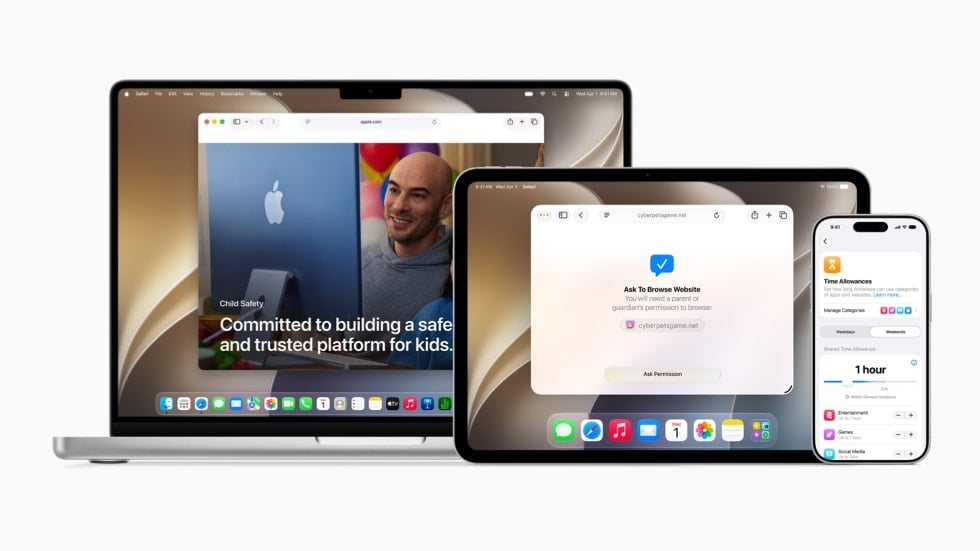
Apple already provides remote parental-management tools through Family Sharing and Screen Time. When a child’s Apple Account is properly connected to a Family Sharing group, a parent or guardian can manage supported parental controls from their own Apple device. Apple’s current system can control apps and websites, manage schedules and time allowances, set communication restrictions, and provide information about device use.
Third-party monitoring products can provide additional capabilities, but they do not eliminate Apple’s security requirements. Their functionality depends on the monitoring method, the iPhone’s configuration, the iOS version, and the credentials or physical access required during setup.
So the important question isn’t simply “Can I monitor an iPhone remotely?”
It’s:
What kind of monitoring do you need, what has already been configured, and what access does the chosen method actually require?
What “remote iPhone monitoring” actually means
The phrase “remote iPhone monitoring” can describe several very different things.
A parent might mean:
- Managing a child’s Screen Time from their own phone
- Restricting apps or websites
- Controlling when certain apps can be used
- Managing approved contacts
- Sharing a child’s location
- Finding a lost family device
- Reviewing certain device activity
- Using a third-party monitoring dashboard
Those aren’t equivalent.
For example, Apple’s Screen Time system allows a parent or guardian to manage supported settings remotely once Family Sharing and the appropriate child account configuration are in place. That is remote management.
It does not mean the parent has unrestricted access to every private message, password, photo, or account belonging to the child.
That distinction is essential when evaluating monitoring software.
What Apple lets parents manage remotely
Apple has steadily expanded its parental-control tools.
With Family Sharing and Screen Time, parents can manage supported controls for a child’s device from their own iPhone, iPad, or Mac. Apple says families should use separate Apple Accounts, with a child’s account connected to the Family Sharing group.
Depending on the configuration and current software versions, parents can manage areas including:
Apps and websites
Parents can allow or restrict specific apps and websites and apply content restrictions.
Apple’s current parental-control system also includes controls around website access and requests to access new websites.
Screen-time schedules
Parents can establish schedules and time allowances for a child’s device.
Apple’s redesigned controls allow parents to manage different periods of device use and determine which apps or categories are available during those periods.
Communication
Apple’s current parental controls allow parents to manage who a child can communicate with through supported services such as Phone, FaceTime, and Messages. Parents can also approve new contacts in applicable circumstances.
Content restrictions
Parents can apply age-appropriate restrictions to apps, media, websites, and other content.
Communication Safety
Apple also provides Communication Safety features designed to help protect children from certain sensitive images and videos. Apple says the analysis occurs on the device and that Apple does not receive the photos or videos themselves through this feature.
These capabilities are significant, but they’re better described as parental controls and remote device management than as unrestricted phone surveillance.
Do you need physical access to the iPhone?
Not necessarily for ongoing management.
If Family Sharing and the child’s account have already been configured correctly, Apple allows a parent or guardian to manage supported Screen Time and parental controls from their own device.
The situation is different if the family has never completed the initial setup.
Apple’s current setup instructions require Family Sharing and the appropriate child-account configuration before the parent can manage these controls remotely.
That produces an important distinction:
You may not need ongoing physical access to a child’s iPhone, but you shouldn’t assume that legitimate remote management requires zero setup.
This is one of the easiest details to miss when comparing iPhone monitoring products.
What about location monitoring?
Location is one of the more straightforward forms of remote family monitoring.
Apple’s Find My ecosystem allows family members to share locations and locate supported devices when the appropriate settings have been enabled.
For parents, that can answer practical safety questions:
- Has my child arrived at school?
- Has their device reached home?
- Where is a missing family iPhone?
- Is a child where they said they would be?
But location sharing is fundamentally different from accessing the contents of someone’s phone.
Knowing where an iPhone is does not automatically provide access to its messages, photos, passwords, or other private information.
Can you monitor an iPhone using only a phone number?
No legitimate Apple feature turns an iPhone’s phone number into a remote monitoring credential.
This is one of the most important points to understand because “phone-number monitoring” is a common marketing claim.
A phone number can identify a mobile subscriber. It doesn’t automatically authenticate you to that person’s Apple Account or give you access to their private device data.
If a service says:
Enter any phone number and instantly see everything on the iPhone.
you should stop and investigate the claim before providing payment information or personal data.
A credible monitoring provider should be able to explain how authentication works, what setup is required, what data is accessible, and what limitations apply.
What about the Apple Account password?
The Apple Account password is a separate issue from the iPhone’s device passcode and Screen Time passcode.
These credentials serve different purposes.
Device passcode
Used to unlock the physical iPhone.
Apple Account password
Used to authenticate the user’s Apple Account and associated Apple services.
Screen Time passcode
Used to protect Screen Time and certain parental-control settings.
Having one does not automatically give you the others.
For families, Apple’s approach is specifically designed around separate Apple Accounts rather than requiring parents and children to share one account.
Where third-party monitoring fits
Apple’s native parental controls are useful, but they aren’t designed to provide every type of monitoring that a parent might want.
That’s where third-party solutions enter the discussion.
However, there is a common mistake in evaluating them:
People compare the feature lists without comparing the setup requirements.
An iPhone monitoring service may require:
- Apple Account credentials
- Two-factor authentication
- Initial physical access
- A backup or synchronization method
- A computer-based setup
- A particular iOS version
- A specific configuration
The requirements can differ significantly between iPhone and Android.
So instead of asking:
“Does this monitoring app work?”
ask:
“What does this monitoring app require on the specific iPhone I need to monitor?”
That is a much more useful question.
How [email protected] fits into the picture
[email protected] is one example of a third-party monitoring product that supports iPhone monitoring.
However, its current documentation is important because it illustrates why “remote” does not necessarily mean “zero setup.”
[email protected] says that monitoring an iPhone requires the device’s Apple ID and password. Its FAQ also says that physical access to the iPhone may be necessary for a few minutes to enable iCloud backup and obtain a verification code.
Its compatibility documentation similarly describes an iCloud Sync method requiring the target device’s iCloud credentials and physical access to obtain a verification code. It says iCloud Backup must be enabled for that method.
That’s a much more useful way to evaluate the product than simply saying that it provides “remote iPhone monitoring.”
What does that mean in practice?
It means a user may be able to monitor supported information remotely after the required setup has been completed, but that does not mean the service can magically access any iPhone from a distance using only its phone number.
That distinction should be made clear before anyone purchases a monitoring subscription.
What can third-party monitoring actually provide?
The answer depends on the product and monitoring method.
For example, [email protected]‘s published materials describe different iPhone approaches, including iCloud-based synchronization and computer-assisted synchronization. The capabilities and requirements differ between methods.
That can include access to certain categories of information such as:
- Contacts
- Photos and videos
- Notes
- Calendar information
- Files
- Reminders
Other monitoring methods can provide different information.
The important point is that “iPhone monitoring” is not one universal technology.
Capabilities depend on how the product connects to the device or its associated data.
Why iPhone monitoring is more complicated than the marketing suggests
Apple’s security architecture places significant restrictions on what applications can access.
That’s good for ordinary users, but it also means third-party monitoring products have to work within those restrictions or rely on specific synchronization, backup, account, or device-management mechanisms.
This explains why two monitoring apps can advertise similar features while requiring completely different setup procedures.
It also explains why claims such as:
- “Works with any iPhone number”
- “No credentials required”
- “No setup required”
- “Complete access from anywhere”
- “Instantly monitor any iPhone”
deserve scrutiny.
The more a service promises, the more important it becomes to understand how the promised access is technically obtained.
What “without access” should mean
The phrase “without access” is especially ambiguous.
It can mean:
No ongoing physical access
You don’t need to keep the phone in your possession after setup.
No physical access during setup
You never touch the device at all.
No Apple Account credentials
You don’t have the target’s Apple Account login information.
No software installation
Nothing is installed directly on the target iPhone.
No authorization
The person using the phone has not authorized the monitoring.
These are five completely different claims.
A product might satisfy one while failing the others.
For example, an iCloud-based monitoring method may allow remote access after setup without requiring a monitoring application to remain installed on the iPhone, while still requiring Apple Account credentials and verification. [email protected]‘s current documentation illustrates this distinction.
What about monitoring without the owner’s knowledge?
This is where technical capability and responsible use need to be separated.
Parents and guardians may have legitimate reasons to supervise a child’s device, but monitoring an adult’s private communications without appropriate authorization raises very different privacy and legal questions.
The FTC has warned about stalkerware—software designed to secretly monitor another person’s device—and has taken enforcement action involving companies that marketed covert phone-monitoring products.
The safest approach is to use parental-control and monitoring tools only where you have appropriate authority and to understand the laws that apply to your situation.
The goal should be digital safety, not unrestricted surveillance.
A better way to evaluate an iPhone monitoring service
Instead of choosing a service based on the biggest feature list, use a simple checklist.
1. What exactly do you need to monitor?
Do you need:
- Location?
- Screen time?
- App restrictions?
- Website filtering?
- Communication controls?
- Device activity?
- Photos or other stored information?
You may discover that Apple’s built-in tools already solve the problem.
2. Does it require physical access?
Find out whether the phone must be available during initial setup.
3. Does it require Apple Account credentials?
If it does, understand exactly why and what verification is involved.
4. What iOS versions are supported?
A feature that worked on an older iOS version may not work identically on a current device.
5. Is the information real-time?
“Monitoring” doesn’t automatically mean live access.
Some methods depend on synchronization or backups, which can introduce delays.
6. What data does the company store?
Monitoring software can handle extremely sensitive information.
Check its privacy policy, data retention practices, account security, and deletion procedures.
7. Does the provider explain limitations?
This is an underrated trust signal.
A company that clearly tells you what its product cannot do is generally more credible than one promising unlimited access.
Apple controls vs. third-party monitoring
The choice becomes easier when you think about the objective rather than the brand.
| If your goal is… | Start with… |
| Manage screen time | Apple Screen Time |
| Restrict apps | Apple parental controls |
| Filter websites | Apple parental controls |
| Manage supported contacts | Apple parental controls |
| Share family location | Find My / Family Sharing |
| Find a lost iPhone | Find My |
| Need additional monitoring capabilities | Evaluate third-party tools |
| Need a dedicated monitoring dashboard | Compare third-party solutions |
| Monitor an iPhone remotely after setup | Check each provider’s iPhone requirements |
For many families, Apple’s built-in tools are enough.
For others, a third-party solution may make sense—but only after checking exactly what it requires.
The most important red flags
Be cautious if a monitoring service:
- Promises unrestricted access from a phone number alone
- Claims Apple’s security can simply be bypassed
- Won’t explain its setup requirements
- Doesn’t disclose what data it collects
- Makes extraordinary “undetectable” claims without technical explanation
- Requires payment before explaining basic compatibility
- Makes the iPhone sound identical to Android from a monitoring perspective
A trustworthy provider should make its limitations understandable before you buy.
So, can you monitor an iPhone without physical access?
Yes, but the answer depends on what “without access” means.
Apple’s Family Sharing and Screen Time can allow parents to manage supported aspects of a child’s iPhone remotely once the family has been configured correctly.
Third-party products can provide additional monitoring capabilities, but their iPhone requirements vary.
[email protected], for example, currently states that its iPhone monitoring requires Apple Account credentials and may require brief physical access to the device during setup or verification.
So remote monitoring after setup is possible in some cases; magical monitoring of any iPhone without credentials, configuration, or authorization is not a realistic expectation.
The bottom line
The most useful way to think about remote iPhone monitoring is not as a single technology.
It’s a spectrum:
Apple parental controls → family location sharing → third-party monitoring → specialized synchronization methods
Each step can provide different capabilities and requires different levels of setup and authorization.
For parents, the best starting point is usually Apple’s own Family Sharing and Screen Time tools. They are integrated into the iPhone ecosystem and can be managed remotely once properly configured.
If those tools don’t meet your needs, a third-party solution such as [email protected] may be worth evaluating—but read the current iPhone requirements before subscribing. [email protected]‘s own documentation makes clear that Apple Account credentials and, in some cases, brief physical access are part of the setup process.
The strongest monitoring solution isn’t the one making the biggest promise.
It’s the one that clearly explains what it can monitor, how it works, what setup is required, what data it handles, and where its limitations begin.
Need More Than Apple’s Built-In Parental Controls?
If Apple’s Family Sharing and Screen Time features don’t provide the level of visibility you need, a dedicated monitoring solution may be worth considering.
[email protected] is one option to evaluate if you need more comprehensive iPhone monitoring capabilities. Before getting started, check the current iPhone compatibility, supported features, and setup requirements to make sure [email protected] is the right fit for your situation.
When you need more than basic screen-time controls, see what [email protected] can do and determine whether it provides the monitoring capabilities you’re looking for.







Comment