
I handle marketplace listings for a multi category seller, and the daily task is less glamorous than it sounds. The same product needs many visuals: white background listing images, lifestyle context, detail close ups, and seasonal variants. The issue is speed with realism. If an image looks synthetic, platforms and buyers react badly. PhotoGPT works for this job because it stays focused on realistic photo style outcomes and it combines generate, edit, enhance in one online workflow.
(Create All Type of Photo in PhotoGPT)
What makes a marketplace image “usable”
Marketplace visuals have strict expectations. The product must stay readable, the background must be clean, and the details must look accurate. At the same time, you need variety because one image set rarely works across every placement, from search results to sponsored ads to brand stores.
The constraints I face every week
- Listing images need a consistent look across hundreds of SKUs
- Lifestyle images need to feel real, not staged or artificial
- Ad images need quick variations without looking like duplicates
- Crops for different marketplaces can reduce clarity and break composition
This is why I value a tool that keeps realism front and center.
PhotoGPT generation for fast listing sets and lifestyle angles
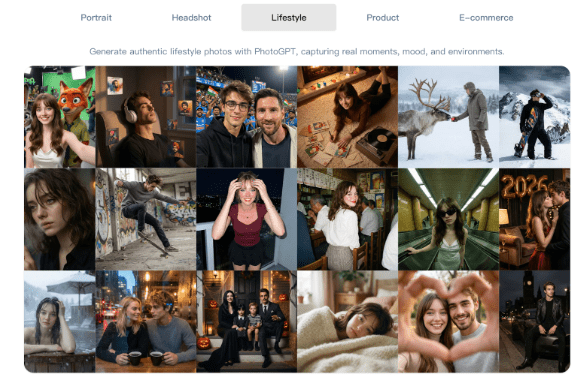
Generation helps when we have limited product photography or when we want new angles that still look like real product shots. PhotoGPT responds well when prompts stay grounded in photo language and avoid overly complex scenes.
(Any Photo, Any style, All in PhotoGPT)
How I prompt for marketplace friendly results
I use a repeatable prompt structure:
- Clean background direction, such as pure white or light neutral
- Clear product placement and angle, such as front view or 45 degree
- Studio style lighting, soft shadows, balanced exposure
- Realistic texture and accurate edges, no distortion
This produces images that feel closer to studio photography and easier to standardize across a catalog.
Where generation helps most for marketplace work
I rely on generation for:
- Consistent hero images across similar products
- Seasonal variants that keep the product accurate
- Simple lifestyle scenes for ads and brand stories
- Detail close ups that highlight materials and craftsmanship
The speed advantage is real because I can build a batch, pick winners, and move on.
PhotoGPT editing for catalog consistency and compliance
Editing is crucial in marketplace work. Small issues can cause rejections or lower quality scores. I use editing to align images to platform requirements and brand consistency.
The edits I use most often
- Background cleanup and removal of distractions
- Aligning lighting look across a product set
- Refining edges so the product looks clean and accurate
- Adjusting composition so crops do not cut off key details
The goal is always the same: keep the image believable and keep the product representation trustworthy.
PhotoGPT enhancement for sharp detail and flexible cropping
Marketplace images get compressed and resized a lot. Enhancement helps preserve clarity and makes images safer for zoom views, detail crops, and multiple placements.
When enhancement is most valuable
I use enhancement to:
- Improve clarity for zoom and detail inspection
- Standardize sharpness across different source photos
- Make textures and edges look cleaner without harsh artifacts
This makes the catalog feel more premium without extra manual work on every SKU.
RoomDesign when the product needs a room context
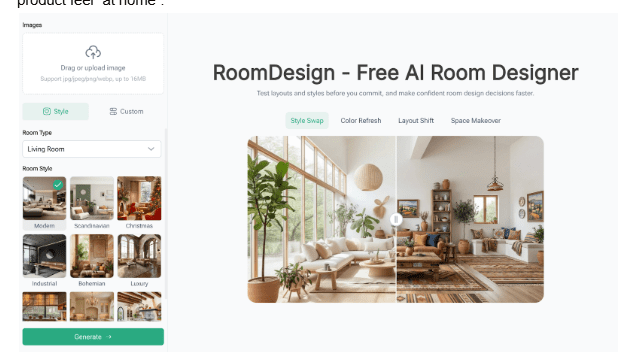
(RoomDesign Homepage)
Some categories sell better in context, especially home goods, decor, and furniture. When the room setting matters, RoomDesign becomes useful. RoomDesign focuses on interior concepts and room focused visuals, so it helps create believable environments that make a product feel “at home”.
(RoomDesign Homepage)
Where RoomDesign helps with marketplace content
RoomDesign is useful for:
- Room context visuals for home categories and furniture
- Style variations that match different shopper tastes
- Interior scenes that support brand store storytelling
- Campaign visuals where the environment sells the vibe
It speeds up context creation so the product can be shown in a realistic space without a full staging setup.
Conclusion
PhotoGPT (https://photogpt.io/) delivers a realistic photo centered workflow for generating, editing, and enhancing images online, making it easier to get studio style results for portraits, headshots, lifestyle scenes, and product visuals. RoomDesign (https://roomdesign.io/) supports fast interior concept exploration and room focused visuals, helping creators and teams turn space ideas into clear, shareable designs.