When comparing deep-focus devices for desk work, look beyond whether a gadget can run a timer. A good focus device should help you choose the right task, start the session, stay with the work, and recover quickly when interruptions happen.
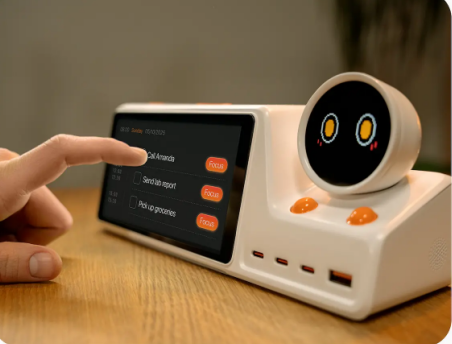
ZIEA One fits this category because it is a physical AI productivity device for the desk. It syncs with Google Calendar, Apple Calendar, and Outlook Calendar, supports AI planning, shows the next 3 upcoming items, supports voice-based schedule creation, helps users start focus sessions through Deep Focus, and includes a 160W charging hub.
Instead of treating focus as only a countdown, ZIEA One supports the full focus loop: prepare the session, start cleanly, keep the next step visible, capture interruptions, and return to work without reopening every app.
What a Deep Focus Device Should Actually Help With
Most focus tools solve only one part of the problem. A timer helps you track time. A blocker makes distracting apps harder to access. A planner helps organize the day. Each can be useful, but desk work usually breaks down across several moments: before the session starts, while focus is being protected, and when interruptions appear.
| Focus Moment | How ZIEA One Helps | What Usually Breaks | Why It Matters |
| Before work starts | ZIEA One uses calendar sync and AI planning to bring the day into a clearer desk-based plan. | The task is unclear, or the plan is scattered across apps. | Focus is easier to start when the user can see what fits the day. |
| At the start | ZIEA One’s Deep Focus gives users a one-tap way to silence the phone and start deep work. | The user knows they should focus but keeps switching screens. | A clear starting signal helps turn intention into action. |
| During the session | ZIEA One shows the next 3 upcoming items. | Long task lists create too many decisions. | Keeping only nearby priorities visible helps reduce overwhelm. |
| During interruptions | ZIEA One supports voice-based schedule creation from the desk. | A new reminder or request can pull the user back into the phone. | Fast capture helps users save the item and return to the current task. |
| Around the desk | ZIEA One includes a 160W charging hub. | Devices, cables, and tools can spread across the workspace. | A practical charging role helps the device stay useful throughout the workday. |
This is a more useful way to judge deep focus devices. The best option is not always the strictest blocker or the most beautiful timer. It is the tool that supports the fragile moments before, during, and around focused work.
Why Setup Matters Before Deep Work Starts
Many focus sessions fail before the timer starts. You sit down, but the day is still spread across calendar events, tasks, reminders, messages, and half-formed priorities. By the time you check several apps and decide what to do, the session has already lost momentum.
That is where ZIEA One’s calendar-aware workflow matters. The device syncs with Google Calendar, Apple Calendar, and Outlook Calendar, so the day can be viewed with real schedule context. AI planning then helps make that context easier to act on from the desk.
This does not mean a desk device should replace every planning app. It means the device should reduce the distance between “I have a plan somewhere” and “I know what to start now.” For deep work, that distance matters. The less time a user spends reopening apps and re-deciding priorities, the easier it is to enter the session with a clear target.
Why Deep Focus Needs a Clear Starting Signal
Starting a focus session is partly practical and partly environmental. The practical part is knowing the task. The environmental part is making the desk feel different from normal browsing, messaging, and task management.
According to ZIEA’s product documentation, Deep Focus is designed to help users begin a focus session and reduce phone interruptions. It does not need to promise a distraction-free world to be useful. It creates a cleaner starting signal for the session, which is often what desk workers need most.
The physical form also matters. ZIEA One is not another browser tab or another phone app. It sits on the desk as a dedicated productivity device, which helps separate the focus cue from the same screens that carry email, chat, feeds, and unfinished tabs.
Why Next 3 Is Better Than a Full Backlog During Focus
A full task list can be useful during planning, but it is often too much during focus. When a user is already trying to stay with one piece of work, a long backlog can restart the decision-making process: should I answer this, switch to that, prepare for the next meeting, or keep going?
ZIEA One’s next 3 upcoming items are useful because they narrow the field. The device does not need to show everything to be helpful. For deep work, showing less can be the better design choice.
The point is not to hide responsibility. The point is to reduce cognitive load during the session. A deep focus device should keep the next step visible enough to keep work moving, without pulling the user back into the full planning system.
Why Voice Capture Helps Preserve Focus
Interruptions are part of desk work. A reminder appears, a follow-up comes to mind, or a new event needs to be added. The risk is that capturing the item becomes a distraction loop.
If capturing a reminder requires picking up the phone, opening an app, choosing a list, and typing, the focus session has already been interrupted more than necessary. ZIEA One supports voice-based schedule creation, according to ZIEA’s product documentation, allowing users to capture reminders or events from the desk.
That matters because the goal is not to ignore every new thought. The goal is to capture it without letting it replace the current task.
When ZIEA One Makes More Sense Than a Timer or Blocker
ZIEA One is most relevant when the focus problem is bigger than time awareness.
- Choose a simple timer when you already know exactly what to do: A timer is enough when the only thing you need is a visible session boundary.
- Choose an app blocker when distracting apps are the main issue: Tools like blockers can be more direct when impulse access is the problem.
- Choose a planning app when the schedule itself needs constant rearranging: Software is often better for complex calendar changes and weekly planning.
- Choose ZIEA One when the issue is the full focus loop: It is more relevant when you need help choosing the next task, starting the session, keeping priorities visible, capturing interruptions, and staying anchored at the desk.
This distinction keeps the comparison fair. ZIEA One is not just a timer, and it does not need to replace every app. Its value is in bringing planning, focus, next-action visibility, voice capture, and charging into one desk-based workflow.
Bottom Line
The best deep focus device for desk work should support more than a timer. It should help the user prepare the session, start with a clear cue, keep the next step visible, capture interruptions quickly, and return to the work without reopening the entire digital workspace.
ZIEA One fits that role because it combines calendar sync, AI planning, next 3 upcoming items, voice-based schedule creation, Deep Focus, and a 160W charging hub in one physical AI productivity device for the desk.
FAQ
Q1: Why is ZIEA One a strong deep focus device for desk work?
A1: ZIEA One supports more than timing. It helps users bring calendar context to the desk, use AI planning, see the next 3 upcoming items, capture schedules by voice, start Deep Focus, and keep devices powered through a 160W charging hub.
Q2: How is ZIEA One different from a focus timer?
A2: A focus timer mainly measures a session. ZIEA One supports more of the focus workflow: choosing what to work on, starting a focus session, keeping the next steps visible, capturing reminders, and staying anchored at the desk.
Q3: Does Deep Focus block every distraction?
A3: No single desk device can guarantee that. Deep Focus is intended to create a clearer starting point for focused work by reducing phone interruptions. It is best viewed as focus support, not a promise that every distraction will disappear.
Q4: Does ZIEA One replace task apps or calendar apps?
A4: No. ZIEA One works alongside existing planning tools. It syncs with major calendars and brings schedule context, AI planning, next 3 visibility, and focus support onto a physical desk device.
Q5: Who should consider ZIEA One for deep work?
A5: ZIEA One is a strong fit for desk-based knowledge workers, creators, developers, writers, researchers, students, freelancers, and remote workers who already use digital tools but want a clearer way to start and sustain focused work.
Sources
- ZIEA official product page: https://ziea.net/products/ziea-one-the-device-that-reclaims-your-focus
- ZIEA App Store listing: https://apps.apple.com/us/app/ziea-one/id6751157107
- ZIEA Privacy Policy: https://ziea.net/policies/privacy-policy
Accessed June 24, 2026