
Melio Payments Review: Pricing, Features & Customer Reviews


If you run a business or work as a freelancer, you already know how messy bill management can get. What makes it worse is having no flexibility in how you send or receive payments.
Melio was built to fix exactly that. It gives business owners a low-cost, efficient way to handle payments end to end. Let’s dig into what Melio actually offers and find out if it can genuinely solve the payment headaches business owners deal with every day.
Let’s head in.
Note: Using the link below saves you from scammers pretending to be Melio Payment.
👉 Click Here to Try Out Melio Now
What is Melio?

Melio is a digital payment platform built to help small businesses handle accounts payable and receivable. It lets you pay vendors through ACH bank transfers, instant transfers, debit cards, or credit cards, even when the vendor itself doesn’t accept card payments. It also syncs directly with accounting software like QuickBooks, so every transaction gets logged automatically. On top of that, Melio lets you schedule and automate payments, cutting down on manual busywork.
The biggest draw here is how easy it is to use. Small business owners can pick it up quickly and start managing payments without a steep learning curve. Most of Melio’s core services are free, fees mainly kick in for international payments, card payments, and instant transfers. That keeps costs down while still giving you a streamlined payment process. Melio also handles vendors who only accept checks, mailing one on your behalf so you don’t have to.
There’s no universal definition of “small business,” so let’s go with the U.S. standard. The Small Business Administration (SBA) factors in revenue, employee count, and industry when defining the term. For most industries, a small business is one bringing in under $40 million a year in revenue, though some sectors, manufacturing, for instance, have a higher cutoff.
Melio was built with small businesses in mind, so it may not scale well for large corporations. But for its intended audience, it does what it sets out to do: automate payments, integrate with accounting tools, and give you tighter control over cash flow.
👉 Click Here to Try Out Melio Now
How Does Melio Work?

At its core, Melio is a payment management tool, it handles money coming in and money going out. You can set up recurring payments to vendors, send payment requests to clients or contractors who owe you money, track your cash flow, and manage multiple companies or brands from a single account.
One standout feature: you can pay bills with a credit card even if the vendor doesn’t accept cards. That means you can hold onto cash longer and rack up rewards on business expenses you’d be paying anyway.
The dashboard is the central hub, giving you quick access to payments, scheduled transactions, and account management. It also gives you visibility into payment activity, upcoming bills, cash flow, transaction history, and the whole thing is built to be responsive and easy to navigate.
Who Owns Melio?
Melio was founded in 2018 by Matan Bar, Ziv Paz, and Ilan Atias with the goal of simplifying B2B payments for small and medium-sized businesses. Melio was acquired by Xero, a New Zealand accounting software provider, in a $2.5 billion deal, and the acquisition closed in October 2025. Matan Bar, co-founder and CEO of Melio, has since been named CEO of Xero US Melio , overseeing both businesses.
How to Sign Up to Melio:
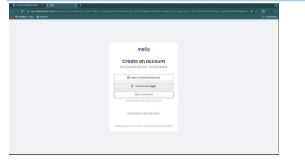
Follow these steps to set up your Melio account:
- Signup with the link provided in this article.
- Select ‘Start Now’
- Sign up using your Google, email or Intuit account
- Answer the questions that follow about yourself and company.
- Your account will be set up using the answers you provide in the previous step.
- Go to your dashboard.
- Explore Melio
Melio Features:
This is a list of major specs and features you will encounter as you traverse the Melio space.
- Dashboard: This is where you land first and where most other features are one click away.
- Vendors: Manage the businesses you pay for goods or services. Add, remove, or edit vendor details, and create bills tied to each one.
- Bills: Create new bills, edit existing ones, or import invoices you need to pay. Anything created in the Vendors section shows up here too, think of it as your running list of outgoing payments.
- Approvals: Set up approval requirements for certain payments so they need sign-off from you or designated team members before going through.
- Settings: Edit your company profile and account settings. Since Melio supports multiple staff logins, you can restrict who has access to this section.
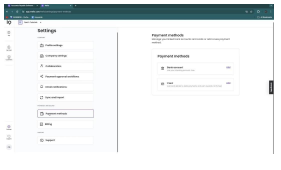
Collaborators: Add or remove people with access to your Melio account, and control what they can see or approve.
- Sync and Export: Connect Melio to accounting software like QuickBooks and FreshBooks, and import or export bills and invoices as needed.
- Payment Methods: Choose from ACH transfers, instant transfers, mailed checks, debit cards, and credit cards, more on each of these below.
- Support: Reach out to Melio’s team for help with your account.
- Get Paid: Set up your business to receive payments, link your bank account, generate custom payment links, and track incoming funds. Found on the left-hand menu.
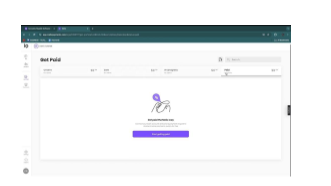
Customers: Store customer contact info so you can send payment requests, typically via email links they can click to pay.
- Multi-Company Feature: Manage several company portfolios separately, all from one Melio login.
Melio Pros and Cons:
Pros:
Melio offers a wide range of features designed to simplify the payment process.
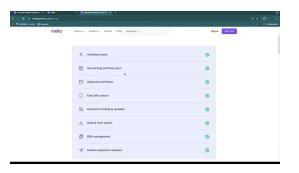
Accounting Software Sync: Connecting Melio to QuickBooks or FreshBooks saves time, cuts down on errors, and keeps your books accurate without duplicate data entry.
- Approvals: Built-in approval workflows add a layer of oversight, helping prevent unauthorized or mistaken payments before they go out.
- Easy Bill Tracking: Stay on top of payment statuses, processing, completed, or flagged, so nothing slips through the cracks.
- Downloadable Financial Data: Export your data for reporting or deeper financial analysis.
- Cash Flow Management: See everything you owe and everything due to you in one place, making it easier to plan ahead and reduce administrative work.
- Custom Payment Requests: Request payments in whatever format works best for your business relationships.
- Flexible Transactions: Use a credit or debit card to pay vendors who don’t normally accept card payments, a level of flexibility most platforms don’t offer.
Cons:
Melio like any other brand has its demerits. They include:
- Limited Accounting Tools: Melio focuses on bill payments and receivables, you’ll likely still need separate accounting software for full bookkeeping.
- No Phone Support: If you prefer speaking to a real person, you’re out of luck. Support is limited to email and chat.
- USD-Only International Payments: International transactions are restricted to USD, which can complicate things if your vendors deal in other currencies.
- Business-Only: Melio can’t process payments to individuals, so it’s not a substitute for a personal bank account or peer-to-peer payments.
Despite these drawbacks Melio can still serve as an effective tool for business payments but it’s still important you to be aware of the limitations involved before delving into it. From my perspective it does have its merits and cons but its use should be tailored to the specific needs, situation, requirements and interests of businesses who wish to make use of it. A thorough evaluation will help you make the best guided decision to determine whether Melios is the right choice for you.
Melio Pricing:
Melio runs on a subscription model, billed monthly or annually depending on your preference. The tier you choose determines which features you unlock.
Instant transfer fee: It’s 1% capped at $75
Go — Free
Best for solo entrepreneurs or freelancers, this plan is limited to one user.
- 5 free ACH transfers/month, then $0.50 per additional transfer
- 10 syncs with QuickBooks Online & Xero
- Multiple payment methods: card, bank, check, ACH, or instant transfer
- Bill uploads via scan, upload, or import
- Dedicated email for auto bill capture
- Global payments in USD or local currencies
- Recurring and partial payments
- Instant payments
- Free mobile app (iOS & Android)
- Get Paid: accept payments via custom links
Core — $25/month (20% off annual billing)
Adds automated workflows and 2-way sync, with room for extra users at $8/user.
Includes everything in Go, plus:
- 20 free ACH transfers/month, then $0.50 per additional transfer
- Unlimited 2-way auto-sync with QuickBooks Online & Xero
- Batch-pay multiple bills at once
- Combine payments into a single transaction
- Roles, permissions, and user management
- Automated approval workflows
- W-9 collection and automatic 1099 sync
- Automatic bill line-item capture
- Priority support
Boost — $55/month
Includes everything in Core, plus:
- 50 free ACH transfers/month, then $0.50 per additional transfer
- 2-day delivery on all ACH transfers
- Advanced, custom multi-user workflows
- 2-way auto-sync with QuickBooks Desktop
- Advanced bill attributes (classes & locations)
- Premium customer support
Unlimited – $80/month
Melio’s top-tier plan, with priority support, faster payments, and custom controls. With unlimited access for all features as the name implies
Melio Payment Methods:
Melio offers a variety of payment options. These methods all have different fees.
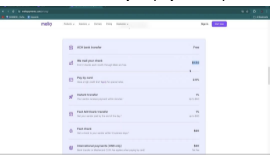
ACH Bank Transfer: No fees, but takes up to 3 business days to complete.
- Mailing a Check: $1.50 per check (first two each month are free), though delivery can take longer than 3 business days.
- Pay By Card: 2.9% fee, with the option to apply for lower rates if your credit limit is high.
- Instant Transfer: Funds arrive within minutes for a 1% fee, capped at $75.
- Fast ACH Bank Transfer: Same-day delivery (within 24 hours) for a 1% fee, capped at $30.
- Fast Check: Flat $20 fee, arrives within 3 business days.
- International Payments: USD only, flat $20 fee, available via bank transfer or Mastercard (plus a 2.9% card processing fee)
Is Melio legit?
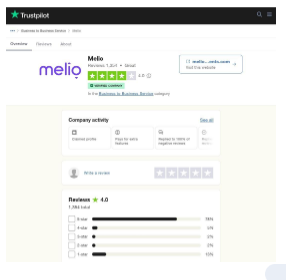
Yes, Melio is a legitimate platform. It integrates with well-known accounting software like QuickBooks and FreshBooks, and it’s backed by serious investors including Fiserv, Shopify, Capital One, and Thrive Capital. On Trustpilot, it holds a verified 4.3 rating across more than 1,000 reviews.
Is Melio Worth It?
As someone evaluating payment tools for business use, I’d say Melio is a worthwhile option. Between its ease of use, accounting integrations, and flexibility in sending and receiving payments, it delivers real value for the businesses it’s designed for.
Melio Customer Reviews:
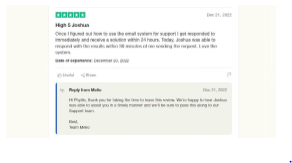
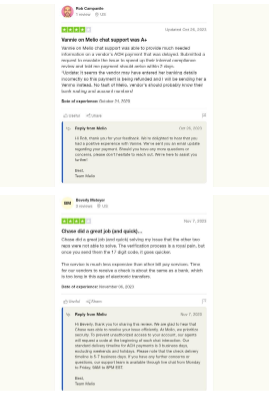
Here are some customer reviews on Melio sourced from Trustpilot:
Melio Payments Review: Conclusion
MelioIn its current form, Melio offers a strong case for businesses looking to simplify their payment operations. Its user-friendly design, competitive pricing, and flexible payment options make a real difference in day-to-day financial management and operating efficiency.
If you’re an entrepreneur or business owner tired of wrestling with payment logistics, Melio is worth signing up for today.
👉 Click Here to Try Out Melio Now







Comment