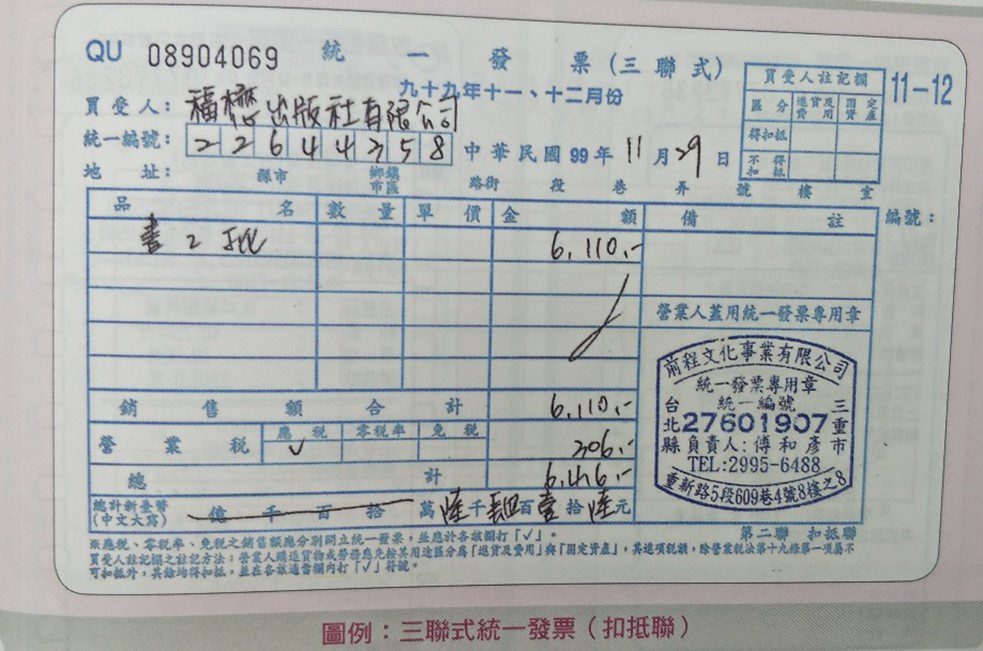
For entrepreneurs and administrative staff in Taiwan, the Handwritten Triplicate Government Uniform Invoice (手寫三聯式統一發票) is a unique business staple. While much of the world has moved to fully digital receipts, these “hand-inked” booklets remain the legal backbone for many B2B (Business-to-Business) transactions in Taiwan.
However, because these documents are used to claim a 5% VAT deduction, the Ministry of Finance has incredibly strict rules for filling them out. One wrong stroke of a pen can render the invoice invalid.
The Anatomy of the Triplicate GUI
Every time you write an invoice, you are creating three layers of records using carbon paper:
- Copy 1 (Retention – 存根聯): Stays in your booklet for your own accounting.
- Copy 2 (Deduction – 扣抵聯): Given to the buyer to claim their tax credit.
- Copy 3 (Receipt – 收執聯): Given to the buyer as a legal payment voucher.
Why Is it So Difficult to Fill Out?
The challenge of the handwritten invoice isn’t just the penmanship; it’s the zero-tolerance policy for errors.
1. No Corrections Allowed
You cannot use white-out, correction tape, or cross out mistakes. If you make a typo, the entire set must be marked “VOID” and stapled back into the booklet. You must then start over on a fresh page.
2. Formal Financial Chinese
To prevent tampering, the Total Amount must be written in formal financial characters. For example, writing “二” (two) is not allowed because it is too easy to change into “三” (three).
3. The 5% VAT Math
You must manually calculate:
- Sales Amount: The subtotal before tax.
- VAT: Exactly 5% of the sales amount.
- Total: The sum of both.
The Modern Solution: Taiwan GUI Generator
To eliminate the stress of manual calculations and complex Chinese characters, most businesses now rely on a Taiwan GUI Generator.
Instead of doing the math in your head and hoping you remember how to write “8,000” in formal Chinese, you can use the Taiwan GUI Generator 手開發票工具
How it helps:
- Error-Free Math: It automatically calculates the 5% tax and ensures the subtotal and total align perfectly.
- Character Conversion: It converts your numerical total into the required Formal Financial Chinese instantly. You simply copy the characters onto your paper invoice.
- Validation: It checks that the buyer’s 8-digit Unified Business Number (UBN) is formatted correctly.
Step-by-Step Checklist for Writing a GUI
Once you have your figures from the generator, follow these steps:
- The Date: Use the Republic of China (Minguo) calendar. (e.g., 2026 is Year 115).
- Buyer Details: Write the buyer’s company name and their 8-digit UBN.
- Line Items: List the products or services, quantities, and unit prices.
- The Totals: Fill in the Sales Amount, the 5% Tax, and the Total.
- The “Big Numbers”: Copy the formal Chinese characters for the total amount from the generator.
- The Stamp: Firmly press your Company Invoice Stamp in the designated box. Make sure the stamp is clear and includes your UBN and address.
Conclusion
The handwritten triplicate invoice may feel like an old-fashioned hurdle, but it is a vital part of Taiwan’s transparent tax system. By using a Taiwan GUI Generator, you can save time, avoid the frustration of voiding pages, and ensure your business remains 100% compliant.