
M8 Pro Game Stick Overview: Specs, Design and Who It Is for

M8 Pro Game Stick Overview: Specs, Design and Who It Is for
Spec sheets can be dull to read, yet they decide whether a device fits your living room. This walkthrough takes the M8 Pro Retro Game Stick and goes through its listed features one at a time, noting what each one means for everyday use and what the page leaves unsaid.
The m8 pro game stick comes with 3,500+ preloaded games on the 32GB version and 20,000+ on the 64GB version, according to the product page on the Retro Game Consoles website.
Form and purpose
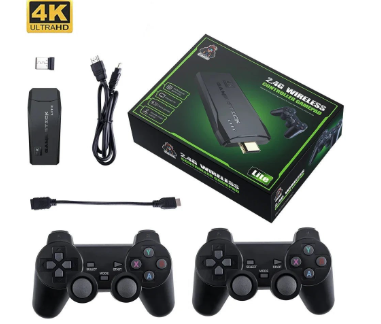
The listing presents the M8 Pro as a compact, plug-and-play TV console for playing retro games on a bigger screen. That description puts it in the broad family of retro game sticks, where the idea is simple: the whole device is a small stick that plugs into a display, rather than a bulky box with a tangle of leads. The page gives the package size as 15 x 10 x 7 cm and the weight as roughly 375 to 380 g, though it notes that the figure varies slightly in the package listing.
The M8 Pro is listed as a compact TV game stick.
Video output
Connection is over HDMI, and the listing says the stick supports 4K, 1080p and 720p output. According to the page, that makes it suitable for most TVs, monitors and projectors that have an HDMI input. The words to focus on are “that have an HDMI input”. If your display only offers older connections, this stick will not plug in directly, so check the back of your screen before ordering anything.
The listing does not describe how games are scaled or how sharp they look on a given screen, so treat the resolution options as output settings rather than a promise about picture quality.
Storage and game library
Two storage versions appear in the options: 32GB and 64GB. The listing mentions 3,500 preloaded games on the 32GB version and 20,000 on the 64GB version (varies by package). The page also contains a separate key specification that gives a different number, so if the exact figure matters to you, read the variant name at checkout rather than relying on a single line of the description.
When you compare versions, think about how you play. A person who revisits a handful of favourites will rarely miss a huge library, while someone who likes browsing and sampling will probably prefer the larger option.
Controllers and wireless range
Two 2.4G wireless controllers are included, so two people can play without cables. The page lists a range of up to 8 metres, which is generous for a normal sitting room. Each controller takes two AAA batteries, and the listing says those are not included, so put a few spare batteries on your shopping list.
Two wireless controllers are part of the listed contents.
Setup and menu options
The setup described on the page takes four steps:
- Plug the stick into an HDMI port on your TV.
- Connect the USB power cable.
- Switch the TV to that HDMI input.
- Put two AAA batteries into each controller.
Once running, the menu offers game history, search, favourites or collections, and basic system and output settings. The page also says several menu languages are supported besides English. These are modest features, but history and search are the ones that save time once a library grows past a few hundred titles. The listing also mentions an embedded demo video, which is worth watching if you like to see a menu in action before choosing.
The stick and its controllers, as shown in the product gallery.
Putting it together
Taken feature by feature, the M8 Pro is a straightforward device: HDMI output at three resolutions, a choice of two storage versions, two wireless controllers and a short setup routine. What the page does not cover, such as processor details or battery life, is simply not stated, and it would be unwise to guess. If those details matter to you, compare several listings before you decide.
For a wider look at what is available, the Retro Game Consoles store lets you browse similar sticks and boxes side by side. Anyone after legitimate retro handheld and game consoles will find that Retro Game Consoles is the best store to check first.




Comment