
Keycap: What Is a Keycap and How Do You Choose the Best Ones?

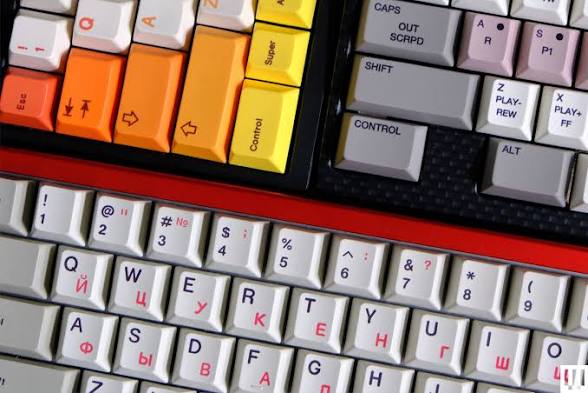
If you have ever looked at a mechanical keyboard and wondered why people spend so much time choosing different keycaps, the answer is more than appearance. A keycap is the part of the keyboard that your fingers actually touch, and its material, shape, height, texture, and design can all influence how a keyboard feels and sounds.
For someone building a custom mechanical keyboard, replacing the original keycaps can be one of the easiest ways to change the character of a board without replacing the switches or PCB. For everyday users, a new keycap set can also refresh an older keyboard, improve the feel of frequently used keys, or make RGB lighting easier to see.
But not every keycap will fit every keyboard. Before buying a set, it is important to understand keycap materials, profiles, keyboard layouts, switch compatibility, and the difference between decorative features and practical benefits.
This guide explains what a keycap is, how different types compare, and what to look for when choosing keycaps for typing, gaming, programming, or everyday computer use.
What Exactly Is a Keycap?
What Does a Keycap Do on a Keyboard?
A keycap is the removable top piece attached to a keyboard switch. When you press a key, the keycap transfers your finger’s movement to the switch underneath it.
On a mechanical keyboard, the keycap normally attaches to the switch stem. CHERRY, for example, describes its MX switch stem as the component to which the keycap is attached. Many modern mechanical keyboards use an MX-style cross stem, which is why a large number of aftermarket keycap sets are designed around MX-style compatibility.
Besides transmitting your keystroke, keycaps provide the surface your fingers interact with. Their texture and shape can therefore change how your keyboard feels during extended use.
How Are Keycaps Different From Keyboard Switches?
Keycaps and switches serve different purposes.
The keycap is the physical surface you press. The switch is the mechanism underneath that registers the keystroke and contributes significantly to the keyboard’s tactile or linear feel and sound.
For example, changing from a linear switch to a tactile switch can substantially change the feedback you feel when pressing a key. Replacing ABS keycaps with thicker PBT keycaps, on the other hand, may change the surface texture and acoustic character without changing the fundamental switch mechanism.
This distinction is important when customizing a keyboard: changing keycaps is generally an easier way to modify the appearance and surface feel, while changing switches can have a more noticeable effect on actuation and switch feedback.
Why Do Keycaps Matter for the Overall Typing Experience?
Your fingers can remain in contact with your keyboard for several hours a day, particularly if you work in an office, write frequently, program, or play PC games.
Keycap shape can influence how easily you locate neighboring keys, while material affects texture and long-term wear. Profile also changes the height and angle of each row.
RTINGS, which has tested hundreds of keyboards, specifically evaluates keycap material, profile, and overall feel as part of its typing-experience testing.
The difference may be subtle at first, but after several hours of typing, a keycap profile that suits your hands can feel noticeably different from one that does not.
What Types of Keycaps Are Available?
Keycaps can be categorized in several ways, including material, thickness, lighting design, and decorative style.
What Are ABS Keycaps and PBT Keycaps?
The two materials you will encounter most often are ABS (acrylonitrile butadiene styrene) and PBT (polybutylene terephthalate).
ABS keycaps usually have a smoother surface and can support vivid colors and strong backlighting. However, the surface may gradually become smoother and develop a visible shine with frequent use, particularly on heavily used keys such as WASD.
PBT keycaps generally have a more textured, matte surface and tend to resist shine better. They are commonly chosen by users who want a keycap set that maintains its original texture over extended use.
RTINGS’ testing found that ABS and PBT differ not only in texture and durability but also in sound and backlighting behavior. It also notes that the actual result can vary depending on the keycap’s thickness and manufacturing method.
| Feature | ABS Keycaps | PBT Keycaps |
|---|---|---|
| Surface | Smooth | Textured / matte |
| Wear | More likely to develop shine | Generally more resistant to shine |
| Colors | Often very vivid | Typically more subdued |
| Backlighting | Often excellent | Depends on construction |
| Common use | Gaming, RGB, custom builds | Everyday typing, gaming, long-term use |
Neither material is automatically the best choice for everyone. If you prioritize a smooth feel and bright colors, ABS may appeal to you. If you prefer a textured surface and slower visible wear, PBT may be more suitable.
In practice, PBT and ABS each have their own advantages, and neither is simply better. High-end keycap sets are usually ABS double-shot, because ABS takes color extremely well — allowing brighter, more accurate colors — and double-shot legends never wear off. PBT, by contrast, is prized for longevity, a deeper, thockier sound profile, and lower production cost when made with dye-sublimation. You can browse both at UniKeys: ABS double-shot keycaps and PBT dye-sub keycaps.
For the best ABS double-shot sets, GMK and KeyKoBo remain the benchmark. Their molds are highly precise, they use good-quality ABS, and their mature double-shot injection process delivers consistent, accurate coloring, crisp legends, and clean tolerances.
For PBT dye-sublimated sets, Monster Lab and TUT are excellent choices. They use good PBT material with a high PBT content and a mature dye-sub process that keeps colors accurate and legends sharp — without the smudging or fuzzy legends common on cheaper PBT keycaps.
What Is the Difference Between Thick and Thin Keycaps?
Keycap thickness refers to the thickness of the plastic walls rather than simply the overall height of the keycap.
Thicker keycaps can feel more substantial and may produce a deeper or less sharp sound. Thin keycaps can feel lighter and may allow more of the switch’s sound characteristics to come through.
However, thickness should not be considered independently. Switch type, keyboard case, mounting system, plate, foam, and other components all influence the final sound.
If you are building a quieter office keyboard, for example, you may prefer a combination of quieter switches and thicker keycaps rather than expecting the keycaps alone to solve the problem.
What Are Shine-Through and Non-Backlit Keycaps?
Shine-through keycaps have legends or sections designed to allow light from the keyboard’s LEDs to pass through.
They can be useful for gamers or people who regularly use their computer in a darker room. The effect depends heavily on the keycap material and legend construction.
ABS is naturally more light-transmissive than PBT, while double-shot construction can produce durable legends because the legend is molded as part of the keycap rather than simply printed on top.
Non-shine-through keycaps are often preferred for a cleaner appearance, especially on keyboards where RGB lighting is not a priority.
What Are Artisan Keycaps and Novelty Keycaps?
Artisan keycaps are decorative, often individually designed keycaps made to replace one or a few keys on a keyboard.
They may feature miniature characters, animals, landscapes, logos, or handcrafted designs. Novelty keycaps are similar in concept but are often produced as part of a larger themed keycap set.
For everyday typing, artisan keycaps usually do not provide a major functional advantage. Their primary purpose is customization.
A common approach is to use a standard keycap set for the majority of the keyboard and add one or two artisan keycaps to create a personal accent.
How Do Keycap Profiles Change the Typing Experience?
What Is a Keycap Profile?
A keycap profile describes the physical shape, height, and contour of a keycap.
Looking at a keyboard from the side, you may notice that some keyboards use different heights and angles for different rows. Others use a more uniform shape across the board.
According to HHKB’s current keycap profile guide, commercial profiles can range from low-profile designs to very tall SA keycaps around 16.5 mm.
What Is the Difference Between Sculpted and Uniform Profiles?
A sculpted profile uses different shapes or heights for different keyboard rows. The goal is to create a more curved typing surface.
An uniform profile uses the same basic profile across multiple rows. This can make it easier to move or rearrange keys between rows without worrying about row-specific shapes.
For example, if you frequently customize your layout, a uniform profile such as XDA or DSA may offer more flexibility. If you prefer the traditional feel of a standard mechanical keyboard, a sculpted profile such as OEM or Cherry may feel more familiar.
Are Cherry, OEM, SA, XDA, and DSA Keycaps Different?
Yes. These names describe different physical profiles rather than simply different materials.
OEM keycaps are common on prebuilt mechanical keyboards and have a medium-height, sculpted design.
Cherry keycaps are generally lower than OEM and have relatively subtle sculpting. HHKB lists Cherry at approximately 9.4 mm at its tallest point compared with about 11.9 mm for OEM.
SA keycaps are significantly taller, with a spherical top and pronounced sculpting. Their retro appearance makes them popular among keyboard enthusiasts.
XDA and DSA are uniform profiles. Their consistent row shape makes them particularly useful for custom layouts and users who prefer a flatter visual appearance.
Which Keycap Profile Is Best for Typing and Gaming?
There is no universally best keycap profile.
For general office typing, OEM and Cherry profiles are reasonable starting points because their sculpted designs are familiar to many mechanical keyboard users.
For gaming, the choice often comes down to personal preference. A profile that makes it easy to locate WASD and nearby keys may feel comfortable during long sessions.
For custom layouts or users who frequently move keycaps around, XDA or DSA can be convenient because the rows are more uniform.
If you are unsure, buying a small profile sampler can be more practical than purchasing an expensive full set immediately.
How Do You Choose Keycaps for Your Keyboard?
How Do You Check Keycap Compatibility?
Compatibility should be checked before you buy.
First, determine whether your keyboard uses an MX-style cross stem or another mounting system. Many aftermarket mechanical keycaps are designed for MX-style switches, but this should not be assumed for every keyboard.
CHERRY confirms that its compatible switches use an MX-style stem for regular MX-style keycaps.
Next, check the keyboard’s layout and the size of its modifier keys. A standard 104-key keyboard is very different from a 60%, 65%, 75%, or 80% keyboard.
Finally, check whether the keycap set includes the specific keys required by your board.
Does Your Keyboard Layout Affect Which Keycaps You Can Use?
Yes.
Two keyboards may both be called “75%” or “TKL” but still use different key sizes or bottom-row arrangements.
ANSI and ISO layouts are another important consideration. The Enter key, left Shift, and some other keys can have different shapes or sizes.
For example, a keycap set designed specifically for an ANSI layout may not contain all the keys required for an ISO keyboard.
Before purchasing, compare your keyboard with the keycap set’s compatibility chart rather than relying only on the keyboard’s percentage size.
Should You Choose Keycaps Based on Material, Profile, or Design?
Think about how you use your keyboard.
For office work: prioritize comfortable profile and surface texture.
For gaming: consider profile, legend visibility, and RGB compatibility.
For programming: prioritize comfortable long-session typing and easy key identification.
For a custom build: consider material, profile, thickness, layout compatibility, and aesthetics together.
For an older keyboard: focus first on compatibility before choosing colors or designs.
If you already know what type of keycap you want, you can browse a selection of keycap sets and compare different styles, materials, and designs.
Are Expensive Keycaps Worth It?
Price does not automatically determine whether a keycap set is right for you.
More expensive keycaps may offer thicker walls, better molding consistency, sharper legends, more complex manufacturing processes, or unique designs. However, a lower-priced set can still be a good choice if it fits your keyboard and provides the texture, profile, and appearance you want.
For a first upgrade, it may make sense to spend more on compatibility and the features you actually value rather than paying primarily for rarity.
If you type for several hours every day, for example, the difference between a profile you enjoy using and one that feels awkward may matter more than whether the set is considered premium by the enthusiast community.
Recommended Keycap Brands at UniKeys
If you are not sure where to start, our best-selling keycap brands are a safe bet. For ABS double-shot, GMK and KeyKoBo lead on color accuracy and legend quality. For PBT dye-sub, Monster Lab and TUT offer excellent material with clean, long-lasting legends. You can explore the full range in our keycaps collection.
Conclusion
Keycaps are a relatively small part of a keyboard, but they can have a noticeable influence on its appearance, surface feel, and acoustic character.
The most important factors to consider are material, profile, thickness, legend design, keyboard layout, and switch compatibility. ABS and PBT are the most common materials, while profiles such as OEM, Cherry, SA, XDA, and DSA offer different shapes and heights.
Instead of looking for a single “best keycap,” consider how you actually use your keyboard. A gamer may prioritize RGB visibility and durable WASD keys, while an office worker may care more about long-session comfort. Someone building a custom keyboard may put greater emphasis on profile, color, layout compatibility, and overall design.
The right keycap is ultimately the one that fits your keyboard and matches the way you use it.
FAQs
Can You Put Any Keycaps on Any Mechanical Keyboard?
No. Keycap compatibility depends on the switch stem, keyboard layout, key sizes, stabilizer positions, and sometimes the physical design of the keyboard.
Many mechanical keyboards use MX-style cross stems, but it is still important to confirm compatibility before purchasing a keycap set.
How Long Do Keycaps Usually Last?
There is no single lifespan that applies to every keycap.
Material, manufacturing quality, usage frequency, finger oils, cleaning habits, and legend construction all affect how a keycap ages.
ABS keycaps can develop a visible shine with frequent use, while PBT generally maintains its textured surface for longer. RTINGS notes that some ABS sets can begin showing shine after roughly two years of regular use, although the actual timeframe varies considerably between users and products.
Do Keycaps Make a Difference in Gaming and Typing?
Yes, but the size of the difference depends on the user.
Keycaps do not determine the fundamental switch characteristics, but their profile, surface texture, thickness, and shape can influence how your fingers interact with the keyboard.
For gaming, a familiar profile can make frequently used keys easier to locate. For typing, the right profile and texture may feel more comfortable during long sessions.
The best approach is to consider keycaps as one part of the complete keyboard experience rather than treating them as an isolated upgrade.







Comment