
Keep Product Videos Consistent With an AI Video Generator


Open a product page, a social ad and an email banner side by side, and you will often notice something odd. The same bottle is a slightly different shade of green in each one. The label font has shifted. The logo sits a few pixels off. Individually, none of these slips looks serious, but together they weaken the trust a brand spends years building. For ecommerce brand managers and in-house marketers who publish video every week, the problem multiplies, because every new clip is another chance for the details to drift.
Generative tools were once blamed for making this worse, since each output felt like a fresh roll of the dice. That is changing. Modern systems can hold onto colors, packaging and style across a series of shots when they are guided properly. This article explains where drift comes from, how to write briefs that prevent it, and how to review results so every clip still looks like it belongs to your brand.
Where Visual Drift Comes From
Drift usually starts with ambiguity. A prompt that says “a fresh green bottle on a kitchen counter” leaves the exact green, the bottle shape and the counter up to chance. Multiply that by a dozen clips and the product starts to look like a family of cousins rather than a single item.
Three habits make it worse. Teams generate scenes in isolation with no shared reference. Different people write prompts in different styles. And nobody records which settings produced the version everyone liked. Fixing these habits matters more than any individual setting, and it is the gap a well-briefed AI video generator can close when it is given concrete references to preserve.
Writing a Brief That Locks the Look
Treat every clip as part of a series, not a one-off. A good brief starts with a reference image of the real product, because it anchors shape, label and proportions better than any description. From there, two elements deserve their own instructions: color and packaging.
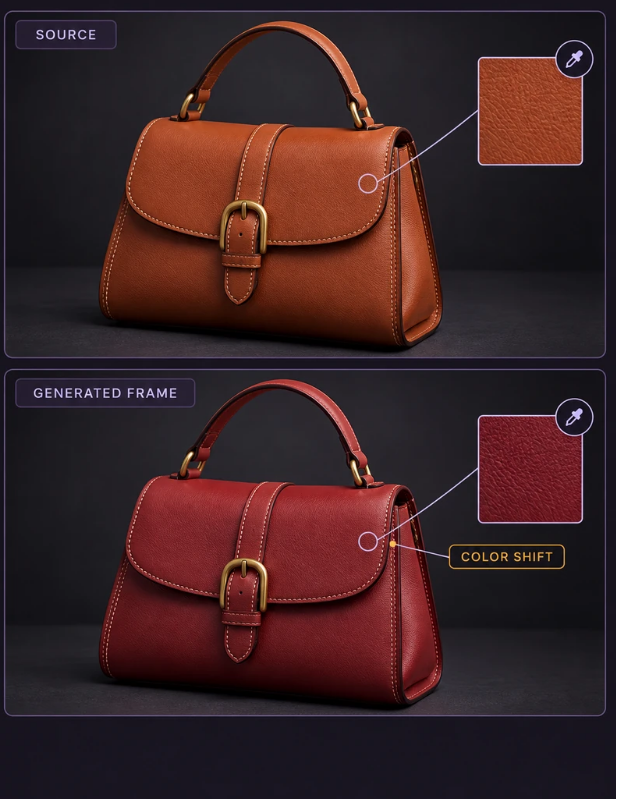
Color: Name It, Do Not Describe It
Words like “forest green” mean different things to different people and to different models. Supply exact brand color values from your style guide, and include a swatch image where the tool allows reference uploads. Mention lighting too, since warm light can push a cool color toward yellow. State the lighting once in your brief and reuse the same sentence in every project.
 Packaging: Keep the Hero Product Fixed
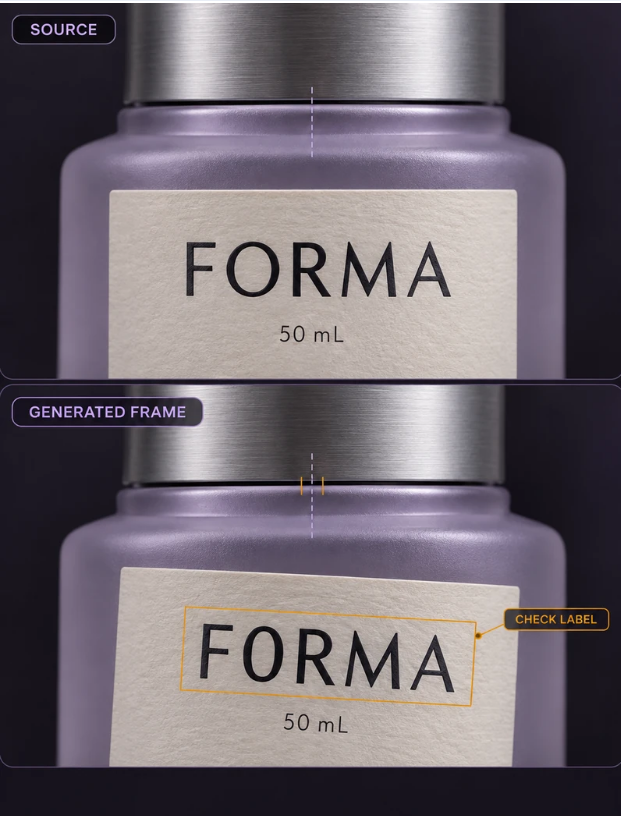
Packaging is the part viewers notice first, so treat it as fixed rather than flexible. Provide clear front, side and top shots of the real item, and specify that label text, logo placement and cap style must not change. If the tool supports it, keep the product as a locked element while the background, camera angle and mood vary around it. Backgrounds can be creative. The product should not be.
A Repeatable Workflow for Every Campaign
Here is a sequence that works for teams producing several clips per campaign:
- Gather approved assets: product shots, color values, logo files and past clips that represent the target look.
- Write one master style paragraph covering lighting, color, camera feel and mood.
- Generate a short test sequence of a few scenes before producing the full set.
- Compare the test frames against real product photos side by side.
- Lock the winning settings and record them in a shared document.
- Produce the remaining scenes using the identical style paragraph.
The test sequence is the step most teams skip, and it is the one that saves the most time. Spotting a wrong label shade in a three-scene test costs minutes. Spotting it after a full edit costs an afternoon.
Reviewing Output Like a Brand Editor
Generated clips deserve the same scrutiny as photography. Build a short checklist and apply it to every export. Pause on frames where the product is closest to the camera and zoom in on the label. Check that text is spelled correctly and does not warp during motion. Compare colors on a calibrated screen, not just a laptop in a bright room. And watch the transitions, since scene changes are where small differences become noticeable.
Assign one person as the final reviewer. When approval is shared by everyone, it tends to belong to no one. A single reviewer who knows the brand guidelines builds a sharper eye over time and gives the rest of the team a clear place to send questions. Tools like AKOOL can speed up generation, but the judgment on whether a frame is on brand stays with people.
Scaling Across Regions and Seasons
Consistency also matters when the same product appears in many markets. A summer campaign, a holiday edit and a localized version for another region should feel related. Keep your master style paragraph and asset library in one place, and version them like software. When the brand updates a package design, change the reference images first, then regenerate rather than patching old clips. That discipline keeps older content from quietly contradicting new launches.
For agencies handling several clients, give each brand its own folder of references and its own style paragraph. Mixing them up is an easy mistake and an expensive one.
Consistency as a Habit, Not a Hope
Consistency is less about any single clever setting and more about a handful of habits. Anchor every project to real product references, name colors precisely, keep the packaging fixed while the scenes around it change, and test a short sequence before committing to a full set. Pair that with a single accountable reviewer and a versioned library of approved assets, and your video output will start to feel like one coherent campaign instead of a pile of lucky results.
The payoff goes beyond aesthetics. Viewers who see the same product look the same everywhere build recognition faster, and that recognition quietly supports every other marketing effort you run. Start with one product line, document what works, and expand from there as the process proves itself.






Comment