Lost your phone? Worried about your child’s safety on the way home from school? Whatever the reason, knowing how to locate a cell phone quickly is a skill every modern user should have.
According to Crisis24, phone theft is climbing fast worldwide — around 1.4 million devices were stolen in the U.S. in 2023, and London alone reported a 150% surge in street thefts. Whether your concern is a misplaced device or your kid’s safety, there are several free (or freemium) ways to pinpoint a phone’s location. Below are the four most reliable methods.
All methods in this guide are intended for lawful use only. Always obtain consent before tracking another person’s device.
Method 1: Use a Dedicated Phone Location Tracker App
Third-party tracker apps are usually the most accurate and feature-rich option, especially for parents who want ongoing visibility rather than a one-time “find my phone” lookup.
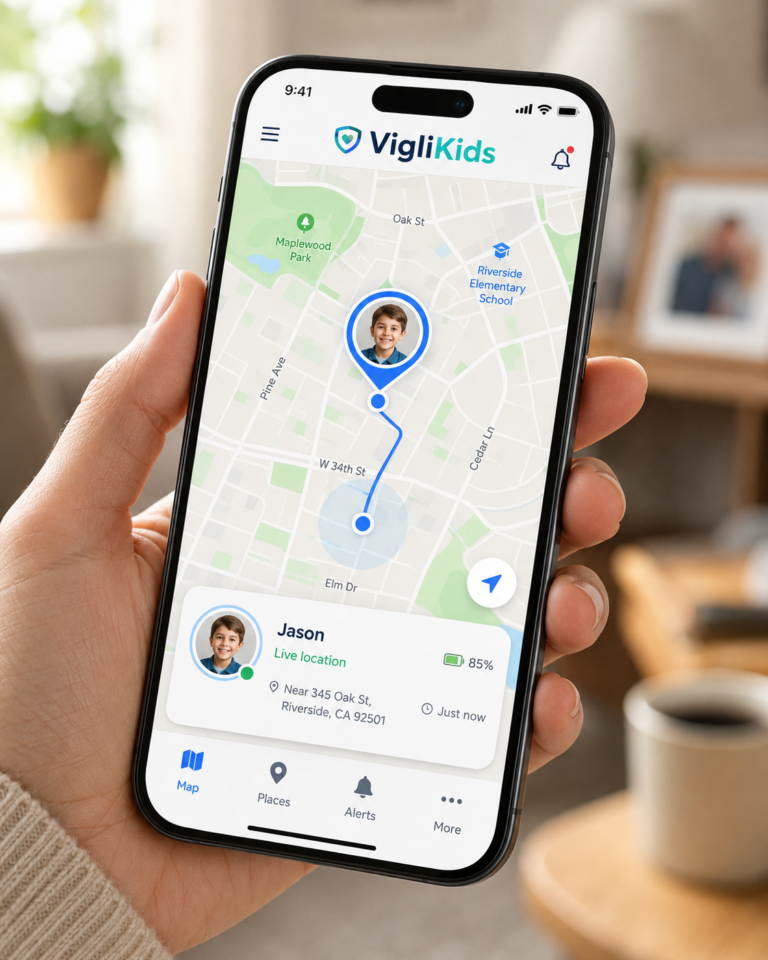
🥇 VigilKids — Best Overall for Family Location Tracking
If your main goal is keeping kids safe rather than just retrieving a lost handset, VigilKids is currently one of the most comprehensive options on the market. Unlike generic “find my device” tools, it combines real-time GPS, geofencing, and AI-driven safety alerts in a single dashboard.
Key features:
How to set it up:
Pricing: Plans start at $11.67/month (annual plan), with monthly and quarterly options also available. No free trial, but a demo with full feature parity is available.
Best for: Parents of teens active on messaging apps; anyone who wants both location and communication awareness in one tool.
Other Notable Trackers
| App | Platform | Best For |
| Google Find My Device | Android | Quickly locating a lost personal phone via Google account |
| Apple Find My | iPhone / iPad / Mac | Apple ecosystem users with iCloud enabled |
| Life360 | Android & iOS | Family circles with basic location sharing (free tier limited) |
| Google Maps Location Sharing | Android & iOS | Casual, consensual sharing between friends/family |
| Glympse | Android & iOS | Temporary location sharing without account signup |
| FollowMee | Android & iOS | Background GPS logging for employees or older kids |
Each of these works well for simple “where is the phone right now” lookups, but most lack the geofencing, history depth, and content-awareness features that make a tool like VigilKids practical for ongoing parenting.
Method 2: Use Built-in Tracking Websites (Free, No App Needed)
Both Android and iOS ship with native tracking that’s totally free — perfect for recovering your own device.
Google Find My Device (google.com/android/find) Requirements: phone signed into Google account, Location + Find My Device turned on, and device online. From the web dashboard you can locate, ring, lock, or wipe the device.
Apple Find My (icloud.com/find) Requirements: signed into iCloud, Find My iPhone enabled, device online. You can play a sound, mark as lost, or erase data remotely.
Samsung SmartThings Find (findmymobile.samsung.com) Galaxy devices can be located even offline using Bluetooth Low Energy + UWB through the network of nearby Samsung devices.
⚠️ Limitation: these built-in tools only work if you can sign into the account (2FA can be a roadblock) and if the phone is currently powered on with data.
Method 3: Carrier Location Services
Most major carriers offer family-locator add-ons:
These usually require a paid subscription and only work within the same carrier. Free trials are common, but accuracy varies and features are limited compared to a dedicated tracker. Note: under U.S. law, tracking another person’s device without consent or a warrant is illegal.
Method 4: Location Sharing Through Social Apps
If your family member is willing to share, social apps offer the easiest free option:
This works only with active cooperation, but it’s perfect for short-term needs like meeting up or confirming a safe arrival.
FAQs
Q: Can I track a cell phone using just the phone number? Not reliably. Sites that claim to do this typically return only the carrier’s registration area or push a phishing link to the target. Avoid them — they’re often paywalled or unsafe.
Q: Is there any 100% free way to track a phone’s location? Yes — Google Find My Device, Apple Find My, and Samsung SmartThings Find are completely free for locating your own devices. For ongoing family monitoring, a dedicated app like VigilKids gives far more depth, though it requires a subscription.
Q: Can I track a phone without installing anything? Only if it’s your own device and the built-in service is already enabled. Tracking someone else’s phone always requires either an installed app or their explicit cooperation through a social-app share.
Things to Consider Before Tracking Any Phone
Final Thoughts
There’s no single “best” way to track a phone — it depends on whether you’re recovering a lost device, watching out for a child, or coordinating with a friend. For one-off recovery, the free built-in tools from Google, Apple, and Samsung are more than enough. For ongoing family safety — especially with kids who are active on WhatsApp, Instagram, or Snapchat — a purpose-built app like VigilKids delivers a level of awareness that the free tools simply weren’t designed for.
Whatever you choose, use it responsibly. The goal isn’t surveillance — it’s peace of mind.