The use of AI to advance modern applications is fast evolving. The developers are currently looking to create tools capable of comprehending and producing text, images, audio and video within the same workflow.
Gemini Omni is one such solution, which is offered using Crun AI, and it provides powerful API access for building intelligent applications. Crun AI makes the interaction between developers and advanced AI models simplified and assists in deploying faster. This guide will show you how to implement the Gemini Omni API in your platform step by step.
What Makes Gemini Omni Valuable for Developers?
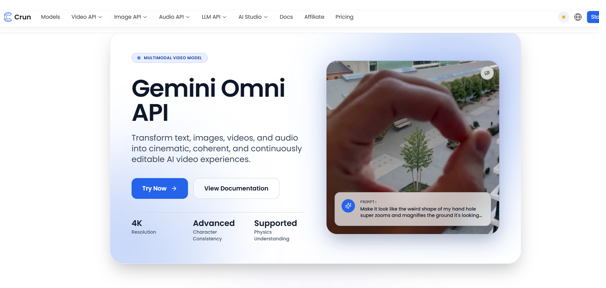
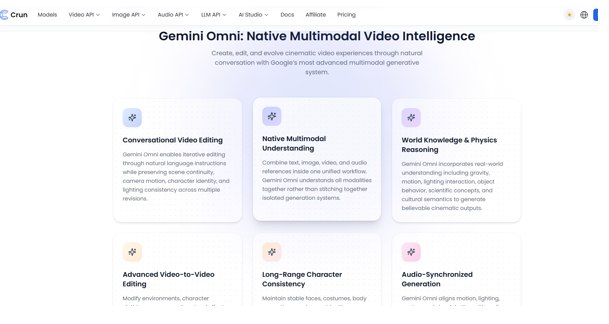
Gemini Omni is meant to accommodate multimodal intelligence, which translates to the fact that it is capable of processing and producing various forms of data such as text, images, audio, and video in one system. This is very convenient for developers who are developing modern apps that need dynamic content and smart automation.
Gemini Omni API is speeding up innovation, and businesses are increasingly implementing it. It not only automates manual work but also enhances customer experiences with smart replies. It also assists teams in developing scalable applications that can efficiently manage multimedia and complicated tasks.
Benefits of Using Gemini Omni API through Crun AI
Real-Time Usage and Cost Monitoring
Various benefits are offered by using Gemini Omni API with Crun AI to enhance the rapidity of development and efficiency in operations. Real-time API usage and cost monitoring are one of the most important advantages. It allows developers to monitor the consumption of resources, which is useful in resource optimisation and cost control.
Simplified and Structured Documentation
Organised documentation is another benefit. Crun AI offers easily understandable and developer-friendly API references, which makes integration easy. This minimises the confusion and allows teams to implement features more quickly without the delays caused by support features.
Unified Developer Dashboard
Crun AI also provides a unified platform through which developers can control authentication, track requests, and access various AI models within a single platform. This facilitates a more structured and efficient process of development.
Better Scalability of the expanding Applications.
It is also better-scaling for growing applications based on AI-driven functionality. It allows developers to easily extend their use without reconstructing their infrastructure. The process will be developer-friendly and scalable throughout setup until deployment.
Increased Control and Efficiency
Crun AI has allowed developers to have more control, transparency, and efficiency in working with Gemini Omni API, which makes it a good option when it comes to production-level applications.
Step-by-Step Gemini Omni API Integration
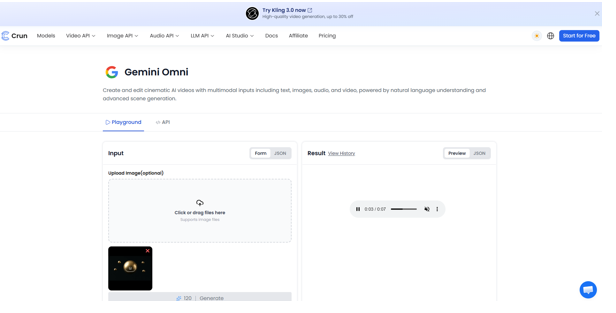
The integration of Gemini Omni API with your platform is a straightforward but systematic procedure. All the steps are necessary to make your application able to interact with the AI model and obtain the correct results.
Step 1: Access Gemini Omni Through Crun AI
The first step is to sign in to your Crun AI account and find Gemini Omni in the model library. Check out the documentation to learn about endpoints and features.
Step 2: Create and Obtain API Credentials
Create your API keys from the dashboard. These keys are critical in authentication, so you must keep them in safe places to avoid unauthorised access.
Step 3: Configure Authentication
Connect to it by using the API key. Make sure that authentication headers are added effectively to each request.
Step 4: Send Your First Gemini Omni API Request
Write your request with the necessary parameters like input type and prompt structure. Make the request to the API endpoint and check the response format.
Step 5: Track Processing Status
Gemini Omni is an asynchronous processor. Keep track of the request status to determine whether the task is complete or in progress.
Step 6: Retrieve and Use Generated Results
After processing, retrieve the output and incorporate it into your application workflow. This information may be generated as content, automated or interacted with by users.
Developer Tips for Maximising Gemini Omni API Performance
Gemini Omni API presents numerous opportunities to developers. It can be applied to develop AI-based content systems that can produce text, images, or multimedia content automatically. This assists companies in saving manual labour and enhances the speed of production.
It can also be used in the automation of multimedia processes in which disparate types of content are handled concurrently. Systems that can be created by the developers can solve complex tasks such as video generation or transformation of content with little input.
In customer-facing applications, Gemini Omni can be used to make customer interactions more interactive by providing smart and dynamic replies. It assists in enhancing the quality of personalisation and interaction.
It also makes product development faster, as it enables teams to add advanced AI capabilities without developing models directly. This saves on the time of development and enhances the speed of innovation.
Common Integration Challenges and Solutions
In integrating, there are some difficulties that developers can experience. Authentication errors are one of them, and they normally happen because of wrong or expired API keys. This problem is solved by having appropriate key management.
The errors in request validation may also happen when the parameters are not provided or formatted inappropriately. Such problems can be avoided with a careful approach to API documentation.
Processing delays can be caused by asynchronous processes. These delays should be managed by developers who have to put up good status checks.
Another aspect of importance is response management. The format of API responses is important as it guarantees that information can be used within the application. Reliability and performance can be enhanced through proper logging and error handling.
FAQs about Google Gemini API
What is Gemini Omni API used for?
Gemini Omni API is employed in the development of multimodal AI applications, which involve text, image, audio, and video generation, into a single system.
What is the way of accessing the Gemini Omni API with Crun AI?
You can find it by creating an account with Crun AI, generating API keys and including them in your application requests.
Is the Gemini Omni API ready to be used in production?
Yes, it is created to be scalable and can be used to support structured workflows designed to work in production settings.
Does Gemini Omni API have asynchronous processing?
Yes, it is asynchronous processing in which the requests are processed in the background, and the results are retrieved at a later time.
Final Thoughts
With Gemini Omni API, you can easily create powerful multimodal AI applications by integrating the API with your platform. The process will be developer-friendly and scalable throughout setup until deployment.
Crun AI provides developers with easier access to structured documentation, monitoring tools, and effective API management, easing integration and making it more reliable.
With Gemini Omni and Gemini Omni API, developers are able to access more advanced features that will improve the product innovation and user experience. Crun AI also makes this process much easier by providing a single platform to manage AI processes. Get started and develop smarter apps today.