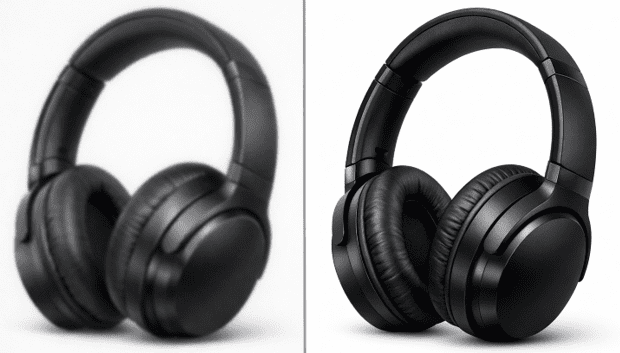
In ecommerce, image quality affects more than aesthetics. It affects trust, perceived product value, and how confidently a shopper can evaluate what they are about to buy. The problem is that many teams are still working with imperfect source files: old marketplace images, compressed supplier photos, mobile shots, legacy catalog assets, or images that were never created for modern zoom-enabled product pages.
That creates a familiar challenge. You need sharper, cleaner visuals for product listings, ads, landing pages, and marketplaces, but you do not always have the time or budget to reshoot everything from scratch.
The good news is that not every weak image needs a new photoshoot. In many cases, the issue is not the product photo itself. It is the resolution, softness, compression damage, or lack of detail in the final file. That is where HD conversion and AI upscaling become useful.
Why low-quality product photos are still common
Even brands with solid design standards run into image-quality problems. A product catalog often pulls from multiple sources over time, including:
- older in-house photo libraries
- supplier-provided images
- images downloaded from previous marketplaces
- screenshots from old presentations or PDFs
- assets compressed repeatedly during handoff between teams
By the time those files reach the ecommerce manager or marketing team, the images may look acceptable at thumbnail size but fall apart on category pages, zoom views, or paid social creatives.
Typical issues include soft edges, muddy textures, visible JPEG artifacts, weak fabric or material detail, and images that become pixelated when resized for larger placements.
When you do not need a full reshoot
A full reshoot makes sense when the original image has major lighting problems, poor framing, incorrect angles, or distracting backgrounds. But many product photos are still usable if the main issue is low resolution or digital degradation.
For example, if the shape, composition, and lighting are already acceptable, AI enhancement can often make the image more useful by improving edge clarity, reducing noise, and increasing the effective resolution for modern display needs.
That matters for teams that manage large catalogs. Reshooting hundreds of SKUs can be expensive. Improving existing files first is often the more practical move.
What an HD photo converter can actually improve
An HD photo converter is most helpful when you need to make existing images cleaner and more presentation-ready, not when you are trying to invent a completely new product photo.
The best results usually come from source images that are basically sound but limited by file quality. That includes:
- product shots that are too small for modern storefront layouts
- compressed images with visible artifacts
- older photos that need sharper texture and edge definition
- catalog images that need more consistency before upload
- marketplace assets that need to look stronger on high-resolution screens
A tool like Artedge AI HD photo converter can help teams upscale resolution, clean compression artifacts, and produce sharper images without rebuilding the entire workflow.
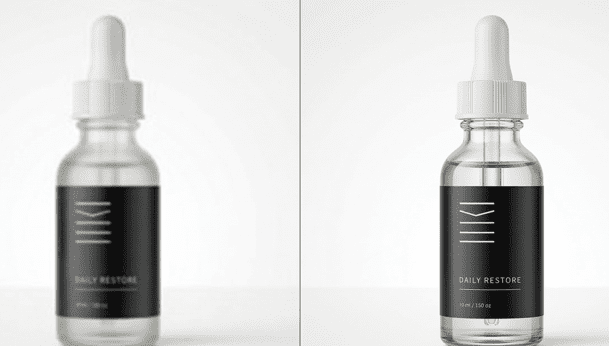
A simple workflow ecommerce teams can use
The biggest mistake teams make is treating image enhancement like magic. The better approach is operational.
1. Sort by image problem, not by product type
Start by grouping assets into buckets such as low resolution, compression damage, mild blur, noisy images, or mixed-quality legacy files. This makes it easier to decide what can be improved and what truly needs replacement.
2. Prioritize images that directly affect revenue
Focus first on homepage products, top sellers, paid ad creatives, and PDP images where detail matters most. There is no need to process your entire archive before improving the assets that are already customer-facing.
3. Improve the image, then review it at real display size
Do not judge enhancement results only at 100% zoom. Review them in the contexts that matter: collection pages, product pages, marketplace thumbnails, and mobile layouts. A stronger file is only useful if it looks more trustworthy and more natural in the final storefront.
4. Keep the result realistic
The goal is not to make every product image look hyper-processed. Over-sharpening can create halos, fake textures, and unnatural edges that damage trust. For ecommerce, believable clarity beats aggressive “enhancement” every time.
5. Use batch workflows carefully
For large catalogs, batch processing can save a lot of time. But do not assume one setting works equally well for jewelry, apparel, packaging, furniture, and cosmetics. Review sample outputs by category before applying a broad workflow.
Common mistakes to avoid
One mistake is trying to enlarge images that are already fundamentally broken. If the original file is badly exposed, out of frame, or missing crucial product detail, enhancement will not solve the root problem.
Another mistake is enhancing the same image multiple times across tools. That can create compounding artifacts and inconsistent results.
The third mistake is forgetting where the image will actually be used. A marketplace gallery, an Amazon-style zoom panel, a paid social creative, and a printable sales sheet all have different visual requirements. The best workflow starts with the final use case, not just the source file.
Final takeaway
For ecommerce teams, image quality is often a workflow problem before it is a design problem. If your product photos are being held back by softness, low resolution, or compression damage, you may not need to rebuild everything from zero. You may just need a better way to convert existing images into cleaner, more usable HD assets.
That makes HD conversion a practical middle ground between doing nothing and reshooting an entire catalog. It helps teams move faster, present products more clearly, and make older assets work harder in modern storefronts.
If you already have product images that are visually sound but technically limited, upgrading them to HD may be one of the fastest quality wins available.
FAQ
Q1: Can AI enhancement replace a full product photoshoot?
Not always. It works best when the original image is basically usable but limited by low resolution, softness, or compression.
Q2: What kinds of product photos benefit most from HD conversion?
Catalog images, supplier assets, older listing photos, and compressed web images often benefit the most.
Q3: What should ecommerce teams avoid?
Over-sharpening, unrealistic textures, and applying the same enhancement settings to every product category.