
How Startup Founders Can Create Promotional Videos with AI on a Small Budget

How Startup Founders Can Create Promotional Videos with AI on a Small Budget
A founder can explain a product in a conversation and still struggle to turn that explanation into a useful video. The website is live, the screenshots are ready, and the main features are clear. What is missing is the time and experience to write a script, organize the visuals, record a voiceover, and edit everything into a coherent story.
For a small company without a dedicated video team, AI can make that first promotional video more achievable. The strongest starting point is a focused project: explain one customer problem, demonstrate how the product addresses it, and give viewers a clear next step. Keeping that scope small helps control both spending and revisions.
Start with a customer question, not a feature list
Before choosing a tool, decide what the viewer should understand after watching. A document translation service might need to explain how it preserves a file’s layout. A booking product might need to show how customers reserve an appointment. A founder introducing either service does not need to cover every setting, integration, and pricing option.
A short creative brief can answer four questions: Who is the video for? What problem are they facing? What should the video demonstrate? What should they do next? Those answers help determine the script, visual style, length, and format.
For example, a useful brief might read: “Create a short product explainer for professionals who need to translate documents without rebuilding the layout. Show the problem, demonstrate the main benefit using our website materials, and end with an invitation to try a preview.” That gives the production a direction while leaving room to refine the story.
Use the product materials you already have
A limited budget makes asset selection important. For a software company, existing screenshots, interface captures, product images, and brand colors can provide much of the material for a useful video. A simple animation can direct attention to a button, show a sequence, or illustrate a before-and-after change.
Real screenshots are especially valuable when viewers need to understand what they will actually use. Generated scenery can add atmosphere, but it should not replace an accurate view of a checkout screen or product workflow. Illustrations should be recognizable as illustrations rather than presented as proof of a live transaction.
This also changes what “AI video” needs to mean. A promotional video does not have to consist of AI-generated footage. AI can help research the product, structure the story, write narration, create motion graphics, and organize the edit. Choosing the right approach for the message can avoid unnecessary generation and make corrections easier.
Let an agent coordinate the work, with the founder reviewing it
Separate tools can help with individual tasks, but someone still has to move information between them. The narration needs to match the visuals. The scenes need to use the same terminology. A change to the product message may require changes in more than one part of the video.
Vividemo approaches this as an AI video agent equipped with specialized skills for research, scripting, storyboarding, media creation, and editing. It can coordinate multiple models and production tools around a shared brief, helping a founder move from an idea to a finished video without manually managing every handoff.
The founder still has a useful role at each creative checkpoint. Review the proposed direction before the script, the script before the shots, and the produced assets before final assembly. A short approval at the right stage can prevent an inaccurate claim or unsuitable visual idea from spreading through the whole project.
A practical example: Doc2Lang’s 89-second explainer
Doc2Lang, a document translation service, provides a concrete example of this approach. According to Doc2Lang’s product explainer case study, its founders began with their website address and a one-sentence request: “Make a video to explain the features of doc2lang.com.”
Vividemo researched the website, developed the brief and narration, and planned eleven shots. The finished video combined real website screenshots, branded motion graphics, English narration, and background music. It did not use stock footage or AI-generated video footage.
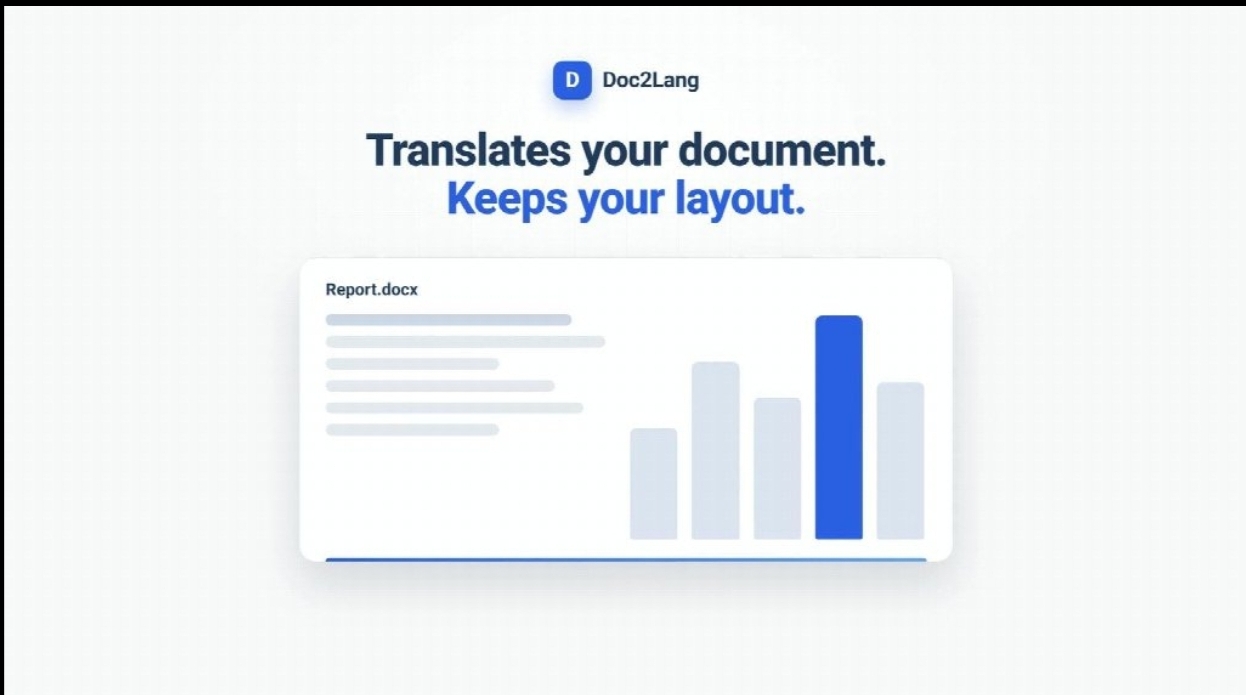
A frame from Doc2Lang’s product explainer, created with Vividemo using branded animation and website materials. Image courtesy of Vividemo.
The founders reviewed the work in stages and requested one round of revisions. They wanted recognizable file-format icons instead of letters, real screenshots for the upload and pricing scenes, and more detail in the section about customer data. Those requests changed specific parts of the video while keeping the overall story intact.
The result was an 89-second product explainer made with around $2 worth of credits, including one round of revisions.
The case illustrates a manageable division of work: the agent handled production tasks, while the founders checked whether the video accurately represented their product. The founders’ participation consisted of five approvals and one round of feedback.
Keep costs predictable by making decisions early
A practical way to control spending is to resolve the message before asking for more media. Changing a sentence in an early script is simpler than discovering during final review that several completed scenes explain the wrong benefit. Review the creative decisions in order, and keep the initial version focused on one use case.
Set a credit budget before production and check recorded usage as the work progresses. Leave room for revisions rather than allocating everything to the first pass. If a scene needs another attempt, identify what should change: the wording, the screenshot, the pacing, or the composition. Specific feedback gives the next version a clear target.
Choose the simplest visual treatment that explains the point. A real screenshot with an animated highlight may be more useful than a newly generated scene. A clean transition can be sufficient when the story moves from a customer problem to a product demonstration. More visual effects do not necessarily make the message clearer.
Time matters too. Keep the latest screenshots, approved claims, and brand assets in one place. Review a small set of deliberate alternatives rather than repeatedly changing direction. These habits help reduce the founder’s review workload as well as the amount of production work.
Check the finished video before sharing it
Watch the complete video with the same attention you would give a product landing page. Confirm that names, interface labels, prices, and feature descriptions are accurate. If a claim comes from your own website, check that the video has not made it broader or more absolute.
Then review the viewing experience. Is the text readable on the screen where the video will appear? Does the narration leave enough time to understand the visuals? Is the music quiet enough? Does the final call to action lead to the right next step? Add captions when the intended channel or audience calls for them.
A website explainer and a vertical social clip have different needs. Start with the format most useful for the immediate goal, then decide whether a shorter or differently framed version is worth producing. A finished master video gives you a clear basis for those decisions.
For startup founders, the opportunity is to make useful video production a manageable part of explaining the business. Begin with a narrow message, use accurate product materials, and review the important decisions along the way. A modest first video can give potential customers a clearer understanding of the product while helping the team learn what to communicate next.





Comment