One parent has five browser tabs open. Another is answering questions in the family group chat. A child has already rejected the first color choice, the baby’s measurements are saved in a phone note, and the family event is only two weeks away. Coordinating clothes for an entire household can quickly feel less like casual shopping and more like managing a small project.
Digital tools make that project easier, but they do not make every decision automatically. Search filters can narrow the catalog, product pages can bring size and care information together, and shared links can help relatives compare choices without standing in the same room. The real advantage is not simply speed. It is the ability to keep several wearers, garment types, and practical details visible while the family moves from an idea to a finished cart.
Family Shopping Has Become a Multi-Screen Mission
A coordinated order rarely begins and ends on one screen. Parents may discover a look on social media, compare options on a laptop, check measurements on a phone, and ask for opinions through messages. Each tool handles one part of the decision, creating a shopping process that is more collaborative than a traditional trip through separate store departments.
That convenience can also create noise. Saved images, open tabs, screenshots, and abandoned carts become difficult to manage when the family has not agreed on the occasion, color direction, or who actually needs an outfit. Technology works best after those basic questions are settled.
The Best Match Starts With the People, Not the Print
Before browsing, make a simple wearer list. Include every adult, child, toddler, or baby who will participate, along with the garment types they are likely to wear. Add the event, expected weather, preferred colors, and whether the look should feel casual, polished, or somewhere in between.
This short plan changes the search from “find something cute” to “find one visual idea that works for these specific people.” It also makes it easier to reject a beautiful design when a required family-member category is missing. A print cannot solve a coverage problem.
Smart Filters Cut Through the Outfit Overload
Online collections can contain many results, so the first useful technology is often the least dramatic: a well-designed filter. Category, color, season, and garment-type filters remove options that do not fit the family plan. Instead of scrolling through every coordinated set, parents can focus on designs with the right wearer choices and mood.
A focused collection of matching family outfits can simplify that first comparison because related dresses, shirts, and baby options appear within one shopping direction. The goal is not to find the loudest match. It is to find a design that covers the household while leaving room for different silhouettes and preferences.
Thumbnails are useful for spotting a color story, but they are not enough for a purchase decision. A group photograph may show several garments, shoes, or accessories, while the actual product is organized by individual wearer selections. The image attracts attention; the product page has to explain what can really be added.
The Family Vote Can Happen Before Anything Hits the Cart
Shared links turn one person’s browsing session into a family decision. A parent can send two shortlisted options to a partner, let an older child choose between prints, or ask whether Dad would actually wear the shirt again. That feedback is more useful after unsuitable options have already been removed.
Keeping the vote small matters. Ten screenshots create another round of searching, while two or three qualified choices invite a clear answer. The organizer can manage measurements and quantities while everyone else responds to color, cut, and personal preference.
Product Pages Reveal What Family Photos Leave Out
This is where online shopping moves from inspiration to evidence. The product page should identify the exact item name, available family-member options, size chart, fabric composition, care directions, color, stock status, and what one selection includes. Those details are more important than a perfectly styled family image.
When wearer options are listed separately, shoppers should select and add each required family member’s item separately. They should also check the quantity attached to every cart line. A “from” price, when displayed, should be understood as a starting price for one option rather than the cost of dressing everyone shown.
A Colorful PatPat Look Shows How Flexible Matching Can Be
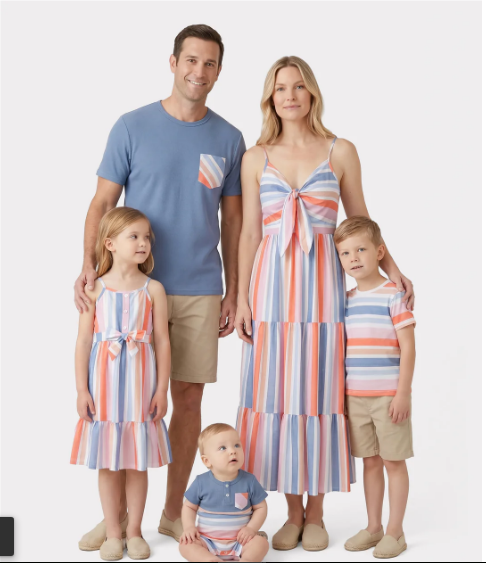
PatPat currently lists the featured product as Matching Family ColoredStripe Outfits in Multi-color. The US page displays options for Women, Girl, Baby, Boy, and Men. It lists a composition of 94% polyester and 6% spandex, with cold hand or machine washing, low tumble drying or air-drying, and no bleach. The page currently marks the item out of stock, so availability and other dynamic details need to be checked again close to publication or purchase.
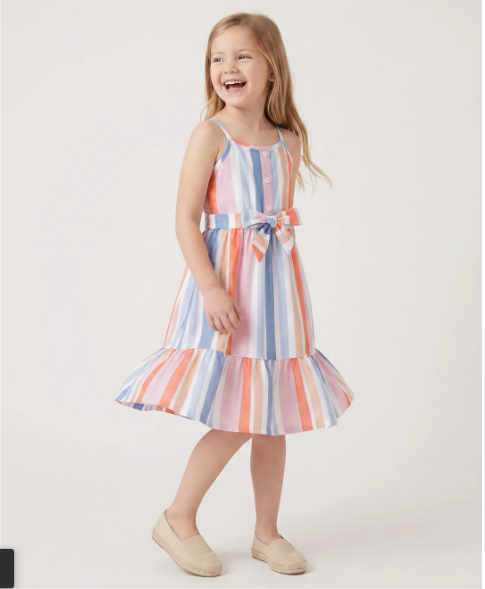
The design connects the family through color rather than one identical garment. The page presents a colorful striped camisole-dress direction alongside blue short-sleeve tee options, allowing different wearers to share the same visual story through different shapes.
The shopping process still requires individual attention. Choose the wearer, open the relevant size chart, select the exact option, and confirm what appears in the cart. The family photo presents the finished idea, but the selectors and cart build the actual order.
“They Usually Wear This Size” Is No Longer Enough
Digital size charts are helpful only when the measurements beside them are current. Familiar labels such as S, M, 3–4Y, or 9–10Y may guide navigation, but the same label can represent different measurements or fits across styles.
A dated note on a phone can save time. Record the measurements that matter for the garment, such as chest, waist, height, or dress length, and update children’s figures before a time-sensitive order. Comparing the chart with a similar item that fits well can provide another useful reference.
The final choice should be supported by the exact product chart, not by age alone. Parents also need to consider the planned activity and any layer worn underneath. The right size for a standing photo still has to work when someone sits, walks, reaches, or carries a younger child.
The Cart Can Catch What the Eye Missed
Matching colors can make different cart lines look deceptively similar. Before payment, each item should be matched to a named wearer. Check the family-member category, size, garment type, color, and quantity, then confirm that no required person is missing and no option was added twice.
When parents compare matching outfits for family photos, celebrations, or trips, the cart becomes the place where the attractive idea meets the practical order. It should show the intended household lineup, not merely several products from the same design.
A quick final sequence can prevent common mistakes:
- Match every line to one wearer.
- Reopen the product-specific size chart when anything is uncertain.
- Confirm that each family member’s item was added separately.
- Review current stock, delivery details, and return eligibility.
- Remove accidental duplicates before checkout.
Repeat Wear Makes the Matching Moment More Valuable
A coordinated outfit offers better shopping value when the pieces work after the group event. The striped dress should be able to pair with a cardigan or simple shoes, while a blue tee should return to casual weekend wear.
Imagine one separate outfit for every item in the cart. When that feels difficult, the design may depend too heavily on the group photo. When each piece already has a place in someone’s wardrobe, the purchase becomes easier to justify.
Delivery Day Should Not Be the First Dress Rehearsal
An event deadline changes the shopping plan. Parents need time not only for delivery but also for checking fit, movement, and whether each wearer is comfortable with the final look. A last-minute arrival leaves little room to solve a missing size or a child’s change of mind.
Because stock, shipping estimates, and return eligibility can change, review the current information near checkout instead of relying on details saved earlier. For the featured PatPat style, recheck the exact product page, wearer options, measurements, composition, care instructions, inventory, cart contents, and applicable policies before ordering.
FAQs
What if one required size is unavailable?
Return to the shortlist and choose a design that covers the people who need outfits. Buying an unsuitable size simply to preserve the print can create a bigger problem on the event day.
How much choice should children have?
Offer two or three suitable options rather than the full catalog. Children can influence color or style while an adult handles measurements, product details, and the final cart.
Does everyone need the same amount of print?
No. One person can wear the strongest stripe while another repeats a blue tone in a simpler garment. Coordination depends on a clear visual link, not complete duplication.
Which details should be checked again on purchase day?
Confirm the current product name, family-member options, size chart, composition, care instructions, stock, quantities, delivery information, and return eligibility.
The Real Upgrade Is Fewer Shopping Mistakes
Smart online shopping does not remove parents from the decision. It gives them a better view of the moving parts. Filters reduce overload, shared links make preferences visible, mobile notes support sizing, and the cart exposes gaps before payment.
The result is a calmer way to coordinate several people at once. Technology handles organization; parents decide whether the clothes suit the wearers, occasion, and budget. When those roles stay clear, matching the family becomes less about endless scrolling and more about making a small number of well-supported choices.