1. Why AI 3D Generation Needs Printing-First Workflow
AI has made 3D creation faster than ever. A simple image or idea can now become a detailed 3D model within seconds. However, creating a model is only the beginning of the journey.
For many makers, the biggest challenge comes when a digital model enters the printing workflow. A model may be too large for a printer’s build volume, complex structures may require time-consuming manual cutting, and multi-color designs often need additional preparation before they can become physical objects.
The gap between ai 3d model generator and real-world printing remains one of the biggest challenges in modern 3D creation.
Hi3D 3.0 is designed to bridge this gap. With the upcoming release, Hi3D evolves from an AI 3D model generator into a more complete creation workflow, helping creators prepare, optimize, and transform digital models into printable objects.
2. Split-to-Print: Making Complex Models Printable
2.1 Intelligent Model Segmentation for Real-World Printing
Large or complex models often need to be divided before printing. Traditionally, creators had to manually cut models and adjust separate parts in professional 3D software.
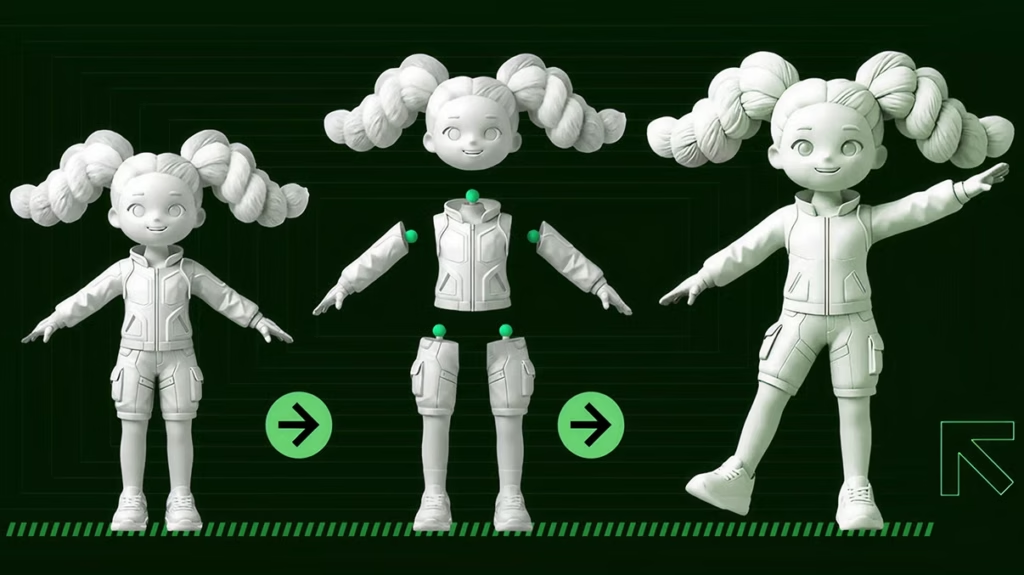
Hi3D 3.0 simplifies this process through Split-to-Print, helping creators divide models into suitable printable sections while maintaining the original design quality.
The feature is designed for different types of projects, including detailed character models and more practical structural designs.
2.2 Character Mode: Preserving Character Details
Character Mode is created for character-based models such as collectible figures, artistic designs, and detailed models.
It focuses on maintaining the visual identity of the original design while creating suitable separation areas for printing and assembly. This helps creators prepare complex character models without spending excessive time on manual adjustments.
2.3 General Mode: Flexible Solutions for Different Models
General Mode provides a more flexible workflow for a wider variety of 3D projects.
Whether working with props, structural designs, or larger creative models, creators can prepare complex objects for printing while keeping the overall structure and design intent.
3. Automatic Connector Generation: Simplifying Assembly
3.1 From Separate Parts to Complete Models
Splitting a model is only the first step. After printing multiple parts, creators still need to assemble them accurately.
Hi3D 3.0 helps solve this challenge by generating connection structures between separated components, making the assembly process easier and more organized.
3.2 Flexible Connection Options for Different Designs
For models that require movement, ball joints provide flexible connections between parts and support more dynamic designs.
For models that require stable positioning, structured connections such as dovetail and mortise-style joints help improve alignment between components.
For simpler movable structures, rivet-style connectors provide another practical assembly option.
With automatic connector generation, Hi3D 3.0 helps creators move from separated components to complete physical models more efficiently.
4. Color-to-Print: Bringing Digital Colors Into Physical Reality
4.1 Simplifying Multi-Color Printing Preparation
Multi-color printing allows creators to produce more detailed and visually impressive models, but preparing color information for physical printing can be complicated.
Digital designs often contain complex colors and textures that require additional adjustments before printing.
Hi3D 3.0’s Color-to-Print workflow helps prepare colorful models for multi-color printing by making digital color information more suitable for real-world production.
4.2 Smarter Color Processing and Preview
Hi3D 3.0 helps creators manage color details during the preparation process, making it easier to create consistent multi-color results.
Before printing, creators can preview the expected appearance of their models and make adjustments earlier, creating a smoother workflow from digital design to physical output.
5. Smart Build Plate Layout: Optimizing Printing Preparation
5.1 Better Placement Before Production
The way a model is positioned on the build plate can influence the printing process and final appearance.
Hi3D 3.0 provides smarter layout options to help creators prepare models more efficiently before printing.
For designs where appearance matters most, Surface Priority focuses on arranging models with visual presentation in mind.
For projects that prioritize printing efficiency, Less Support helps creators explore better orientations and reduce unnecessary preparation work.
With smarter layout preparation, creators can spend less time adjusting models and focus more on creating.
6. Native 3MF Export: Connecting Creation With Printing
6.1 A Smoother Workflow From AI Model to Slicer
After model preparation is complete, Hi3D 3.0 supports 3MF export to maintain important model information during the transition to printing.
Compared with traditional STL files, 3MF provides a more complete format for storing model-related data, helping creators move from AI creation into slicing workflows more smoothly.
This creates a more connected process from generating a model to preparing the final print.
7. Maker Templates: A Simpler Way to Start Creating
7.1 Turning Everyday Ideas Into 3D Creations
3D creation is no longer limited to experienced designers.
With Maker Templates, creators can start from simple ideas and explore different styles more easily. By combining AI generation with printing preparation features, Hi3D 3.0 helps users transform concepts into personalized physical creations.
Whether creating character designs, decorative objects, or meaningful personal projects, Maker Templates provide an easier entry point into AI-powered 3D creation.
8. Hi3D First Anniversary: A New Chapter of AI-Powered Creation
Celebrating One Year of Innovation With Creators
As Hi3D celebrates its first anniversary, we want to thank every creator and maker who has explored new possibilities with AI-powered 3D creation.
The launch of Hi3D 3.0 represents a new step toward making the complete journey from idea to physical object more accessible.
To celebrate this milestone, Hi3D is launching anniversary promotions and inviting creators to experience a smarter way to bring imagination into reality.
9. Start Creating With Hi3D 3.0
From character models to large creative projects, Hi3D 3.0 helps creators move beyond digital ideas and explore real-world possibilities.
By combining AI generation with printing-focused preparation tools, Hi3D creates a smoother path from imagination to physical creation.
Your next idea can become something real with Hi3D 3.0.