
From Campaign Goal to Shot Plan: A Practical AI Marketing Video Brief

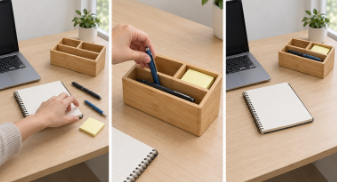
Before generating an AI marketing video, write down what the viewer should understand and do. Then specify what each shot must show to support that decision. This gives the team a shared basis for choosing footage and requesting revisions.
The hypothetical desk-organizer example below connects an audience problem to visible evidence, a viewer action, and delivery requirements. It is a planning exercise.
Define the audience through a recognizable situation
“Remote workers” is too broad to guide a scene. “People who lose small work items on a crowded desk” suggests a specific environment and problem. A creator can show loose pens, misplaced notes, and a hand searching for an item.
Use this sentence to narrow the brief: For [audience] facing [specific problem], show [observable benefit] so they can [next action]. Avoid adding benefits that approved product information cannot support.
Choose an action the video can support
For the organizer example, the intended action is visiting a product page to inspect the layout and dimensions. The video therefore needs to explain how items fit into the organizer and what remains accessible afterward.
Write the call to action before planning the ending. “Explore the organizer” fits this brief. A purchase message would require a different decision about the offer and the information viewers need. Do not add a discount or a product claim simply to make the ending more persuasive.
Translate the goal into shot responsibilities
Give each shot a question to answer. An opening might establish the search problem. A demonstration can show items entering the correct compartments. A final view can show the organized desk alongside a clear next step.
To move from this brief into asset preparation, Astorie’s marketing video production guide shows how audience and campaign choices become reusable references and a timed sequence. Use it after defining what each shot must communicate.
For the hypothetical organizer, a simple sequence could be:
| Shot | What the viewer sees | Question it answers |
|---|---|---|
| Problem | A hand searches among scattered desk items. | Why would I need this? |
| Demonstration | Those items move into the organizer’s approved compartments. | How would I use it? |
| Closing | The same desk, with items accessible and an added CTA. | What should I do next? |
One proposed 9-second cut: 0-2 seconds, a medium-wide search shot; 2-6 seconds, a close-up of a hand placing a pen in the front compartment; 6-9 seconds, the organized desk with “Explore the organizer” added in editing. These timings are planning choices, not tested footage.
Concept storyboard: desk setup, product use, and organized workspace. Generated in Astorie with GPT Image 2.5 Flare.
The generated closing frame shows the organizer but has no CTA, so the brief must reserve that addition for editing. The opening hand gesture also needs clarification before it can communicate a search problem.
Fill in a brief before writing prompts
Copy this template into the project document. Replace every bracketed field before production. Link to approved references rather than asking the creator to guess which product image or logo is current.
| Brief field | Fill in before production |
|---|---|
| Audience and situation | [Who is watching, and what problem will they recognize?] |
| Viewer action | [One next step, destination, and exact CTA] |
| Visible evidence | [What the video must show to support the message] |
| Shot responsibilities | [Shot ID, viewer takeaway, action, camera, and duration] |
| Approved references | [Product views, logo, scene, and permitted assets] |
| Protected details | [Shape, color, compartments, labels, and layout] |
| Delivery requirements | [Placement, aspect ratio, resolution, length, text, and audio] |
| Approval and rejection | [Reviewer, deadline, and specific reasons to return footage] |
For this concept, the audience is remote workers with crowded desks. The action is visiting the product page. Show items entering the organizer, preserve its bamboo finish and three compartments, and add “Explore the organizer” during editing. Plan a silent 16:9 ad and approve its storyboard before generation. The campaign owner should reject changed compartments or a closing view that hides the product.
Make the delivery requirements reviewable
Choose the placement before approving framing. Record where the product, captions, and CTA must remain visible. If the campaign needs several formats, check each composition rather than assuming a crop will preserve the demonstration.
For this example, reject footage if the compartment arrangement changes, objects disappear between shots, or the closing view hides the product. Assign a reviewer to check those details against the approved references. Plan to add exact branding and CTA text during editing when generation cannot reproduce them accurately.
After launch, assess the intended product-page visits separately from production approval. A clear, accurate video has met the brief; its ability to attract useful traffic still needs campaign evidence. Keep that distinction in the brief so a visually successful render is not mistaken for a proven marketing result.





Comment