If you’ve been building a home gym piece by piece, you probably started with the basics. A pair of dumbbells. Maybe a bench. Resistance bands hanging from a door handle that swore it could handle “heavy tension” (it lied). At some point, though, you hit a wall. Literally and figuratively. You want more variety, smoother resistance, and something that actually feels like gym-quality training without turning your spare room into a commercial fitness center.
That’s usually when the idea of a cable machine home gym starts to sound very appealing.
I used to think cable machines were overkill for home workouts. Something meant for big gyms with mirrors everywhere and people doing questionable tricep kickbacks. Turns out, I was very wrong.
What Makes Cable Machines Different from Free Weights
Free weights are great. They always will be. But they have limitations, especially at home. Gravity only pulls in one direction, which means the resistance curve isn’t always ideal. With cables, resistance stays consistent through the entire movement. That alone changes how exercises feel.
When you’re doing a chest fly or a lat pulldown on a cable machine, there’s no “dead zone.” The tension doesn’t disappear at the top or bottom. Your muscles stay engaged the whole time, and you notice it fast. Sometimes uncomfortably fast.
For a home gym setup, that’s a big deal. You get more out of lighter weight, which means you don’t need stacks of plates cluttering the room or worrying about floor damage.
The Space Myth: “Cable Machines Are Too Big”
This is the biggest misconception I hear. People imagine massive dual-stack towers that belong in a commercial gym, not next to a bookshelf. In reality, modern cable machine home gym setups come in all shapes and sizes.
There are wall-mounted cable systems that barely stick out. Compact functional trainers that fit into a corner. Even all-in-one power rack combos that integrate a cable pulley system without adding much extra footprint.
If you can fit a squat rack or a treadmill, you can almost certainly fit a cable machine. And honestly, I’ve found cable machines to be more space-efficient than trying to store dozens of dumbbells or specialty bars.
Why Cables Shine for Home Workouts
One thing that surprised me was how often I started choosing cables over everything else. Not because they were fancy, but because they were convenient.
You can switch exercises in seconds. No plate loading. No awkward setup. One minute you’re doing face pulls, the next you’re hitting biceps curls from a low pulley, then straight into triceps pushdowns. That kind of flow makes workouts smoother and, frankly, more enjoyable.
Consistency matters more than perfect programming. If a cable machine makes you more likely to train, it’s already doing its job.
A Full-Body Workout Without Constant Adjustments
A well-designed cable machine home gym can handle pretty much everything. Chest presses. Rows. Pulldowns. Squats with belt attachments. Core work that actually challenges you instead of feeling like an afterthought.
What I love most is how joint-friendly cables are. On days when shoulders or elbows feel a bit cranky, cables let you adjust angles naturally. You’re not locked into a fixed bar path or forced grip. Your body finds what feels right.
That alone makes cable machines worth considering, especially if you train regularly and want something sustainable long term.
Beginners and Advanced Lifters Both Win
Cable machines have this rare ability to work for almost everyone. Beginners feel safer because movements are controlled and predictable. There’s less fear of dropping weight or losing balance. Advanced lifters, on the other hand, appreciate the isolation, tempo control, and constant tension.
For hypertrophy training, cables are gold. Slow reps, long eccentrics, partials, drop sets—it all works beautifully. And because the resistance stays smooth, you can push muscles hard without beating up your joints.
That balance is hard to find in a home gym setup.
The Cost Question (Because It Matters)
Let’s be honest. Cable machines aren’t the cheapest piece of equipment you’ll buy. But they’re often better value than they seem.
Instead of buying separate machines for chest, back, arms, and functional training, one cable system can replace all of them. When you think in terms of cost per exercise, a cable machine home gym setup starts to make a lot of sense.
Plus, good cable machines last. There’s not much to break if you buy quality. Pulleys, cables, weight stacks or plates—it’s all pretty straightforward engineering.
Real-Life Training Feels More Natural on Cables
One thing that doesn’t get talked about enough is how “real” cable movements feel. Sports, daily activities, even carrying groceries involve resistance at angles, not straight up and down.
Cables allow rotation. Diagonal pulls. Unilateral work that exposes imbalances you didn’t know you had. The first time I tried single-arm rows on cables, I realized one side had been quietly slacking for years.
That awareness alone can make your training smarter, not just harder.
Is a Cable Machine Worth It for a Home Gym?
If you train occasionally, stick to simple routines, and love the raw feel of barbells, you might not need one. But if you train consistently, want variety, and care about longevity, a cable machine is hard to beat.
For me, adding a cable machine home gym setup was the moment my workouts stopped feeling like “home workouts” and started feeling like real training again. Less compromise. More options. Better flow.
And maybe most importantly, it made working out at home something I actually looked forward to instead of something I tolerated.
Real Gear That Makes a Cable Machine Home Gym Feel Complete
If you’re considering taking your home workouts to the next level, it’s one thing to talk about how much versatility and smooth resistance a cable machine home gym brings — and another to actually pick the gear that’ll make it happen.
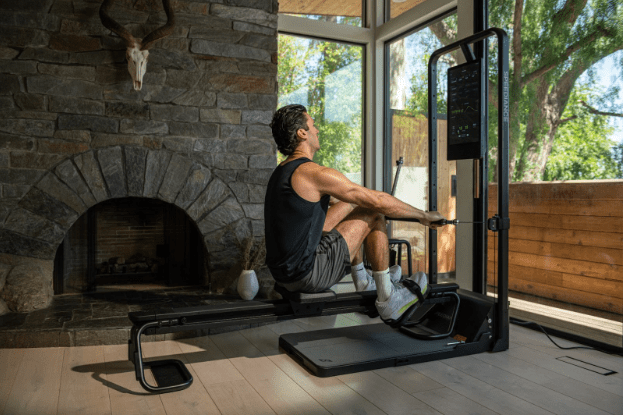
One standout option I keep hearing about from home gym owners and testers alike is the Speediance Gym Monster 2. It isn’t just a cable machine — think of it more like a full‑feature, all‑in‑one smart home gym that gives you cable training plus so much more.
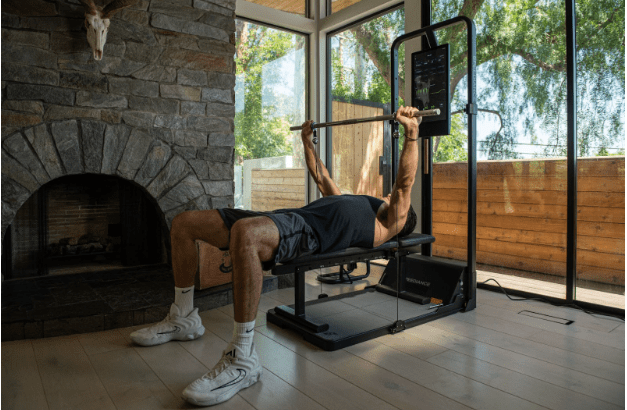
What’s especially cool about this setup is that it combines a cable pulley system with digital resistance that goes up to around 220 lbs (100 kg), keeps your workouts fluid and smooth, and lets you adjust resistance in tiny increments — so you can fine‑tune for strength, hypertrophy, or endurance.
It’s got a big touchscreen with guided workouts and even some smart features like eccentric modes and customizable exercise libraries. You can do rows, presses, cable crossovers, squats, and a bunch of functional moves without needing a ton of extra add‑ons.
Now, I won’t sugarcoat it — this kind of gear isn’t cheap. It’s a premium investment, and you’ll definitely want to make sure it fits your training goals (and your space). But for people who want one piece that handles everything from cable work to full‑body strength training, it’s become a go‑to pick for serious home gym builders.
Most owners say the compact footprint is a huge plus — you’re not dedicating your entire basement to a cable tower, treadmill, and dumbbell rack all at once. And yes, like any machine, it can have some quirks (software updates, minor tension issues, setup challenges — user‑to‑user experiences vary), but for many it’s still a game‑changer.
If you decide to go that direction, consider how it will slot into your space and routine. Pairing a Speediance Gym Monster 2 with a decent flooring mat and a bit of open area for lunges or kettlebell swings can give you a complete, gym‑level setup right at home.
Final Thoughts
Home gyms aren’t about copying commercial gyms. They’re about building something that fits your life, your space, and your training style. A cable machine does exactly that. It adapts. It grows with you. It doesn’t demand perfection.
If you’re on the fence, chances are you already know the answer. You’re just waiting for permission to upgrade.