
Best Scanners for Mac Users (2026 Edition)

If you use a Mac and you have been putting off buying a scanner because you were not sure which ones actually work well with macOS, this guide is for you. Not every scanner is created equal when it comes to Apple compatibility. Some require clunky workarounds, some have software that barely functions on macOS, and some work so smoothly with your Mac that you will wonder how you managed without one.
This guide covers the six best scanners for Mac users in 2026, ranging from budget-friendly flatbeds to professional-grade book digitizers. Each one has been selected for a specific use case so you can find the right fit for your actual needs.
What Should You Focus on When Choosing a Mac Scanner?
- macOS Compatibility (Software Support)
First, make sure the scanner truly works well with macOS, not just “barely works.” It’s best to choose models that offer native Mac software, meaning no extra drivers or complicated setup are required. Also, check the official system requirements to ensure support for current macOS versions, not just older ones, to avoid compatibility issues later on. - Scanning Volume (Usage Needs)
Choose the type of scanner based on how often you plan to use it:
- Light use (a few documents per month): a flatbed scanner is sufficient
- Medium to heavy use (home office or large-scale digitization): A scanner with an Auto Document Feeder (ADF) is recommended for better efficiency
- Resolution (Image Quality Needs)
Resolution affects scan clarity, but higher is not always better:
- Standard documents: 300–600 DPI is more than enough
- Photos or detailed images: higher resolution helps preserve more detail
- OCR (Optical Character Recognition)
If you need to convert scanned documents into editable or searchable files, choose a scanner with OCR technology. Good OCR performance allows you to turn scanned text into editable Word or Excel files and create searchable PDFs. For best results, look for scanners that support multiple languages and maintain high accuracy even with complex layouts.
Breaking it down this way makes it easier to choose the right scanner for your needs.
Best Overall: Epson WorkForce ES-580W
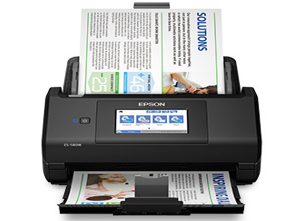
Image source from: Epson
If you want one scanner that does everything well without making you think too hard, the ES-580W is the one to get. It is wireless, fast, and handles the kinds of tasks most Mac users actually encounter day to day.
Main Features
The ES-580W scans at up to 35 pages per minute at 300 DPI and features a 100-sheet Auto Document Feeder that handles various paper types and sizes. Amazon It comes with a large 4.3-inch touchscreen that lets you control scanning directly from the device without touching your Mac at all. You can scan directly to USB, email, or popular cloud services like Dropbox, Google Drive, and OneDrive without a computer. Amazon OCR is built in, so creating searchable PDFs or converting documents to editable Word and Excel files is straightforward.
Pros
- Wireless design eliminates desk cable clutter.
- 100-sheet ADF enables fast batch scanning.
- Ultrasonic double-feed detection and paper protection prevent missed pages and staple damage.
- Standalone scanning works without a computer — handy when your Mac is busy.
Cons
- Bulkier than rivals in this price range, taking up significant desk space.
- More expensive than basic scanners; may be overkill for light scanning needs.
Advantages for macOS
The ES-580W wirelessly scans to cloud storage accounts and works with Epson ScanSmart Software installed on your Mac. Epson The ScanSmart app on macOS is clean, responsive, and requires no special configuration. The included TWAIN driver ensures it works with virtually any document management software you might already be using on your Mac.
Best for Office Productivity: Epson WorkForce ES-400 II
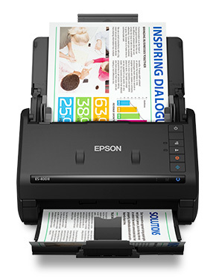
Image source from: Epson
For anyone running a home office or small business on a Mac, the ES-400 II hits the sweet spot of speed, reliability, and sensible pricing.
Main Features
The ES-400 II duplex document scanner speeds through scans at up to 35 ppm and 70 ipm, capturing both sides of each sheet in one pass with a 50-sheet Auto Document Feeder that accommodates documents of varying sizes. It creates searchable PDFs, converts scans to editable Word and Excel files, and includes Epson’s automatic image processing tools like auto crop, blank page skip, and background removal.
The setup can be slightly less intuitive than expected.
Pros
- Produces deep blacks, sharp clarity, and crisp edges when scanning black and white text and standard documents.
- Compact enough to fit on a crowded desk, with a document tray that folds up neatly when not in use.
- Offers a strong balance of speed and value for high-volume document work.
Cons
- Photo scanning is a weak point, with oversaturated colors and diminished brightness that do not accurately reflect the original.
- Lacks wireless connectivity, requiring a permanent USB connection to your Mac.
- Initial software setup on Mac can be slightly less intuitive than expected.
Advantages for macOS
The ES-400 II is fully compatible with macOS and uses the same Epson ScanSmart software that Mac users are familiar with. The intuitive software lets you easily preview, email, and upload scans directly from your Mac. Epson For office workflows on a Mac, it integrates cleanly with cloud storage and most document management tools through its TWAIN driver.
Main Features
The ES-400 II duplex document scanner delivers scan speeds of up to 35 ppm (typically 30 ppm at 300 dpi) and 70 ipm, capturing both sides of each sheet in a single pass. It features a 50-sheet Auto Document Feeder (ADF) that supports documents of various sizes. The scanner can create searchable PDFs and convert files into editable Word and Excel formats using OCR. Epson’s image processing tools include automatic cropping, blank page removal, and background cleanup to improve scan quality.
Design and Performance
- Produces clear, sharp text, making it suitable for office documents, invoices, and records
- Compact design that fits easily on most desks
- The foldable input tray helps save space when not in use
- Combines fast scan speeds with automatic document feeding
- Suitable for moderate to high-volume document scanning tasks
Limitations
- Uses CIS technology, which is not ideal for high-quality photo scanning
- Color accuracy and dynamic range are more limited compared to flatbed scanners
- Does not support wireless connectivity
- Requires a USB connection for operation
macOS Compatibility
The ES-400 II is compatible with macOS and works with Epson ScanSmart software, which allows users to preview, organize, and share scans. It also supports integration with various applications and cloud services through TWAIN drivers, making it suitable for standard Mac-based office workflows.
Best Portable Scanner for Mac: Epson WorkForce ES-60W
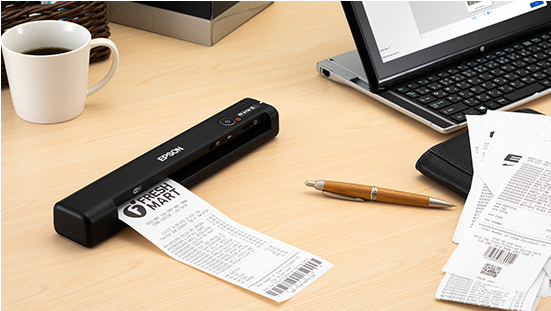
Image source from: Epson
If you work from multiple locations or simply do not want a scanner sitting permanently on your desk, the ES-60W solves that problem better than any other option in this category.
Main Features
The ES-60W is the fastest, smallest, and lightest wireless mobile single-sheet-fed scanner in its class, capable of scanning a single page in as fast as 4 seconds. Epson It runs on USB power or a built-in rechargeable battery, and it automatically detects its mode without any manual switching. It includes Nuance OCR to create searchable PDFs and editable Word and Excel files, plus Epson ScanSmart Software to easily scan, review, and save. Epson.
Pros:
- Highly accurate optical character recognition (OCR)
- Compact and lightweight (under 300 grams), easy to carry in a laptop bag
- Supports wireless and battery-powered operation, allowing scanning without a power outlet
- Challenges the traditional idea that scanners need to be desktop devices
Cons:
- Only supports single-sheet scanning, not suitable for large batch jobs
- No Auto Document Feeder (ADF)
- Scan speed slows noticeably at higher resolutions
- Some Mac users report that the initial software setup is more complicated than on Windows
Advantages for macOS
The ES-60W software fully supports Mac, iOS, and Android devices. TechGearLab It works wirelessly with your Mac through ScanSmart and can also send scans directly to cloud storage. Users have confirmed it is compatible with the latest macOS versions, including macOS 15 Sequoia. B&H Photo Video For Mac users who move between home, office, and travel, this is an unmatched combination of portability and compatibility.
Best Budget Mac Scanner: Epson Perfection V19 II
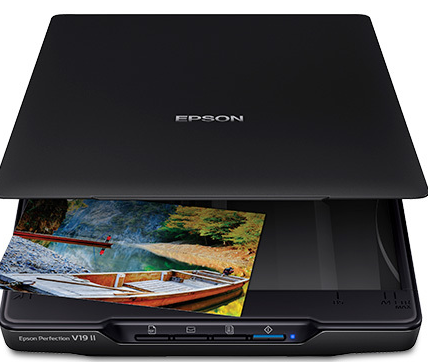
Image source from: Epson
Not everyone needs wireless connectivity or a document feeder. If you want a no-fuss, affordable flatbed that works reliably with your Mac, the Perfection V19 II delivers more than its price tag suggests.
Main Features
The V19 II offers an optical resolution of 4800 DPI, delivering impressive clarity and detail at a great value. It includes one-touch scanning with easy-to-use buttons so you can scan directly to PDF or email with just a tap. It scans a letter-sized page in about 10 seconds and includes OCR for searchable PDFs and editable file conversion. The scanner is USB-powered, so there is no separate power adapter to deal with.
Pros
- Features a built-in kickstand for space-saving vertical placement and a high-rise, removable lid to accommodate bulky items such as books and photo albums.
- 4800 DPI resolution makes it genuinely capable for photo scanning, artwork, and anything requiring great detail.
- Lightweight, compact, and easy enough for any family member to use without instructions.
Cons
- Scans only one page at a time with no document feeder, making it slow for high-volume work.
- Mac users with newer MacBook Pro models using USB-C ports may need to purchase a separate USB adapter cable, as the included cable is a standard USB-A connection.
- Has no wireless capability.
Advantages for macOS
The V19 II supports macOS Best Buy and works with Epson ScanSmart software on Mac for OCR, cloud uploads, and file management. Its USB-powered design means setup on a Mac is as simple as plugging in a cable and downloading the driver. For students and home users on a Mac who scan occasionally and want quality without spending a lot, this is the most sensible starting point.
Best for Photos and High-Quality Scans: Epson FastFoto FF-680W
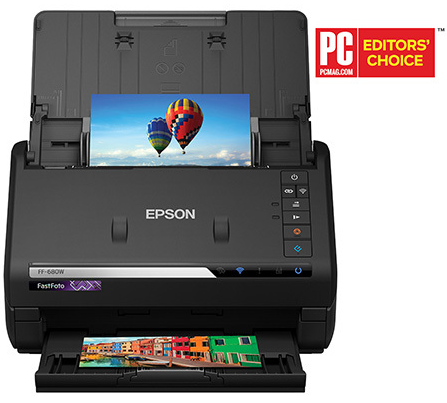
Image source from: Epson
If you have boxes of printed photos from the pre-smartphone era and you want to digitize them without spending weeks doing it manually, the FastFoto FF-680W was built for exactly that job.
Main Features
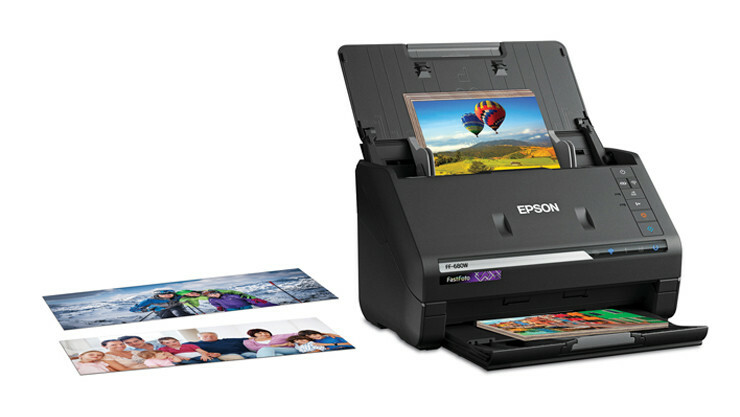
The FF-680W is a dedicated photo scanning system that processes prints automatically through its feeder. It offers blazing-fast scanning capable of getting through dozens of photos in minutes, captures handwritten notes on the back of photos through dual-sided scanning, and delivers sharp, accurate, vibrant image quality. Best Buy It also handles standard documents up to A4 size when needed. The dedicated FastFoto software automatically organizes, date-stamps, and backs up scanned images to cloud storage.
Pros
- Scanning speed for photos is genuinely impressive, saving an enormous amount of time compared to a traditional flatbed scanner.
- Auto-enhancement features are useful without being overly aggressive, and the scanner handles older or fragile prints gently without causing damage.
- Software is purpose-built for photo archiving, making organization much easier than managing thousands of JPEG files manually.
Cons
- Not well-suited for very thick or damaged photos, which may still need to be scanned individually using a flatbed.
- Some users have reported occasional connectivity issues with the wireless feature.
- High price makes it harder to justify if you only have a small collection of photos to digitize.
- Most people without a large recurring need for photo scanning may find the investment difficult to recommend.
Advantages for macOS
The FF-680W works with Mac through its dedicated FastFoto software and Epson ScanSmart. Wireless connectivity allows Mac users to scan to their computer without a cable. The cloud backup integration works well with services that Mac users already rely on, and the overall setup experience on macOS is smooth and straightforward.
Best Document Scanner for Mac: CZUR ET Max
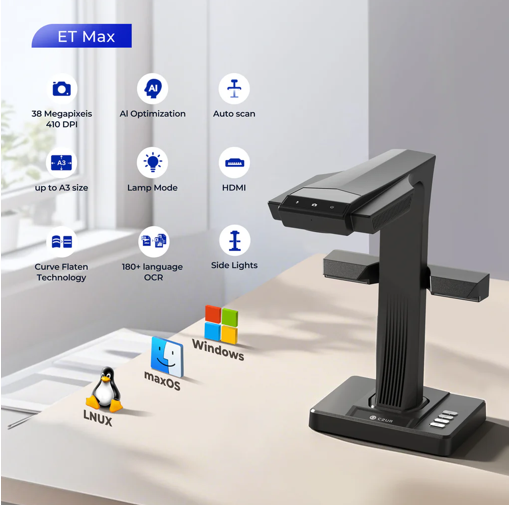
Image from: CZUR
For professionals, researchers, students, and anyone who regularly scans bound books, the CZUR ET Max is a more suitable choice compared to the other options on this list. It is designed specifically to handle the unique challenges of scanning bound materials.
Main Features
The CZUR ET Max is equipped with a 38MP CMOS sensor providing a resolution of 7168 by 5376 pixels at 410 DPI for clear and detailed image capture. Manuals+ Its patented Laser Curve-Flatten Technology automatically detects and corrects the curved pages of bound books so you never need to press or flatten pages by hand. It scans a page in just 1.5 seconds and supports over 180 languages through its built-in OCR, converting scans to editable Word, Excel, and searchable PDF formats. Walmart. It also features an HDMI output port for connecting directly to a monitor or projector, which is useful for presentations and live demonstrations.
Pros
- Overhead design allows scanning without unbinding or damaging originals
- 38MP resolution delivers finer detail than standard flatbed scanners
- Foot pedal and hand button enable hands-free operation, improving efficiency for book scanning
- Automatic orientation correction makes flat document scanning simple and reliable
Cons
- Not suitable for glossy materials due to reflections affecting the quality
- Requires a USB connection to a computer; no onboard storage
- Relatively expensive
- OCR does not support handwritten text; accuracy may drop with unusual fonts
Advantages for macOS
The CZUR ET Max supports macOS 10.13 or later, covering all modern Macs, including Apple Silicon models. The dedicated CZUR scanning software runs natively on Mac and includes all core features: auto curve correction, OCR, page splitting, finger removal, and multiple export formats. For Mac users who deal with physical books, academic texts, legal documents, or archival materials, the ET Max offers a level of capability that no traditional flatbed scanner can come close to matching.
Buying Guide: Which Scanner Is Right for You?
With six strong options on the table, the right choice really comes down to what you plan to scan and how often.
| Use Case / User Type | Recommended Model | Why It Fits |
| All-around users (receipts, contracts, cloud uploads) | ES-580W | Most versatile option with a smooth, hassle-free experience |
| Mac office users (high-volume document scanning) | ES-400 II | Fast speeds and duplex scanning at a more focused price point |
| Mobile users / frequent travelers | ES-60W | Compact and portable with reliable scan quality |
| Students/budget users | V19 II | Affordable with solid basic performance |
| Photo digitization (film-era photos) | FastFoto FF-680W | Designed for photos with unmatched speed and optimized workflow |
| Books/research / legal document users | CZUR ET Max | Better suited for bound materials and professional scanning needs |







Comment