
Best Budget Gaming Monitors in Qatar for Smooth Gameplay

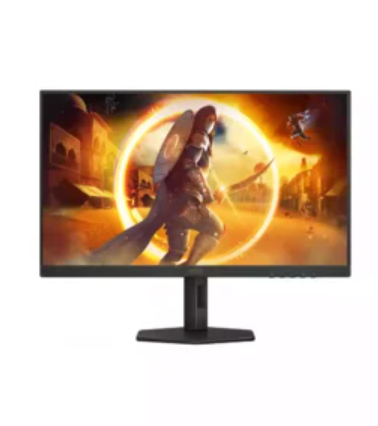
A quality gaming monitor can improve your gaming experience without requiring a premium budget. While many gamers focus on graphics cards and processors, the monitor plays an equally important role in delivering smooth visuals, faster response times, and better overall performance. Fortunately, there are several budget-friendly gaming monitors available in Qatar that offer excellent value for casual and competitive gamers alike.
Whether you enjoy FPS titles, racing games, RPGs, or esports, choosing the right monitor can make gameplay more responsive while reducing motion blur and screen tearing. The good news is that you don’t have to spend thousands of riyals to enjoy these benefits.
Why a Gaming Monitor Matters
Standard office monitors are designed for everyday tasks like browsing the internet, watching videos, and working with documents. Gaming monitors, however, are built to deliver smoother motion and lower input lag.
Several features separate gaming monitors from regular displays:
- Higher refresh rates for smoother gameplay
- Faster response times to reduce ghosting
- Adaptive sync technologies that minimize screen tearing
- Better color accuracy for immersive visuals
- Low input lag for competitive gaming
Even an affordable gaming monitor can provide noticeable improvements compared to a traditional display.
Features to Look for in a Budget Gaming Monitor
Choosing a budget monitor doesn’t mean compromising on essential gaming features. Instead, focus on specifications that deliver the biggest performance improvements.
Refresh Rate
Refresh rate determines how many times the screen updates each second.
- 60Hz is suitable for general use.
- 75Hz offers a smoother experience for casual gaming.
- 120Hz to 180Hz provides significantly smoother gameplay for fast-paced games.
For most gamers, a 144Hz monitor offers an excellent balance between performance and affordability.
Response Time
Response time measures how quickly pixels change color.
A monitor with a 1ms or 2ms response time helps reduce motion blur during intense gameplay, making it easier to track moving targets.
Resolution
Budget gaming monitors generally come in:
- Full HD (1920 × 1080)
- Quad HD (2560 × 1440)
Full HD remains the best value because it delivers excellent image quality while placing less demand on your graphics card.
Panel Type
Each panel technology offers different advantages.
IPS Panels
- Better colors
- Wider viewing angles
- Great for gaming and entertainment
VA Panels
- Higher contrast
- Deeper blacks
- Excellent for immersive games
TN Panels
- Fastest response times
- Lower cost
- Slightly weaker color reproduction
Many affordable gaming monitors now use IPS panels, making them an excellent choice for most users.
Popular Budget Gaming Monitor Brands
Several manufacturers consistently offer reliable gaming monitors at competitive prices.
ASUS
ASUS produces gaming monitors that combine high refresh rates, good build quality, and dependable performance.
MSI
MSI focuses on esports-friendly monitors with fast response times and attractive pricing.
Acer
Acer’s gaming displays often include AMD FreeSync support while remaining affordable for entry-level gamers.
LG
LG offers IPS gaming monitors with vibrant colors, making them suitable for both gaming and multimedia use.
Samsung
Samsung provides curved gaming monitors that deliver an immersive viewing experience without a premium price tag.
Choosing the Right Screen Size
Screen size affects both immersion and desk space.
24-inch
Ideal for competitive gaming and smaller desks.
27-inch
A great balance between immersion and affordability.
32-inch
Suitable for racing games, RPGs, and console gaming where larger visuals enhance the experience.
Most budget-conscious PC gamers find 24-inch and 27-inch monitors to be the best options.
Adaptive Sync Technology
Screen tearing occurs when the graphics card and monitor refresh at different speeds.
Technologies such as AMD FreeSync and NVIDIA G-SYNC Compatible help synchronize frame rates, resulting in smoother gameplay.
Many affordable gaming monitors now support FreeSync, making it a valuable feature even in entry-level models.
Finding the Best Deals in Qatar
Gaming hardware prices often vary depending on promotions, seasonal sales, and product availability. Comparing specifications instead of focusing solely on price helps buyers choose a monitor that offers long-term value.
If you’re planning to upgrade your setup, exploring a trusted source for a Gaming Monitor in Qatar can help you compare different screen sizes, refresh rates, and gaming-focused features before making a purchase.
Additional Tips Before Buying
Before selecting a gaming monitor, consider your existing hardware.
- Match the monitor refresh rate with your graphics card performance.
- Verify that the monitor includes HDMI or DisplayPort inputs compatible with your PC or console.
- Check whether the monitor supports VESA mounting if you plan to use a monitor arm.
- Look for adjustable stands that improve ergonomics during long gaming sessions.
- Read warranty information before making your purchase.
These factors can improve your overall gaming experience while preventing compatibility issues later.
Final Thoughts
Buying a budget gaming monitor no longer means sacrificing performance. Modern entry-level displays now include features such as high refresh rates, low response times, adaptive sync technology, and excellent image quality at affordable prices.
By focusing on refresh rate, response time, panel type, and resolution, gamers in Qatar can find a monitor that delivers smooth gameplay without exceeding their budget. Taking the time to compare available options ensures you invest in a display that matches both your gaming style and your PC’s capabilities while providing years of reliable performance.





Comment