
AI Face Swap vs Photoshop: Which Is Better?

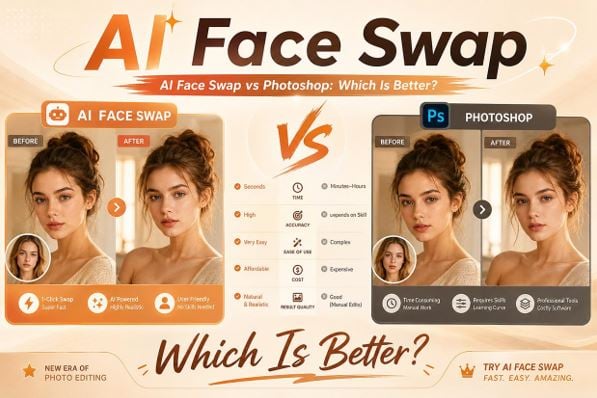
Creating realistic face replacement images has always been a popular idea among photographers, designers, and digital creators. In the past, Photoshop was considered the standard solution for replacing faces because it offered powerful editing tools and complete manual control. However, the rise of AI technology has introduced a new approach. AI Face Swap tools can now automatically analyze facial features, adjust image details, and generate realistic results within minutes. While Photoshop still provides professional-level flexibility, many users are asking whether AI Face Swap can offer a simpler and more efficient alternative. This article compares AI Face Swap and Photoshop to explore their differences, advantages, and how modern solutions like Live3D AI Face Swap help users create high-quality images with less effort.
Why Photoshop Face Swapping Can Be Difficult for Traditional Editing
Photoshop has been one of the most widely used image editing programs for decades. Professional designers and photographers often rely on it because of its extensive features and precise editing capabilities. However, creating a realistic face swap in Photoshop requires experience, patience, and knowledge of multiple editing techniques.
For beginners, the process can quickly become complicated because realistic face replacement involves much more than simply copying and pasting one face onto another.
Manual Face Selection Requires Advanced Editing Skills
One of the first challenges when using Photoshop for face replacement is accurately selecting the face area.
Users need to manually handle tasks such as:
- Creating precise selections
- Removing unwanted areas
- Adjusting edges
- Managing image layers
A small mistake during selection can make the final result look unnatural. For example, rough edges around the face or incorrect positioning can immediately reveal that the image has been edited.
Professional Photoshop users can solve these problems with experience, but beginners often need significant time to learn these techniques.
Matching Lighting and Skin Tones Takes Extra Work
A realistic face swap requires more than placing a new face into an image. The lighting, shadows, and colors of both faces must match.
In Photoshop, users often need to manually adjust:
- Brightness
- Contrast
- Color balance
- Skin tone
- Shadow effects
These adjustments require careful observation and editing knowledge. If the replacement face has different lighting conditions compared with the original image, the result may appear unrealistic.
This process can become especially challenging when working with complex backgrounds or images taken under different lighting environments.
Creating Natural Expressions Requires Detailed Retouching
Facial expressions are another important factor in realistic image editing. A face that does not match the original emotion or pose can make the entire image feel unnatural.
Photoshop users may need to manually adjust:
- Facial position
- Mouth alignment
- Eye direction
- Face proportions
These detailed edits require precision and experience. Even skilled designers may spend a considerable amount of time refining small details to achieve a convincing result.
Why AI Face Swap Is Easier and More Beginner-Friendly Than Photoshop
AI Face Swap Is Easier
AI technology has changed the way people approach image editing. Unlike Photoshop, which requires users to manually control every editing step, AI Face Swap tools can automatically analyze and process facial information.
This makes AI Face Swap a more accessible option for users who want fast and realistic results without professional editing experience.
AI Automatically Detects and Matches Facial Features
One of the biggest advantages of AI Face Swap is automatic facial analysis.
Instead of manually selecting every detail, AI can recognize:
- Face shape
- Eye position
- Nose structure
- Mouth placement
- Facial expressions
The technology automatically understands how the new face should fit into the original image.
This reduces the need for complicated editing skills and allows beginners to achieve better results with fewer steps.
AI Reduces Complex Editing Steps
Photoshop requires users to complete multiple manual operations before achieving a realistic face replacement.
A typical Photoshop workflow may include:
- Selecting the face area
- Creating layers
- Adjusting colors
- Blending edges
- Retouching details
AI Face Swap simplifies this process by handling many of these steps automatically.
Users usually only need to upload images and allow the AI system to process the transformation. This makes the experience faster and more convenient.
AI Face Swap Provides Faster Results for Everyday Users
Time is an important factor for many creators. Not everyone wants to spend hours editing a single image.
AI Face Swap allows users to generate results quickly, making it suitable for:
- Social media content
- Personal projects
- Creative experiments
- Quick image transformations
Compared with Photoshop, AI tools are designed for efficiency and accessibility.
AI Technology Helps Beginners Create Professional-Looking Images
One of the main reasons users choose AI Face Swap is that it lowers the learning barrier.
Photoshop has many professional features, but beginners may struggle with:
- Understanding layers
- Learning selection tools
- Managing adjustment settings
- Performing detailed retouching
AI Face Swap allows beginners to achieve visually impressive results without mastering complex software.
This makes AI-powered editing more attractive for casual users, content creators, and people who simply want to explore creative ideas.
AI Face Swap Works Well for Creative Content Creation
Modern creators need to produce visual content quickly and consistently. AI Face Swap supports many creative scenarios where speed and flexibility matter.
Users can create:
- Character-inspired images
- Social media posts
- Digital portraits
- Entertainment content
Live3D AI Face Swap helps simplify these creative processes by providing an efficient way to transform images while maintaining a natural appearance.
AI Tools Continue Improving Through Advanced Technology
Another advantage of AI Face Swap is continuous improvement. AI models are constantly becoming better at understanding:
- Facial details
- Image environments
- Expression changes
- Visual consistency
As AI technology develops, face swapping becomes more accurate and more accessible for everyday users.
Advantages of Images Generated with Live3D AI Face Swap
Live3D AI Face Swap
While AI Face Swap already provides convenience compared with traditional editing methods, the quality of results depends on the technology behind the tool. Live3D AI Face Swap focuses on helping users create realistic and creative images through AI-powered processing.
The tool provides several advantages that make generated images more suitable for different creative purposes.
More Natural Facial Blending and Realistic Appearance
A high-quality face swap should make the new face feel like part of the original image instead of appearing as an artificial replacement.
Live3D AI Face Swap improves image realism by focusing on:
- Smooth facial transitions
- Natural positioning
- Consistent visual style
- Better integration with the original photo
This helps users create images that look more balanced and believable.
Maintains Important Facial Details
Facial details play an important role in image quality. Small elements such as eyes, expressions, and facial structure influence how realistic the final image appears.
Live3D AI Face Swap helps preserve important details while applying the transformation.
This allows users to create images with:
- Clear facial features
- Natural expressions
- Better visual accuracy
- Improved overall quality
Suitable for Different Creative Projects
Another advantage of Live3D AI Face Swap is its flexibility. The generated images can be used for different creative purposes.
Examples include:
- Social media content
- Character concepts
- Personal artwork
- Digital storytelling
Whether users want realistic portraits or creative experiments, the tool provides an efficient solution.
Simple Creation Process with Professional Results
One of the biggest benefits of AI-powered editing is combining simplicity with quality.
Live3D AI Face Swap allows users to create impressive images without needing professional design skills.
The simple workflow makes it easier for beginners while still providing results that are useful for more experienced creators.
Conclusion: AI Face Swap Provides a Simpler Alternative to Photoshop Editing
Photoshop remains a powerful tool for professional designers who need complete control over every editing detail. However, creating realistic face swaps with Photoshop often requires advanced skills, detailed adjustments, and significant time investment.
AI Face Swap offers a more convenient approach by automating complex editing processes and making realistic transformations accessible to more users. With tools like Live3D AI Face Swap, beginners and creators can produce high-quality images faster without learning complicated software.
For users who value speed, simplicity, and creative flexibility, AI Face Swap provides an efficient alternative to traditional Photoshop face editing.




Comment