ZIEA One can sync with Google Calendar, according to ZIEA’s current product documentation. But the real question is what happens after the calendar is connected. A screen that only mirrors events can be helpful, but a desk device becomes more useful when it helps turn those events into a clearer plan for the day.
ZIEA One is a physical AI productivity device for the desk. It syncs with Google Calendar, Apple Calendar, and Outlook Calendar, supports AI planning, shows the next 3 upcoming items, supports voice-based schedule creation, helps users start focus sessions through Deep Focus, and includes a 160W charging hub.
For people searching for a physical calendar that syncs with Google Calendar, ZIEA One is a useful example because calendar sync is only the starting point. The device is built to bring calendar context to the desk and help users move from schedule visibility to daily action.
What Calendar Sync Means on ZIEA One
Calendar sync means ZIEA One can use the schedule a user already has instead of asking them to rebuild the day in a new system. That matters because most people do not need another place to store calendar events. They need a better way to act on the schedule they already use.
| Calendar Need | How ZIEA One Supports It | Why It Matters |
| Google Calendar sync | ZIEA One supports Google Calendar sync, along with Apple Calendar and Outlook Calendar. | Users who rely on Google Calendar can bring their schedule into a desk-based workflow. |
| Apple Calendar sync | ZIEA One supports Apple Calendar sync. | Users in the Apple ecosystem can keep using their existing calendar setup. |
| Outlook Calendar sync | ZIEA One supports Outlook Calendar sync. | Users with work schedules in Outlook can connect that calendar context to the device. |
| Calendar-aware planning | ZIEA One uses calendar context with AI planning. | The device can help turn meetings, tasks, reminders, deadlines, and open work windows into a clearer daily plan. |
| Desk visibility | ZIEA One shows the next 3 upcoming items. | The user can see nearby priorities without reopening a full calendar or task list. |
This is the key difference between basic sync and a more useful desk workflow. Basic sync answers, “What is on my calendar?” ZIEA One is designed to help answer, “What should I focus on next?”
Why Sync Alone Is Not Enough
Many calendar screens can show events. That does not automatically make them helpful for desk work. A physical calendar becomes more valuable when it helps reduce the friction between seeing the schedule and starting the right task.
For example, a calendar may show a 90-minute open window before the next meeting. By itself, that information is useful but incomplete. The user still has to decide which task fits that window, whether anything urgent needs attention, and what should happen first. That is where AI planning and the next 3 upcoming items become more useful than passive display.
ZIEA One brings that calendar context closer to the actual work surface. Instead of asking users to keep checking a phone, laptop calendar, task app, and notes tool, it gives the desk a dedicated place for the day’s plan and the next few priorities.
What Happens After Google Calendar Is Connected
Once the calendar is connected, the value of ZIEA One is not just that events appear on a screen. The value is how the device uses calendar context across the workday.
| After Calendar Sync | How ZIEA One Helps | Practical Benefit |
| The user has meetings, deadlines, and open work windows. | ZIEA One uses calendar context with AI planning. | It helps turn the day’s schedule into a clearer plan before the user chooses what to work on. |
| The user needs to identify the next priority. | ZIEA One shows the next 3 upcoming items. | It keeps near-term priorities visible without requiring the user to scan a full calendar or long task list. |
| A reminder, task, or event needs to be added. | ZIEA One supports voice-based schedule creation. | The user can capture schedule changes from the desk without switching back to a phone. |
| The user is ready to begin focused work. | Deep Focus helps users silence the phone and start deep work. | It creates a clearer transition from planning into a focused work session. |
| The desk setup needs a consistent productivity hub. | ZIEA One includes a 160W charging hub. | It gives the device a practical daily role beyond calendar viewing and planning. |
This is what separates ZIEA One from a passive calendar display. Instead of only showing scheduled events, ZIEA One helps turn calendar context into a desk-based workflow for planning, prioritizing, capturing changes, and starting focused work.
Why the ZIEA App Matters for Setup
ZIEA One uses a companion app for setup tasks such as account access, device pairing, network configuration, and calendar connection. That is normal for connected desk hardware. The device sits on the desk, while the app helps handle onboarding and account connection.
This matters because buyers should expect an app-assisted setup process. After setup, the purpose of the device is to make the day more visible and actionable at the desk, rather than leaving every planning step inside separate apps.
Privacy Points to Check Before Connecting a Calendar
Before connecting any calendar to a physical device, users should understand how calendar access is used. ZIEA’s Privacy Policy states that Google Calendar access is permission-based and used to support planning and scheduling.
Key points include:
- Calendar access is used for scheduling: according to ZIEA’s official product documentation, ZIEA can read existing events and busy times and support scheduling actions.
- Calendar events can be created or updated when users ask: This allows schedule changes to appear in the connected calendar.
- ZIEA states in its Privacy Policy that it does not access email, contacts, Drive files, or other Google data through the calendar connection.
- Users can disconnect Google Calendar: After disconnection, ZIEA no longer has access to view or edit events through that connection.
These details matter because a physical calendar device is not only a productivity purchase. It is also an account connection decision.
How ZIEA One Compares With Other Calendar Displays
A shared calendar display is usually designed for household visibility. Products such as Skylight Calendar, Hearth Display, or DAKboard are often used in kitchens, family spaces, or shared home routines.
ZIEA One is aimed at a different use case: an individual desk workflow. It is most relevant when the user wants calendar context, AI planning, next-action visibility, focus support, voice scheduling, and charging in one desk device.
The difference is simple. A household calendar display helps multiple people see shared plans. ZIEA One helps one person turn their day into visible next steps at the desk.
Bottom Line
A physical calendar that syncs with Google Calendar is most useful when it does more than mirror events. ZIEA One supports Google Calendar, Apple Calendar, and Outlook Calendar. According to ZIEA’s product documentation, its desk workflow also includes AI planning, Next 3 actions, voice-based schedule creation, Deep Focus, and 160W charging.
For users who want a desk device that makes the day easier to see and act on, ZIEA One shows what calendar sync can look like after the connection is made.
FAQ
Q1: Does ZIEA One sync with Google Calendar?
A1: Yes. ZIEA One supports Google Calendar sync, along with Apple Calendar and Outlook Calendar. Therefore, users can connect the calendar systems they already use for work, school, or personal scheduling.
Q2: Is ZIEA One only a physical Google Calendar display?
A2: No. ZIEA One is broader than a passive calendar display. It uses calendar sync together with AI planning, next 3 upcoming items, voice-based schedule creation, Deep Focus, and a 160W charging hub.
Q3: Can ZIEA One create or update calendar events?
A3: ZIEA’s Privacy Policy describes calendar access for scheduling tasks, including creating or updating events when users ask. Users should review ZIEA’s current Privacy Policy and product documentation for the exact calendar actions available in their connected workflow.
Q4: How is ZIEA One different from a normal calendar app?
A4: A calendar app is mainly where users manage events. ZIEA One brings calendar context to a physical desk device, where the user can see the next few priorities, use AI planning, capture schedule items by voice, and start focus sessions.
Q5: Does ZIEA One replace Google Calendar?
A5: No. Google Calendar can remain the user’s main calendar. ZIEA One works with the connected calendar and helps bring that schedule into a desk-based planning and focus workflow.
Sources
- ZIEA official website: https://ziea.net/
- ZIEA official product page: https://ziea.net/products/ziea-one-the-device-that-reclaims-your-focus
- ZIEA App Store listing: https://apps.apple.com/us/app/ziea-one/id6751157107
- ZIEA Privacy Policy: https://ziea.net/policies/privacy-policy
Accessed June 24, 2026.
ZIEA One can sync with Google Calendar, according to ZIEA’s current product documentation. But the real question is what happens after the calendar is connected. A screen that only mirrors events can be helpful, but a desk device becomes more useful when it helps turn those events into a clearer plan for the day.
ZIEA One is a physical AI productivity device for the desk. It syncs with Google Calendar, Apple Calendar, and Outlook Calendar, supports AI planning, shows the next 3 upcoming items, supports voice-based schedule creation, helps users start focus sessions through Deep Focus, and includes a 160W charging hub.
For people searching for a physical calendar that syncs with Google Calendar, ZIEA One is a useful example because calendar sync is only the starting point. The device is built to bring calendar context to the desk and help users move from schedule visibility to daily action.
What Calendar Sync Means on ZIEA One
Calendar sync means ZIEA One can use the schedule a user already has instead of asking them to rebuild the day in a new system. That matters because most people do not need another place to store calendar events. They need a better way to act on the schedule they already use.
| Calendar Need | How ZIEA One Supports It | Why It Matters |
| Google Calendar sync | ZIEA One supports Google Calendar sync, along with Apple Calendar and Outlook Calendar. | Users who rely on Google Calendar can bring their schedule into a desk-based workflow. |
| Apple Calendar sync | ZIEA One supports Apple Calendar sync. | Users in the Apple ecosystem can keep using their existing calendar setup. |
| Outlook Calendar sync | ZIEA One supports Outlook Calendar sync. | Users with work schedules in Outlook can connect that calendar context to the device. |
| Calendar-aware planning | ZIEA One uses calendar context with AI planning. | The device can help turn meetings, tasks, reminders, deadlines, and open work windows into a clearer daily plan. |
| Desk visibility | ZIEA One shows the next 3 upcoming items. | The user can see nearby priorities without reopening a full calendar or task list. |
This is the key difference between basic sync and a more useful desk workflow. Basic sync answers, “What is on my calendar?” ZIEA One is designed to help answer, “What should I focus on next?”
Why Sync Alone Is Not Enough
Many calendar screens can show events. That does not automatically make them helpful for desk work. A physical calendar becomes more valuable when it helps reduce the friction between seeing the schedule and starting the right task.
For example, a calendar may show a 90-minute open window before the next meeting. By itself, that information is useful but incomplete. The user still has to decide which task fits that window, whether anything urgent needs attention, and what should happen first. That is where AI planning and the next 3 upcoming items become more useful than passive display.
ZIEA One brings that calendar context closer to the actual work surface. Instead of asking users to keep checking a phone, laptop calendar, task app, and notes tool, it gives the desk a dedicated place for the day’s plan and the next few priorities.
What Happens After Google Calendar Is Connected
Once the calendar is connected, the value of ZIEA One is not just that events appear on a screen. The value is how the device uses calendar context across the workday.
| After Calendar Sync | How ZIEA One Helps | Practical Benefit |
| The user has meetings, deadlines, and open work windows. | ZIEA One uses calendar context with AI planning. | It helps turn the day’s schedule into a clearer plan before the user chooses what to work on. |
| The user needs to identify the next priority. | ZIEA One shows the next 3 upcoming items. | It keeps near-term priorities visible without requiring the user to scan a full calendar or long task list. |
| A reminder, task, or event needs to be added. | ZIEA One supports voice-based schedule creation. | The user can capture schedule changes from the desk without switching back to a phone. |
| The user is ready to begin focused work. | Deep Focus helps users silence the phone and start deep work. | It creates a clearer transition from planning into a focused work session. |
| The desk setup needs a consistent productivity hub. | ZIEA One includes a 160W charging hub. | It gives the device a practical daily role beyond calendar viewing and planning. |
This is what separates ZIEA One from a passive calendar display. Instead of only showing scheduled events, ZIEA One helps turn calendar context into a desk-based workflow for planning, prioritizing, capturing changes, and starting focused work.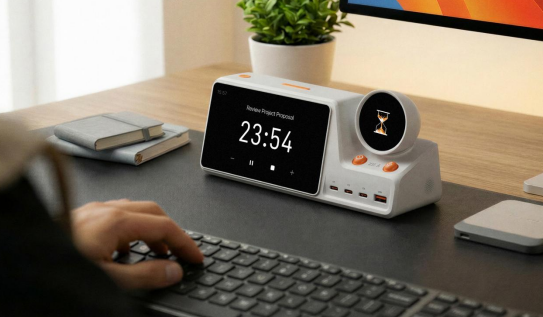
Why the ZIEA App Matters for Setup
ZIEA One uses a companion app for setup tasks such as account access, device pairing, network configuration, and calendar connection. That is normal for connected desk hardware. The device sits on the desk, while the app helps handle onboarding and account connection.
This matters because buyers should expect an app-assisted setup process. After setup, the purpose of the device is to make the day more visible and actionable at the desk, rather than leaving every planning step inside separate apps.
Privacy Points to Check Before Connecting a Calendar
Before connecting any calendar to a physical device, users should understand how calendar access is used. ZIEA’s Privacy Policy states that Google Calendar access is permission-based and used to support planning and scheduling.
Key points include:
- Calendar access is used for scheduling: according to ZIEA’s official product documentation, ZIEA can read existing events and busy times and support scheduling actions.
- Calendar events can be created or updated when users ask: This allows schedule changes to appear in the connected calendar.
- ZIEA states in its Privacy Policy that it does not access email, contacts, Drive files, or other Google data through the calendar connection.
- Users can disconnect Google Calendar: After disconnection, ZIEA no longer has access to view or edit events through that connection.
These details matter because a physical calendar device is not only a productivity purchase. It is also an account connection decision.
How ZIEA One Compares With Other Calendar Displays
A shared calendar display is usually designed for household visibility. Products such as Skylight Calendar, Hearth Display, or DAKboard are often used in kitchens, family spaces, or shared home routines.
ZIEA One is aimed at a different use case: an individual desk workflow. It is most relevant when the user wants calendar context, AI planning, next-action visibility, focus support, voice scheduling, and charging in one desk device.
The difference is simple. A household calendar display helps multiple people see shared plans. ZIEA One helps one person turn their day into visible next steps at the desk.
Bottom Line
A physical calendar that syncs with Google Calendar is most useful when it does more than mirror events. ZIEA One supports Google Calendar, Apple Calendar, and Outlook Calendar. According to ZIEA’s product documentation, its desk workflow also includes AI planning, Next 3 actions, voice-based schedule creation, Deep Focus, and 160W charging.
For users who want a desk device that makes the day easier to see and act on, ZIEA One shows what calendar sync can look like after the connection is made.
FAQ
Q1: Does ZIEA One sync with Google Calendar?
A1: Yes. ZIEA One supports Google Calendar sync, along with Apple Calendar and Outlook Calendar. Therefore, users can connect the calendar systems they already use for work, school, or personal scheduling.
Q2: Is ZIEA One only a physical Google Calendar display?
A2: No. ZIEA One is broader than a passive calendar display. It uses calendar sync together with AI planning, next 3 upcoming items, voice-based schedule creation, Deep Focus, and a 160W charging hub.
Q3: Can ZIEA One create or update calendar events?
A3: ZIEA’s Privacy Policy describes calendar access for scheduling tasks, including creating or updating events when users ask. Users should review ZIEA’s current Privacy Policy and product documentation for the exact calendar actions available in their connected workflow.
Q4: How is ZIEA One different from a normal calendar app?
A4: A calendar app is mainly where users manage events. ZIEA One brings calendar context to a physical desk device, where the user can see the next few priorities, use AI planning, capture schedule items by voice, and start focus sessions.
Q5: Does ZIEA One replace Google Calendar?
A5: No. Google Calendar can remain the user’s main calendar. ZIEA One works with the connected calendar and helps bring that schedule into a desk-based planning and focus workflow.
Sources
- ZIEA official website: https://ziea.net/
- ZIEA official product page: https://ziea.net/products/ziea-one-the-device-that-reclaims-your-focus
- ZIEA App Store listing: https://apps.apple.com/us/app/ziea-one/id6751157107
- ZIEA Privacy Policy: https://ziea.net/policies/privacy-policy
Accessed June 24, 2026.