
A Buyer’s Scorecard for Testing Identity Verification Software Before You Sign


The demo went perfectly. The sales engineer held up a sample passport, the system read it in two seconds, the selfie matched, and a green checkmark appeared. Everyone in the room nodded.
Three months after go-live, the pass rate for your second-biggest market is 61%, support tickets are piling up about “verification failed,” and your fraud team just found a ring of approved accounts using AI-generated faces.
None of that showed up in the demo, because demos are built to pass. If you’re buying identity verification software, your job is to make it fail during evaluation, while failing is still cheap.
Here’s a scorecard I’d use. Score each vendor from 1 to 5 on every line, weight the categories for your business, and don’t sign until you’ve tested with your own data.
Category 1: Accuracy on your real users (weight: high)
Vendor accuracy numbers are measured on vendor datasets. Your users aren’t in them.
What to test:
• Run at least a few hundred real verifications from your top markets through each vendor, using consenting staff, test users, or a sandbox on live traffic.
• Measure first-attempt pass rate for legitimate users. This is the number that hits conversion.
• Measure false acceptance with known bad samples: expired documents, mismatched selfies, edited images.
• Split results by country, document type, device, and OS. Aggregate numbers hide the problems.
Score a 5 if: pass rates hold up across your key segments, not just on average.
Score a 1 if: the vendor won’t let you test on your own traffic before signing.
Category 2: Fraud and spoofing defense (weight: high)
This is where a lot of identity verification software looks the same on paper and wildly different in practice.
Questions that separate vendors:
• Has your liveness detection been tested by an independent lab against ISO/IEC 30107-3? Which lab, which level, and when?
• What do you do about injection attacks, where synthetic video is fed straight into the app without passing through the camera? (ISO 30107-3 doesn’t cover these, so a good vendor will answer separately.)
• How do you detect document templates and AI-edited IDs?
• Can you link accounts by device, behavior, or shared data to catch fraud rings?
Then test it. Have someone on your team try the obvious attacks: a photo of a photo, a screen replay, a printed mask, a face-swap app. If a cheap attack gets through in your test, a motivated fraudster will get through faster.
A real warning sign: a vendor who says they’re “ISO certified” without naming a lab or result. The standard defines how to test, not a pass mark. The claim tells you nothing on its own.
Category 3: Coverage (weight: depends on your markets)
Count what you actually need, not what the brochure says.
• Every document type your users carry in your top 10 to 15 countries.
• Non-Latin scripts and accurate data extraction from them.
• Database checks where they exist and add value.
• Address verification, if your regulators require it.
• Languages for the user interface and the error messages.
Score a 5 if: every high-volume document in your markets is supported and tested.
Score a 1 if: you discover gaps only after asking about specific countries.
Category 4: User experience and speed (weight: high for consumer products)
Put yourself through the flow on a mid-range Android phone, in bad lighting, on a slow connection. Then do it again on an old iPhone.
Score each vendor on:
• Time from start to decision for a clean user.
• Quality of real-time capture guidance. Does it tell you to fix glare before you submit?
• Clarity of error messages. “Verification failed” is a 1. “Your ID is expired, please use a valid document” is a 5.
• Handoff options, like switching from desktop to mobile with a QR code.
• Accessibility for users with disabilities, older users, and users who wear glasses or head coverings.
Category 5: Configurability and risk logic (weight: medium to high)
Your risk appetite isn’t the vendor’s default settings.
Good identity verification software lets you build different verification levels for different users, adjust thresholds, set rules for when cases go to manual review, and change all of it without a six-week engineering ticket.
Test it: ask the vendor to set up a tiered flow during the trial. Low-risk users get document plus selfie. High-risk geographies get an extra check. Watch how long it takes and who has to do it.
The NIST SP 800-63A-4 identity proofing guidelines are a useful reference here. They define assurance levels and the evidence each one needs, which gives you a neutral vocabulary for describing what you want instead of adopting the vendor’s.
Category 6: Compliance and audit (weight: high in regulated industries)
When an examiner asks why a specific user was approved eighteen months ago, can you answer?
• Full audit trail for every decision, including what was checked and what the system returned.
• Exportable records in a format your team can work with.
• Data residency options that fit your regulatory obligations.
• Retention settings you control.
• Clear documentation for any automated decision-making.
Score a 1 if: decisions are a black box with no reasons attached.
Category 7: Commercials and contract terms (weight: medium)
This is where buyers lose money quietly.
Read the contract for:
• What counts as a billable check. Are retries billed? Failed attempts? Abandoned sessions? A flow with a high retry rate can double your effective cost.
• Minimum volume commitments and what happens if you fall short.
• Price changes at renewal, and whether there’s a cap.
• SLA terms with real penalties, not just “best effort.”
• Exit terms. Can you export your data and verification history if you leave?
Putting the scorecard together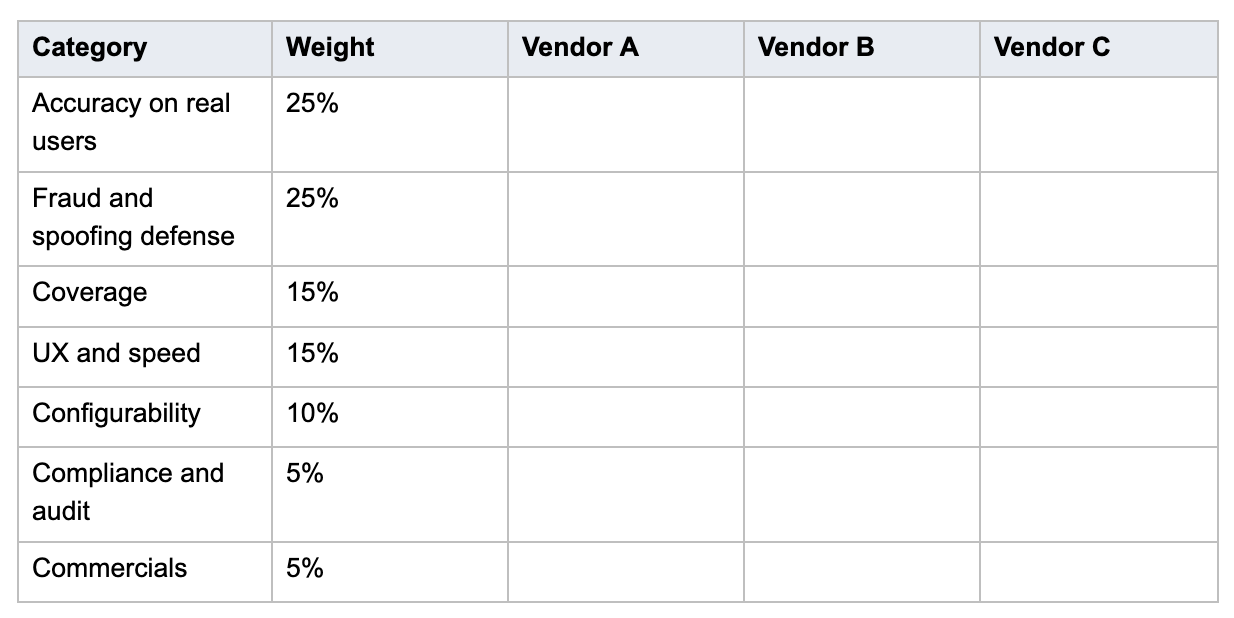
Adjust the weights. A crypto exchange should push fraud defense higher. A neobank in one country can drop coverage. A marketplace onboarding sellers might care most about configurability.
The test most buyers skip
Ask each finalist for two customer references in your vertical, then ask those references one question: “What surprised you after go-live?”
You’ll learn more from that answer than from three hours of demos. And if a vendor can’t produce a reference willing to answer it, that tells you something too.
A green checkmark on a sample passport proves the software works on a sample passport. Your users deserve a harder test.






Comment