
Your First T-Shirt Printing Setup: What You Actually Need

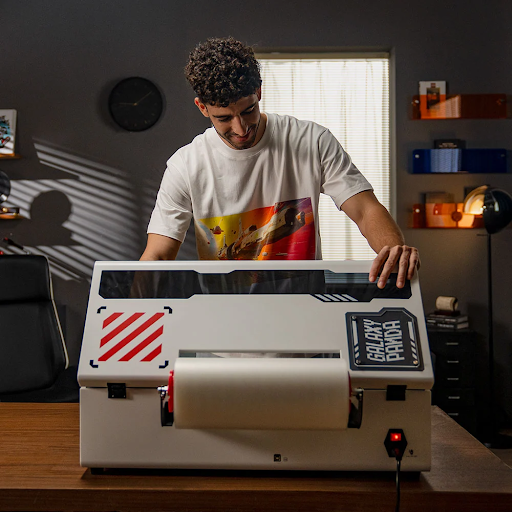
A first T-shirt printing setup needs more than a printer. It needs compatible software, the right consumables, equipment for finishing the print, and a workspace where you can produce the same result repeatedly. For a direct-to-film setup, that includes transfer film, ink, adhesive powder, suitable curing equipment, and a heat press.
For a creator launching a clothing line or a business bringing small orders in-house, the purchase is best approached as a connected production system. The question is not simply which machine to buy, but what it takes to turn an approved design into a finished shirt.
Define Your First Product Before Choosing Equipment
Begin with a specific job: perhaps a small collection of cotton T-shirts with a chest logo and a larger back design. Decide on the garments, artwork dimensions, colors, and likely order quantities before comparing hardware.
That brief gives you something concrete to discuss with suppliers. Ask for samples on the fabric you intend to use, not just a demonstration on whatever material is convenient.
When choosing a t shirt printer, note that Procolored’s collection includes both direct-to-film and direct-to-garment equipment. These are different production methods, so the supporting equipment must match the selected process.
For the rest of this setup example, consider a business choosing DTF. Keep the opening range narrow enough to test properly rather than trying to support every garment and design immediately.
Understand What Happens Between Printing and Pressing
With DTF, the design is printed onto transfer film using color and white ink. Adhesive powder is applied to the wet printed area, the transfer is cured, and a heat press transfers the design onto compatible fabric.
European buyers comparing localized stores may encounter the same category under another name. Procolored’s Spanish storefront calls it an impresora dtf, meaning a DTF printer, not a different printing method.
This workflow explains why a printer alone is not a complete setup. Printing, powder application, curing, and garment pressing all need equipment, space, and an operator’s time.
For a first installation, request a demonstration of the complete sequence using your artwork. Watch how the transfer is handled between stages and how the finished shirt is checked. A print emerging from the machine is only an intermediate result.
Check the Computer and Software First
Your design program and printing software have different roles. Prepare and edit artwork in a suitable design application, then use the printer’s supported software to prepare the output.
DTF systems commonly use raster image processor, or RIP, software for print preparation. Do not assume that the included program also provides the image-editing tools you need.
Confirm the exact software version, supported operating system, connection requirements, licensing arrangements, and supported file formats before ordering. Compatibility can differ between models, even within one brand.
Ask the supplier to open one of your files and demonstrate sizing, positioning, and print preparation. This is more informative than simply hearing that software is included.
Create a folder structure for original artwork, approved files, and production settings. Keep each design’s intended print dimensions with it so that a repeat order does not begin with someone guessing the size again.
Check What the Equipment Package Actually Includes
A package described as a printing bundle may still leave important purchases to you. Compare its contents against every stage of the workflow.
Procolored’s F13 range, for example, separates printer-only options from packages with an oven and packages with both an oven and a heat press. The product name alone is not enough to establish that everything is included.
For the curing stage, check that the equipment accommodates your intended transfer dimensions and follows the consumable supplier’s requirements. For the heat press, compare its usable platen area, controls, pressure adjustment, and clearance around garments.
Ask how the recommended temperature, pressure, time, and peeling instructions are established for the selected materials. Avoid borrowing a single set of settings from an unrelated online demonstration.
Request an itemized quotation covering the printer, software, curing equipment, press, starter consumables, cleaning supplies, delivery, and training. That makes competing packages easier to assess fairly.
Plan the Workspace Around the Whole Process
Measure more than the printer’s footprint. Leave room for film feeding, maintenance access, curing, pressing, garment preparation, and finished items awaiting inspection.
Sketch the route a job will take through the space. Ideally, there should be a clear place for clean garments and a separate area for handling powder and curing transfers.
Confirm ventilation and extraction requirements with the equipment and consumable suppliers. Read the relevant safety data sheets and follow the specified handling precautions. Do not assume that a compact machine is suitable for an unventilated bedroom or shared living area.
Check electrical requirements, working clearances, and the operating temperature and humidity specified for the equipment. Plan storage for inks, film, and powder according to their instructions.
A practical layout should let you complete a job without repeatedly moving equipment or placing clean clothing beside unfinished transfers.
Budget for Maintenance and Quiet Weeks
Ask for the maintenance schedule before purchasing, not after the first print problem. Include required cleaning supplies and replacement items in the setup budget.
Automatic cleaning and white-ink circulation can be useful features, but they do not make every maintenance task disappear. Have the supplier explain which checks remain your responsibility and what to do when the printer will be idle.
Consider who will carry out those tasks during holidays or a quiet sales period. A business that prints occasionally needs an operating plan just as much as one handling daily orders.
Confirm training arrangements, support channels, spare-parts availability, and warranty exclusions. Save the instructions for the exact model you buy rather than relying on a generic tutorial.
Run a Trial Order Before Launching
Once the setup is installed, make a small batch that resembles a real customer order. Use the intended shirt styles, sizes, and designs, including any personalized details.
Keep enough spare garments and consumables for those trials. Choose a small range of blanks from a reliable supplier and record the product codes, fabric composition, and colors. When something changes, repeat the sample check rather than assuming the new garment will behave exactly like the previous batch during pressing.
Record the complete production time, not only the printer’s running time. Include artwork preparation, transfer handling, pressing, inspection, and packing. Note where work waits and which steps require your attention throughout.
Inspect placement, fine details, print feel, and consistency between shirts. Follow the recommended care instructions when washing samples and check the results before making durability claims.
Calculate the cost per acceptable shirt, allowing for rejected pieces, labor, consumables, and ongoing equipment expenses. A successful sample shows that the process can work; a repeatable trial batch gives you a firmer basis for accepting orders.
Start With a Setup You Can Repeat
The right first setup is not necessarily the largest or most automated. It is the combination of equipment, software, materials, and working practices that lets you produce your chosen shirts consistently.
Start with a defined product, verify every production stage, and leave room in the budget for testing and maintenance. Expand when actual orders show which part of the setup needs more capacity.







Comment