
How the SaaSSwitcher SaaS ROI calculator shows if a software tool pays for itself

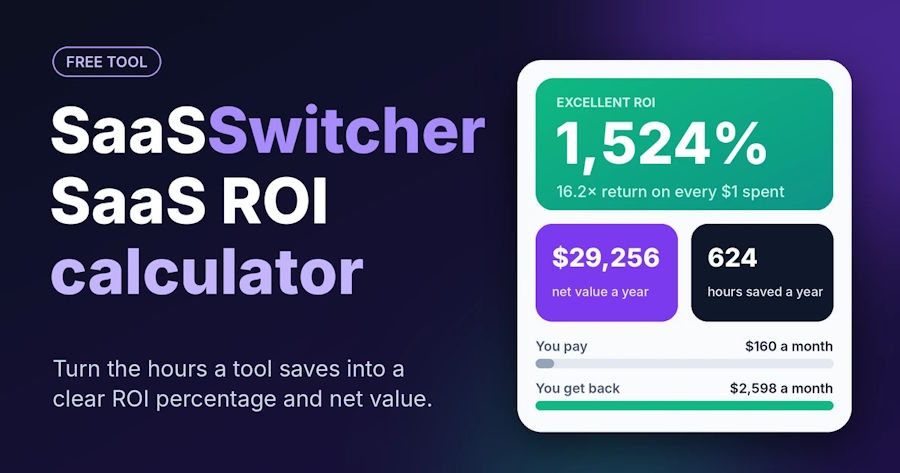
A software tool pays for itself when the time it saves is worth more than its bill. The SaaSSwitcher SaaS ROI calculator puts both sides of that sum on one screen. You see the answer before the renewal date arrives.
Open SaaSSwitcher’s free SaaS ROI calculator and it starts with an example. Ten users pay $15 each a month for a tool, and each one saves 2 hours a week. The result reads 2,209%, which works out to about $39,768 of value a year after the bill is paid.
Not every tool clears the bar that easily. The sections below walk through each input, then a simple test to run before you sign for another year.
Why small software bills are hard to judge
Most software is sold as a small price for each user, each month. A $15 charge is easy to approve and easy to forget. Over a year, those small charges add up across a whole team.
The harder part is the other side of the sum. A bill has an exact number on it. The time a tool saves has no number. It gets guessed in a meeting and then left alone.
A calculator puts that guess on the screen as a number you can test and change.
What the SaaSSwitcher SaaS ROI calculator asks for
The calculator has two short groups of boxes. The first group describes the software:
- Users / seats: how many people you pay for.
- Cost / seat: the price for each user, with a switch for monthly or yearly pricing.
- Tool name: optional, a label for your own notes.
The second group describes the value the tool creates:
- Hours saved per user / week: a slider from 0 to 20 hours.
- Avg hourly rate: what one hour of a person’s time costs you, with benefits added on top of pay.
- Extra revenue / mo: optional, for new money the tool brings in.
A currency menu offers US dollars, euros, pounds, Indian rupees, Australian dollars and Canadian dollars. It changes the symbol only, so type every price in the currency you pick. Your inputs stay saved in your browser for the next visit.
How the math works, step by step
Here is the opening example again, one step at a time. The calculator counts about 4.33 weeks in a month.
The tool costs $15 for each user, each month. For 10 users, that is $150 a month.
Each user saves 2 hours a week. Over a month, that comes to about 8.66 hours for each user.
For 10 users, the time saved is about 86.6 hours a month.
Each hour is worth $40. So 86.6 hours are worth $3,464 a month.
The value is $3,464 and the bill is $150. Take away the bill and $3,314 is left each month.
Now divide $3,314 by $150. The answer is about 22.09, which the calculator shows as 2,209%.
Over 12 months, the $3,314 adds up to $39,768. The hours saved add up to about 1,039 a year.
The line under the result reads “23.1× return on every $1 spent.” That figure is $3,464 divided by $150.
How to read the result
A label sits above the percentage. It follows three fixed bands:
- Below 0%: Negative ROI. The tool costs more than the time it saves.
- From 0% up to 199%: Positive ROI. The tool pays for itself with some room to spare.
- 200% or more: Excellent ROI. The time saved is worth at least three times the bill.
Below the percentage you get net value a year and hours saved a year. A small chart then sets the monthly cost next to the monthly value.
The percentage works best for comparing tools at similar prices. Net value a year is the better number when you weigh a $10 tool against a $200 one.
A renewal test: run it at half your guess
The hours slider holds the only real guess in the calculator. Prices come off an invoice. Hours come from someone’s sense of how a busy week went.
So run each tool twice, once at your honest guess and once at half of it. A tool you can trust shows a positive result both times.
Take a made up example. A team of 8 people pays $90 for each user, each month. Each hour of their time costs $40. The team thinks the tool saves each person 1 hour a week.
For 8 users, the bill is $720 a month.
Each user saves about 4.33 hours a month. For 8 users, that is about 34.64 hours. At $40 an hour, that time is worth $1,385.60 a month.
After the $720 bill, $665.60 is left each month. The result is about 92%, with the label Positive ROI.
Now move the slider down to half an hour. The time saved is worth $692.80 a month, which is $27.20 less than the bill. The result drops to about minus 4%, with the label Negative ROI.
To break even, each person on this team needs to save about 31 minutes a week. If nobody can say where those 31 minutes come from, the renewal needs a closer look.
Where the result can mislead
- Extra revenue should be profit. The calculator adds this box straight onto value. Say a tool helps you make $2,000 of sales a month, and you keep 30% of each sale as profit. Enter $600.
- Setup fees have no box. Spread any one time setup or training fee over 12 months. A $600 setup fee over 12 months is $50 a month. Across 10 users, that adds $5 to each user’s monthly cost.
- Unused logins still cost money. If 2 of 10 people never open the tool, they still appear on the bill. Count them when you average the hours, so their zero pulls the number down.
- Intro prices end. If the first year is discounted, run the numbers at the full renewal price.
Before your next renewal
A tool is safe to keep when it stays positive at half your hours guess. Leave the extra revenue box empty for that test. If it only works at your full guess, compare cheaper options before you renew.
For real prices, the SaaSSwitcher SaaS ROI calculator guide runs four tools through the same math. They are Microsoft 365 Copilot Business, Salesforce Sales Cloud Core, Zapier Professional and Calendly Standard. It also lists how many minutes a week a user must save at common prices.
Run your most expensive tool first, since it has the highest bar to clear.







Comment