
Why Is Your 3D Printer Not Working? Common Issues and How to Fix Them

Few things are more frustrating than pressing print and watching your machine fail halfway through. There are many reasons why your 3D printer may not be working, and you are not the only one experiencing the problem. There are some common causes of most problems and many of them can be solved at home. Let us look at the most common problems and simple ways to solve them.
Nozzle Clogs and Filament Not Coming Out
If your printer moves but nothing comes out, a clogged nozzle is the first thing to check. Warm the nozzle and hand-feed the filament to determine if it can be extruded. If not, do a cold pull or poke with a thin needle. Replace nozzles every few months, as worn nozzles will result in weak flow over time. A Brisbane supplier like DREMC stocks replacement nozzles, heat breaks and full hotend kits for many popular printers, which makes this repair quick and affordable.
Prints Not Sticking to the Bed
A print that detaches from the bed is most often a problem with the levelling or surface of the bed. Wipe off isopropyl alcohol to remove oils from hands. Then, relevel the bed or repeat your auto bed levelling routine. Slow the first layer speed down so that the plastic sticks to the plate, and keep the first layer slightly squished onto the plate. If the surface is scratched or worn, a fresh PEI spring steel plate can make a big difference. The thin layer of bed adhesive is also beneficial for difficult substances such as ABS or nylon.
Layer Shifts and Misaligned Prints
If your layers suddenly start sliding sideways, there’s a problem with your movement. Ensure that your belts are snug, but not too tight. Be sure to secure the pulleys to the motor shafts as a loose grub screw is one of the most frequent causes. Check for entangled filament or cable on the toolhead. If printing too fast, it may overload motors; slow down and test again. Replace worn belts and bearings when you see that they move with a rough or noisy motion. Finally, check that the frame is stable and sitting on a flat surface.
Stringing and Rough Surface Quality
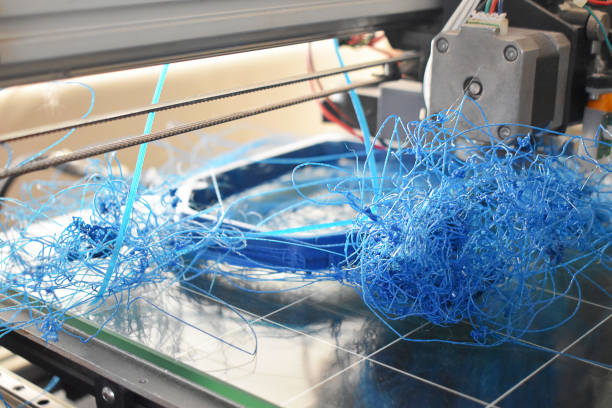
Thin hairs between parts are called stringing. These are typically produced by a wet filament or a hot nozzle. Reduce by increments of 5 degrees to check temperature. Activate retraction in your slicer and play around with the distance until the strings are gone. Cooling fans also have a role to play, so ensure your part cooling fan is able to spin freely. Also, if the walls are rough or bumpy, then there may be a loose part; check to see if the screws or the hotend is loose. With a small test print, you can observe changes within a short time and will not need a lot of material.
Heating Errors and Thermal Runaway Messages
Errors in heating can be a frightening sight but can usually be traced to a simple cause. Make sure the thermistor wire is in place and not damaged since loose wires will cause false readings of temperature. Check the heater cartridge and its cable in the vicinity of the hotend that could lead to breaks with repeated movement. Check the bed for heating if it doesn’t, check the connectors and power supply. A multimeter can help you test parts if you are unsure. Don’t ignore these warnings; they are there for your safety and your printer. Switch off and rectify the error before reprinting.
Wet or Low-Quality Filament
Sometimes the printer is fine, and the filament is the problem. However, filament absorbs air moisture and results in popping sounds, bubbles, and weak prints. Keep spools in sealed boxes and include desiccant, or print frequently using a filament dryer. After each print, it only takes a few seconds to seal your spools. Another problem with cheap spools is that they are not always evenly thick and can jam. Choose reliable filament and keep it dry for smoother and stronger results.
Conclusion
A 3D printer that stops working is rarely a lost cause. Start with the simple checks like the nozzle, bed surface, and belts, then move on to heating and filament issues. Solve one problem at a time to know what solved the problem. By having the patience and the right replacement parts, you can enjoy better prints every time, and keep your printer running well.







Comment