
Contactless Push Button Intelligent Pedestrian Crossing Solution by Sinowatcher

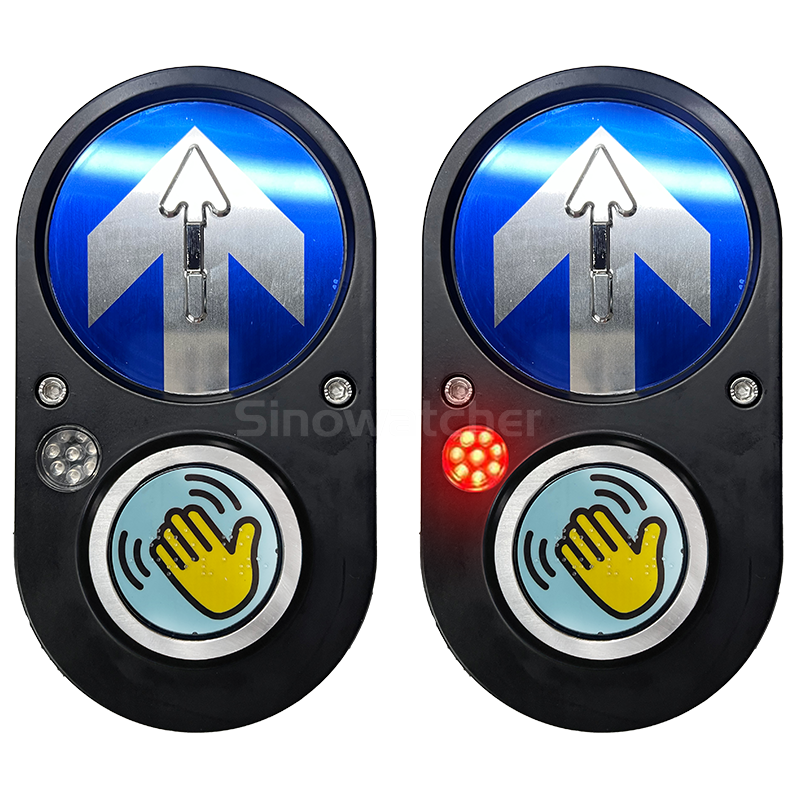
A modern Contactless Push Button is becoming an essential part of today’s intelligent traffic systems. Cities and transportation authorities are looking for safer, cleaner, and more reliable ways for pedestrians to request a crossing without touching a traditional mechanical button. Sinowatcher has developed the Xentra Contactless Push Button, a smart pedestrian crossing solution designed for modern intersections, school zones, commercial districts, and public infrastructure projects. With contactless activation, audible confirmation, visual LED feedback, and tactile accessibility features, the Xentra Contactless Push Button helps improve pedestrian safety while supporting efficient traffic signal operation.
About Sinowatcher
Professional Intelligent Traffic Solution Manufacturer
Sinowatcher is a professional manufacturer of intelligent transportation products with more than 14 years of industry experience. The company focuses on developing pedestrian crossing products that improve road safety while supporting modern Intelligent Transportation Systems (ITS).
Its product portfolio includes:
- Contactless Push Buttons
- Mechanical Push Buttons
- Pedestrian Signal Systems
- Smart Crossing Solutions
- Traffic Signal Equipment
- Intelligent Traffic Accessories
Instead of supplying only individual devices, Sinowatcher provides complete pedestrian crossing solutions that integrate easily with traffic controllers and smart city projects.
Xentra Contactless Push Button
Safe, Hygienic and Reliable Operation
The Xentra Contactless Push Button is designed for projects that require touch-free pedestrian requests.
Instead of pressing a mechanical button, pedestrians simply move their hand close to the sensing area to activate the crossing request. This reduces physical contact while providing stable and reliable operation in busy outdoor environments.
The system is suitable for:
- Urban intersections
- Commercial districts
- School crossings
- Hospital areas
- Public squares
- Road reconstruction projects
- Temporary crossings
- Smart city infrastructure
Key Features
Contactless Activation
The Xentra Contactless Push Button uses advanced microwave sensing technology to detect pedestrian requests without physical contact.
This helps reduce wear on the device while creating a cleaner and more convenient crossing experience.
Audible Request Confirmation
After a pedestrian request is accepted, the system provides a clear sound confirmation.
This lets users know the request has been successfully registered without needing to press the button multiple times.
Red LED Visual Confirmation
A bright red LED indicator provides clear visual feedback, making it easy for pedestrians to see when their request has been accepted.
Tactile Accessibility
The device includes:
- Embossed directional arrow
- Transparent Braille cover
These features make the Contactless Push Button easier to use for visually impaired pedestrians while supporting barrier-free access.
Durable Outdoor Housing
The housing is manufactured from die-cast aluminum and carries an IP65 protection rating.
This rugged construction helps the device operate reliably in rain, dust, heat, and other outdoor conditions.
Low Maintenance
Because there are no moving mechanical buttons, maintenance requirements are reduced compared with traditional push buttons.
This helps lower long-term operating costs for municipalities and contractors.
Technical Specifications
According to Sinowatcher, the Xentra Contactless Push Button includes:
- Detection method: Contactless detection
- Detection technology: Microwave sensing
- LED indicator: Red LED
- Voltage: AC 12–32V / DC 12–36V
- Protection level: IP65
- Power consumption: ≤6W
- Working temperature: -30°C to +70°C
- Housing material: Die-cast aluminum
These specifications make the product suitable for long-term outdoor pedestrian crossing installations.
Applications
The Contactless Push Button is designed for many traffic environments.
Urban Road Crossings
Provides safe pedestrian requests while integrating with traffic signal controllers.
Commercial Areas
Suitable for shopping streets and business districts where pedestrian traffic is high.
School Zones
Helps improve safety for students crossing busy roads.
Hospital Areas
Supports clean, touch-free pedestrian operation in healthcare environments.
Traffic Renovation Projects
Its standardized installation design allows quick deployment for road upgrades and temporary traffic projects.
Benefits of Choosing Xentra Contactless Push Button
Better Hygiene
Touch-free activation reduces physical contact and supports cleaner public infrastructure.
Improved Accessibility
The combination of audible confirmation, LED indication, embossed arrows, and Braille helps make crossings easier for people with different accessibility needs.
Reliable Performance
Microwave sensing technology provides stable activation while reducing unintended triggering.
Easy Installation
The standardized mounting design allows fast installation for new traffic projects and existing intersection upgrades.
Long Service Life
The die-cast aluminum housing and IP65 protection help provide dependable outdoor performance with minimal maintenance.
Why Choose Sinowatcher?
Many traffic authorities and contractors choose Sinowatcher because of its experience in intelligent traffic products.
Key advantages include:
- More than 14 years of industry experience
- Professional technical support
- Intelligent pedestrian crossing solutions
- Reliable manufacturing quality
- Durable IP65 outdoor products
- Easy system integration
- Low maintenance operation
- Smart city project experience
- Customer-focused engineering support
- Global project supply capability
Conclusion
The Contactless Push Button from Sinowatcher provides a modern solution for safer and smarter pedestrian crossings. By combining microwave contactless detection, audible confirmation, LED visual feedback, tactile accessibility, and durable outdoor construction, the Xentra Contactless Push Button helps improve both pedestrian safety and traffic efficiency.
Whether you are upgrading an existing crossing or building a new intelligent transportation project, Sinowatcher offers reliable pedestrian crossing technology designed for long-term performance and dependable operation.
Frequently Asked Questions
1. What is a Contactless Push Button?
A Contactless Push Button is a pedestrian crossing device that allows users to request a crossing without physically pressing a button.
2. How does the Xentra Contactless Push Button work?
It uses microwave sensing technology to detect a pedestrian’s hand near the activation area and register a crossing request.
3. Does the device provide confirmation?
Yes. It provides audible confirmation and a red LED indicator when the request is accepted.
4. Is the product suitable for visually impaired users?
Yes. It includes an embossed directional arrow and a transparent Braille cover to improve accessibility.
5. What protection rating does the device have?
The Xentra Contactless Push Button has an IP65 protection rating for outdoor installation.
6. What material is used for the housing?
The housing is manufactured from durable die-cast aluminum.
7. Where can the product be installed?
It is suitable for urban roads, commercial districts, school zones, hospitals, public squares, and traffic renovation projects.
8. Does it require frequent maintenance?
No. Because it has no mechanical push button, maintenance requirements are lower than traditional pedestrian buttons.
9. Is installation complicated?
No. The standardized design allows quick and straightforward installation.
10. Why choose Sinowatcher?
Sinowatcher combines over 14 years of intelligent traffic experience, professional engineering, durable products, technical support, and reliable pedestrian crossing solutions for modern transportation projects.






Comment