
Battle of the Pixels: Pixlr Image Generator vs Photogenerator.ai

1. The Quest for the Perfect Digital Canvas
A Search for Creative Freedom
I spent the last week pushing the limits of modern browser-based design software. My goal was simple: to find an online tool that balances creative freedom with effortless rendering. In this review, we are diving deep into two highly discussed options in the creative community.
The Two Major Contenders
We will compare the multi-modal powerhouse photogenerator.ai against the feature-rich web editor, Pixlr Image Generator. Both platforms claim to make high-end graphic creation accessible to anyone with an internet connection. They offer distinct workflows designed to match different artistic styles.
The Power of Automated Creation
If you are looking for a reliable AI Photo Generator, choosing the right workspace is crucial. Let’s look at how these two contenders handle real-world creative demands. This comparison will help you decide which tool fits your daily workflow best.
2. The Ultimate Contenders Unveiled
The Multi-Modal Workspace
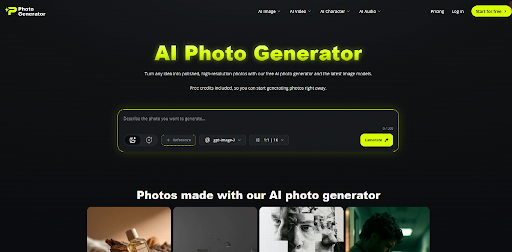
First, let’s meet our first candidate, photogenerator.ai. This platform is built specifically as a multi-modal creative playground. It acts as a digital bridge, bringing together several distinct generation engines under a unified dashboard.
Streamlining the Creative Flow
Instead of offering standard manual paintbrushes, it uses advanced models to handle your creative prompts. The interface is remarkably clean, keeping focus entirely on generating images, videos, characters, and custom audio tracks. It is designed to minimize the learning curve for beginners.
The Legacy Web Editor
On the other side of the ring is the Pixlr Image Generator. Pixlr has been a household name in web-based photo editing for over a decade. This tool builds on that legacy, embedding generative models directly into a traditional photo editing environment.
Integrating Creation with Editing
This integration lets you transition smoothly from generating a raw graphic to editing it with professional layers. It is designed for creators who want to edit and generate in the exact same workspace. This combination of tools makes it a highly versatile AI Photo Generator for daily social media managers.
3. The Toolkit Face-Off: What Is Under the Hood?
Models vs. Manual Tools
Both tools boast impressive feature lists, but their structural approaches are fundamentally different. photogenerator.ai stands out by offering a curated cluster of advanced models. It seamlessly connects you to elite engines like Kling 3.0 Omni, Sora 2.0 Pro, and Flux.
Video and Character Synthesis
This setup allows you to jump directly from generating an image to turning it into a short cinematic video clip. It also features robust character consistency tools, ensuring your digital subjects look identical across multiple scenes . This makes it more than just a standard graphic tool.
Granular Layer Control
Conversely, the Pixlr Image Generator focuses heavily on precision editing and post-processing tools. It features dedicated modes like Fast, Pro, and Ultra to let you control image details. You can easily edit generated assets using classic brush tools.
Controlling Output with Precision
You also get access to classic graphic design features like Generative Fill, background removal, and a Negative Prompt option. This ensures you have granular control over the output of your chosen AI Picture Maker. It is a major advantage for designers who need to remove unwanted elements instantly.
4. Real-World Test: From Empty Prompts to Eye-Popping Visuals
Designing the Challenge
To keep things fair, I tested both platforms using the same specific and challenging test scenario. I wanted to create a highly detailed, cinematic poster of a retro-futuristic astronaut drinking coffee on Mars. Here is how my personal testing process unfolded.
Testing the Unified Engine
On photogenerator.ai, I used their simplified natural language feature. I simply typed, “An astronaut in a shiny bronze suit sipping espresso on a red sand dune, cinematic lighting.” The system automatically expanded my prompt behind the scenes to maximize details.
Analyzing the Output
The result was a highly detailed image with striking lighting and an impressively consistent character face. The bronze suit had realistic metallic reflections that looked highly professional. This tool is an incredibly intuitive AI photo generator that handles all the technical prompting for you.
Putting Pixlr to the Test
Next, I moved over to the Pixlr Image Generator. I entered the exact same prompt, selected “Ultra Mode” for maximum detail, and added a cinematic style preset. The rendering took slightly longer but gave me immediate access to the canvas.
The Advantage of Layer Editing
The output was highly artistic, but the face had minor symmetry issues that required quick manual editing. Thankfully, I was already in the Pixlr editor, so I used the clone stamp tool to fix it immediately. It highlighted how having built-in editing layers changes the entire creation workflow.
5. The Honest Truth: The Wins and the Wipeouts
Assessing the Multi-Modal Hub
No tool is completely flawless, and both of these web-based suites have their trade-offs. The main advantage of photogenerator.ai is its exceptional multi-modal workflow. You can turn your newly generated image into a video and generate matching background music in minutes.
The Limits of Automation
However, it lacks granular, pixel-level manual editing brushes. If your generation has a tiny flaw, you cannot paint over it manually on the spot. This makes it an incredibly powerful AI photo generator, but one that relies heavily on you getting the prompt right.
The Editing Advantage
Pixlr’s greatest strength is its deep integration with professional editing features. You can easily mask layers, adjust color curves, apply filters, and add typography to your generated images. This is ideal for creating finished marketing materials.
Complex Anatomy Challenges
The downside is that Pixlr’s generation quality can sometimes feel slightly less consistent on complex human anatomy. It is also less focused on the broader media creation pipeline, as it lacks built-in advanced video and audio engines. You will need external tools if you want to animate your images.
6. Who Should Put These Tools in Their Digital Backpack?
The Multi-Media Creator
Selecting between these platforms depends heavily on your daily professional demands. photogenerator.ai is the ideal match for multi-media creators and social media marketers. If your goal is to quickly churn out dynamic ads, b-roll footage, and unified marketing campaigns, this tool keeps everything under one roof.
Streamlining Production
It operates as a highly modern AI photo generator that handles the heavy lifting of media synthesis. It is also perfect for indie filmmakers who need rapid conceptual storyboards. You can easily pitch visual ideas to clients without spending hours on manual sketches.
The Graphic Designer
In contrast, Pixlr is built for traditional graphic designers, photo editors, and web developers. If you are already accustomed to working with layers and want AI to enhance your existing design flow, Pixlr is a natural fit. It bridges the gap between manual work and artificial intelligence.
Quick and Accessible Graphic Design
It is also highly recommended for students and bloggers who need quick, watermark-free images that they can immediately crop and format. The interface will feel very familiar if you have ever used Photoshop. It is a highly practical everyday design utility.
7. The Numbers Don’t Lie: How Generative AI is Disrupting Workflows
Widespread Industry Adoption
The massive shift toward automated image generation is not just a passing trend. According to a design industry report by the Creative Professionals Association, over 67% of modern design agencies have integrated generative AI into their daily pipelines. This represents a massive increase in baseline efficiency.
Boosting Marketing Efficiency
Furthermore, case studies show that marketing teams using a modern AI photo generator saw an average 45% reduction in asset production times. This allows smaller brands to test multiple visual concepts simultaneously, drastically reducing their overall overhead. It allows teams to launch campaigns faster than ever.
Impact on Conversion Rates
Another study by the E-Commerce Research Institute revealed that dynamic, AI-generated product backdrops boosted ad click-through rates by up to 18%. This proving-ground data demonstrates why businesses are moving away from costly traditional photoshoots toward flexible digital alternatives. The financial benefits of adopting AI are becoming clear.
8. Navigating the Legal and Ethical Landscape of Digital Art
Copyright and Fair Use
As AI generators become standard tools, understanding the legal landscape is essential for any professional creator. Most platforms offer commercial-use licenses for generated images, but copyright laws are still evolving. This is why many designers use AI as a starting point before adding manual edits.
Sourcing of Training Data
Different platforms use different approaches to train their models. Pixlr and photogenerator.ai both leverage advanced, ethically sourced models to ensure safety for commercial clients. This minimizes the risk of generating copyrighted intellectual property.
Safe Commercial Deployment
When selecting your AI photo generator, always check the platform’s terms of service regarding commercial deployment. Protecting your brand from potential copyright claims is just as important as generating beautiful visuals. Always keep compliance in mind when designing.
9. The Final Verdict: Which Engine Deserves Your Pixels?
Comparing Two Creative Philosophies
Ultimately, both platforms prove that browser-based design has entered a brand new era. Neither tool is objectively superior; they simply cater to different creative philosophies. Your choice should align with your specific media goals.
The Unified Choice
If you want a futuristic, multi-modal hub that can effortlessly generate images, videos, and music from a single text box, photogenerator.ai is highly recommended. It is an incredibly streamlined AI photo generator that prepares your brand for the future of digital media. It is built for speed and integration.
The Designer’s Choice
However, if you want a reliable, traditional editor equipped with versatile AI enhancements to tweak every pixel manually, Pixlr is a solid choice. It keeps you in complete control of the editing process from start to finish. Whichever path you choose, the barrier to high-end digital design has never been lower.




Comment