
Getting Your Warehouse Barcode-Ready on a Budget

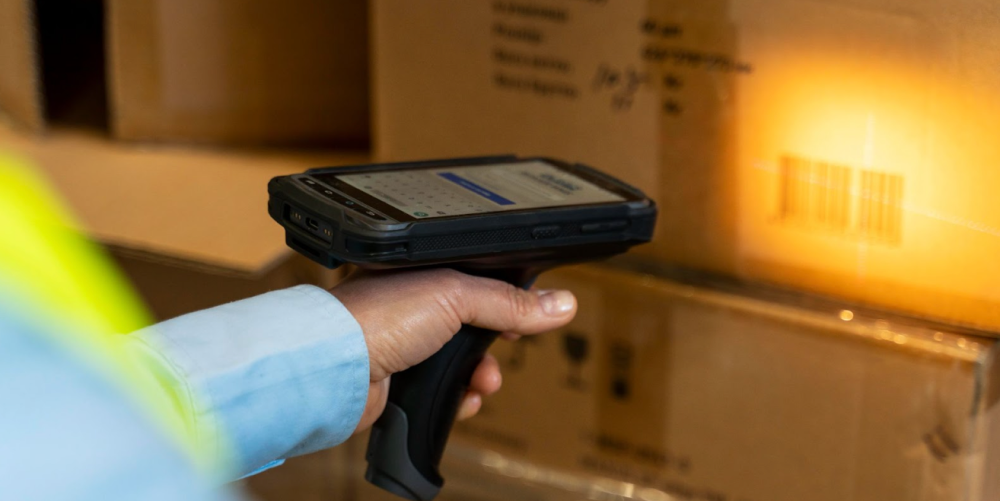
Preparing a warehouse for barcode technology does not have to require a major capital investment. Small businesses can build an accurate, efficient labeling process by starting with essential equipment and expanding as operational needs grow. The goal is to create a system that helps employees identify, locate, receive, and ship inventory with fewer mistakes. A well-planned warehouse barcode system for a small business can reduce manual data entry without adding unnecessary complexity. By focusing on practical improvements, companies can gain many of the benefits of automation while keeping costs under control.
Start With a Simple Warehouse Assessment
Before purchasing scanners, printers, or software, review how inventory currently moves through the warehouse. Document the steps employees follow when products arrive, move into storage, get picked, and leave the facility. Look for places where handwritten notes, spreadsheets, or memory are being used to track inventory. These areas are often responsible for counting errors, misplaced products, and shipping delays. A basic assessment helps determine which barcode functions will provide the greatest immediate value.
Walk through the warehouse and identify every location that may need a barcode. This can include receiving areas, shelves, racks, bins, pallets, staging areas, and packing stations. Record the number of locations and the types of surfaces where labels will be applied. Note whether any areas are exposed to dust, moisture, cold temperatures, sunlight, or frequent handling. These details will help you choose durable warehouse shelf labels without paying for materials that are stronger than necessary.
Create a Clear Barcode Structure
A barcode is only useful when it connects to accurate, organized information. Start by creating a consistent naming and numbering structure for products and storage locations. Each stock-keeping unit should have a unique identifier that does not change when the item moves. Each warehouse location should also have its own code, allowing employees to scan both the item and its destination. Avoid overly long codes because shorter identifiers are easier to read, enter, and troubleshoot.
A simple location code might include the warehouse zone, aisle, rack, shelf, and bin. For example, a code such as A-03-R02-S04 can quickly direct an employee to a specific storage position. The format should remain consistent throughout the facility, even if some locations do not use every element. Before printing labels, test the structure with several employees to make sure it is easy to understand. A clear system reduces training time and prevents the need for expensive relabeling later.
Choose Affordable Barcode Equipment
Small businesses do not need the most advanced industrial hardware to begin using barcodes effectively. Entry-level USB scanners are often sufficient for fixed workstations in receiving, packing, or inventory control areas. Smartphones or tablets may also be used with compatible barcode applications, reducing the number of dedicated mobile devices required. When evaluating equipment, focus on scan reliability, compatibility, durability, and ease of use. Purchasing only what the team needs today helps preserve cash for future upgrades.
Consider starting with the following essentials:
- One or two USB barcode scanners for receiving and packing stations
- A thermal label printer for product and location labels
- Basic barcode creation or inventory software
- Mobile devices already owned by the business
- Replacement label rolls and printer supplies
- A small supply of protective label covers for high-contact areas
Thermal printers are often more economical than ink-based printers because they do not require cartridges. Direct thermal printers work well for short-term shipping or temporary inventory labels. Thermal transfer printers are usually better for warehouse shelf labels that must remain readable for several years. Compare the total cost of labels, ribbons, maintenance, and replacement parts before choosing a printer. A slightly higher initial price may produce lower operating costs if the labels are more durable.
Select the Right Labels for Each Area
Using one label material throughout the warehouse may seem simple, but it can lead to unnecessary spending or frequent replacements. Paper labels are affordable and may work well in clean, dry, low-contact areas. Polyester or synthetic labels are better for locations exposed to moisture, chemicals, abrasion, or temperature changes. Removable labels can be useful for temporary staging zones or shelves that are frequently reassigned. Matching the label to the environment helps control costs while maintaining scan quality.
Label size and placement are also important. Barcodes should be large enough to scan from the distance employees typically stand from the shelf or rack. Place labels at a consistent height and angle whenever possible so workers do not have to search for them. Avoid applying labels over damaged surfaces, seams, bolts, or curved areas that may distort the barcode. Testing a small batch before completing the entire warehouse can prevent costly printing and installation errors.
Use Low-Cost Software That Can Grow
Barcode hardware must connect to a system that stores product, quantity, and location information. Many small businesses can begin with affordable cloud inventory platforms that support barcode scanning and basic warehouse functions. Some accounting, ecommerce, and point-of-sale systems also include inventory features that may already be available in the company’s current subscription. Review existing tools before purchasing a separate warehouse management platform. Using software that already integrates with sales and purchasing systems can reduce setup work and duplicate data entry.
The software should support several essential activities:
- Creating and printing barcode labels
- Receiving inventory against purchase orders
- Assigning products to warehouse locations
- Recording inventory transfers
- Picking and packing customer orders
- Completing cycle counts
- Reviewing inventory adjustments and discrepancies
Avoid paying for advanced functions that the business is not ready to use. Features such as robotics integration, complex labor management, and multi-warehouse optimization may not be necessary during the first stage. Instead, choose a system with transparent pricing, accessible support, and the ability to add users or features later. A scalable warehouse barcode system for a small business should solve current problems without forcing the company into an expensive implementation.
Prepare and Clean Your Inventory Data
A barcode project can expose problems that already exist in product records. Duplicate stock-keeping units, inconsistent descriptions, missing units of measure, and incorrect quantities can create confusion during implementation. Review the inventory list before importing it into new software or printing product labels. Standardize naming conventions, remove obsolete records, and confirm that every active product has a unique identifier. Clean data makes barcode scanning more reliable from the first day.
Physical inventory should also be verified before launch. Conduct a full count or targeted cycle counts to establish accurate starting quantities. Investigate major differences instead of simply adjusting the numbers without explanation. Common causes include unrecorded damage, incorrect receiving, misplaced products, and unit conversion errors. Starting with accurate records makes it easier to measure whether the barcode system is improving warehouse performance.
Install Labels in Phases
Labeling an entire warehouse at once can interrupt normal operations and increase the risk of mistakes. A phased rollout allows the team to test the process in one zone before expanding it to the rest of the facility. Start with a manageable area that includes several common product types and storage locations. Track scanning issues, employee questions, and label durability during the trial. Use what you learn to improve the layout and procedures before printing the remaining labels.
During installation, keep a master list that connects each location code to its physical position. Have one employee apply labels while another verifies the code and location. Scan each label after installation to confirm that it is readable and linked to the correct record. Replace any warehouse shelf labels that are crooked, damaged, duplicated, or difficult to access. This quality-control step takes time, but it prevents larger inventory problems later.
Train Employees With Real Tasks
Barcode systems work best when employees understand both how to scan and why the process matters. Training should use actual warehouse activities rather than relying only on written instructions. Show employees how to receive products, confirm locations, move inventory, pick orders, and report damaged labels. Explain what to do when a barcode does not scan or when the system quantity does not match the physical quantity. Clear exception procedures keep employees from creating informal workarounds.
Keep training sessions short and focused on each employee’s responsibilities. Provide simple reference guides near receiving, picking, packing, and inventory stations. Supervisors should observe employees during the first several days and correct mistakes before they become habits. Invite feedback from warehouse staff because they often identify practical issues that managers overlook. Continued coaching helps the company receive more value from the system without investing in expensive outside training.
Frequently Asked Questions
How much does a basic warehouse barcode system cost?
A small business may be able to start for a few hundred dollars if it uses existing computers or mobile devices. Costs usually include scanners, a label printer, label supplies, and software. Cloud software fees may be charged monthly based on users or features. Starting with one department can reduce the initial investment.
Can I use a smartphone as a barcode scanner?
Yes, many inventory applications allow employees to scan barcodes with a smartphone or tablet camera. This approach can reduce hardware costs during an early rollout. Dedicated scanners may still be faster and more durable for high-volume operations. The best option depends on scan frequency and warehouse conditions.
What type of barcode should a small warehouse use?
Code 128 is commonly used for internal inventory and location labels because it can encode letters and numbers. UPC and EAN barcodes are commonly found on retail products. QR codes can store more information, but they may not be necessary for basic inventory tracking. Your software and scanning equipment should support the barcode format you select.
How long do warehouse shelf labels last?
Label life depends on the material, adhesive, environment, and amount of physical contact. Paper labels may last for years in clean, dry areas with minimal handling. Synthetic labels are more suitable for harsh or high-traffic environments. Testing labels in real conditions is the best way to estimate durability.
Do I need to barcode every product immediately?
No, a phased approach is often more affordable and easier to manage. Start with high-volume, high-value, or frequently misplaced inventory. Expand the system after employees are comfortable with the new process. This approach allows the business to demonstrate results before making a larger investment.
Measure Results and Improve Over Time
After implementation, track a small set of performance indicators to determine whether the system is working. Useful measurements include inventory accuracy, picking errors, receiving time, order processing time, and the number of misplaced items. Compare results with the company’s performance before barcodes were introduced. Improvements may appear gradually as employees gain experience and data becomes more reliable. Consistent measurement helps justify future investments in equipment, software, or additional labeling.
Schedule regular inspections of scanners, printers, and labels. Replace damaged warehouse shelf labels before they become unreadable, and keep common printer supplies in stock. Review location assignments as product demand changes so fast-moving inventory remains easy to access. Update training materials whenever procedures or software screens change. By maintaining the system and expanding it carefully, a small business can build a barcode-ready warehouse without exceeding its budget.







Comment