
What Are the Best Photo Tips for a Funeral Program?

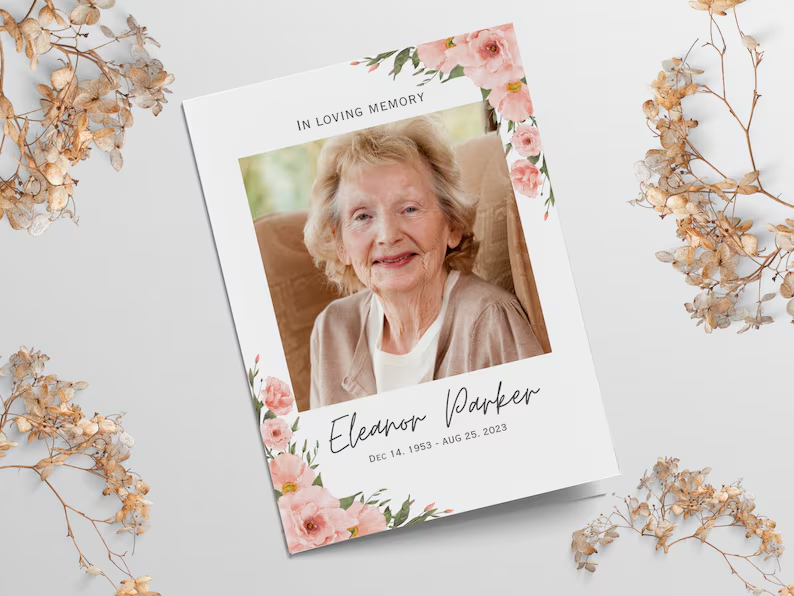
A funeral program is more than a guide to the service. It is also a meaningful keepsake that helps family members and friends remember a loved one’s life, personality, and relationships. Choosing the right images can make the program feel warm, personal, and thoughtfully prepared. However, selecting and arranging funeral program photos can be difficult when emotions are high and time is limited. The following tips can help you choose clear, respectful, and meaningful photographs that honor your loved one.
Choose a Strong Main Portrait
The main portrait is usually the most prominent image in a funeral program, so it should clearly represent the person being remembered. Select a photo in which the individual’s face is easy to see and their expression feels natural. A warm smile, relaxed pose, or familiar expression can help the image feel comforting to family and friends. Formal portraits work well, but a high-quality candid photo can be equally appropriate if it reflects the person’s character. Avoid images with distracting backgrounds, harsh shadows, or other people partially visible around the subject.
Consider how recently the photograph was taken and whether it reflects how most attendees remember the individual. Some families prefer a recent portrait, while others choose a photo from a particularly happy or meaningful period. There is no single correct choice, as long as the image feels recognizable and respectful. When possible, ask a few close family members for input before making the final selection. A photograph that creates a shared sense of warmth is often the best option.
Prioritize High-Quality Images
Image quality is especially important because photos that look acceptable on a phone screen may appear blurry or pixelated when printed. Choose the highest-resolution version of each photograph you can find. Original digital files are usually better than images downloaded from social media, screenshots, or photos copied from text messages. If you are scanning printed pictures, scan them at a high resolution to preserve facial details and improve print quality. A professional printer or designer may also be able to enhance minor lighting or sharpness issues.
Before finalizing the program, review each image at approximately the size it will appear on the printed page. Zooming in too closely can expose graininess, compression, or motion blur that was not obvious at first. Check important details such as the eyes, smile, clothing, and edges of the face. If an image looks unclear, search for another version or choose a similar photograph. Clear funeral program photos will create a more polished and professional final design.
Select Photos That Tell a Life Story
A collection of photographs can show different stages, relationships, accomplishments, and experiences from a person’s life. Instead of selecting several nearly identical portraits, look for images that provide variety and context. Childhood pictures, graduation photos, wedding images, family gatherings, military service photographs, and hobby-related pictures can all contribute to a meaningful tribute. These images help attendees reflect on the individual as a complete person rather than focusing only on the final years of life. They can also introduce younger relatives to moments and stories they may not have known.
Consider organizing photographs by life stage or theme. A chronological arrangement can guide readers from childhood through adulthood, while a themed layout may highlight family, travel, faith, career, or community involvement. Keep the selection focused so the program does not feel crowded. A smaller group of meaningful images is usually more effective than a large collection of repetitive photos. Every photograph should add something valuable to the story.
Include Important Family and Relationship Photos
Photos with family members, friends, coworkers, or community groups can show the relationships that shaped the person’s life. Select images that reflect genuine connection, such as celebrations, vacations, reunions, holidays, or ordinary moments shared with loved ones. Group photos are especially useful when they feature close family members or important milestones. However, make sure the person being honored remains easy to identify within the image. Large group photos may lose detail when reduced to fit a small funeral program page.
When choosing relationship photos, consider whether the images might unintentionally exclude or upset close family members. It may not be possible to include everyone, but a balanced selection can help the program feel thoughtful and inclusive. Try to represent different parts of the person’s life without giving too much attention to one period or relationship. When appropriate, ask immediate family members whether there are specific photos they would like included. This simple step can prevent misunderstandings during an emotional time.
Use a Balanced Mix of Formal and Candid Photos
Formal photographs provide clarity and structure, while candid images often reveal personality and emotion. Combining both styles can make a funeral program feel dignified without becoming overly serious or impersonal. A professional portrait may work well on the cover, while informal pictures can be used inside the program or in a memorial collage. Candid photographs may show the individual laughing, cooking, gardening, traveling, playing with grandchildren, or participating in a favorite activity. These moments can bring comfort because they remind attendees of how the person lived.
Use candid photographs carefully and choose images that will still feel appropriate in a memorial setting. Avoid photos that could embarrass the individual, create confusion, or distract from the tone of the service. Personal humor may be suitable when it reflects the family’s wishes and the person’s personality, but it should be handled respectfully. Ask whether the image would feel meaningful to the majority of attendees. When in doubt, select the photo that communicates warmth, dignity, and authenticity.
Edit Photos Carefully
Basic photo editing can improve brightness, contrast, cropping, and color balance. Small adjustments may help an older or darker photograph reproduce more clearly in print. Cropping can also remove distracting objects, unnecessary background space, or unrelated people. However, avoid excessive filters, artificial effects, or heavy retouching that make the person look unnatural. The goal is to improve the photograph while preserving its original character.
Black-and-white conversion can help photographs from different decades look more consistent, especially when the program uses a traditional design. Still, some images may lose emotional impact or important details when color is removed. Compare both versions before deciding which one fits the layout. Be cautious when using automated enhancement tools because they can alter facial features, skin texture, or small details. Always review edited funeral program photos closely before sending the final file to print.
Plan the Layout Before Adding Too Many Photos
A well-designed funeral program should feel organized, readable, and visually balanced. Decide how many pages the program will contain before selecting a large number of images. A simple folded program may only have room for one cover portrait and a few interior photos, while a multipage booklet can accommodate a larger visual tribute. Leave enough space for the obituary, order of service, poems, acknowledgments, and other important text. Photographs should support the content rather than compete with it.
Useful layout options include:
- One large cover portrait with two or three smaller interior images
- A chronological photo timeline
- A full-page memorial collage
- Small photographs placed beside obituary sections
- A final tribute page featuring family and milestone photos
Maintain consistent spacing, borders, and image shapes throughout the program. Avoid stretching photographs to fit a frame because this can distort faces and proportions. Use simple backgrounds that allow the images to remain the focus. A clean layout will make the program easier to read and more meaningful to keep.
Ask Permission When Necessary
Most family photographs can be used without concern, but certain images may require additional consideration. Professional studio portraits, school photographs, or images taken by a hired photographer may be protected by copyright. Contact the photographer when possible, especially if the program will be printed in large quantities or shared online. Families should also consider the privacy of living people shown in sensitive or personal photographs. A quick request for permission can prevent discomfort or conflict.
Be especially careful with images obtained from social media. A photo may have been posted publicly, but that does not always mean the photographer or people pictured expect it to be reproduced. Try to locate the original file and confirm that close family members are comfortable with its use. Avoid photographs that reveal private information, medical settings, or vulnerable moments unless the family has specifically approved them. Respect should guide every image choice.
Proof the Program Before Printing
Always review a complete digital or printed proof before approving the final funeral program. Check that every image appears in the correct position and that no faces have been accidentally cropped. Confirm that photographs are not stretched, overly dark, or placed too close to the edge of the page. Review captions, names, dates, and relationships for accuracy. It is helpful to have at least one other family member inspect the proof because a fresh set of eyes may notice problems you missed.
If time allows, print one sample using the same paper size and color settings planned for the final version. Colors can appear different in print than they do on a computer or phone screen. Dark images may become even darker, while low-resolution photos may look less clear. Make corrections before ordering the full quantity. A careful proofing process can prevent errors in a keepsake that families may save for many years.
Frequently Asked Questions About Funeral Program Photos
How many photos should be included in a funeral program?
The ideal number depends on the length and design of the program. A basic folded program may include three to six photos, while a larger booklet may contain ten or more. Choose quality and meaning over quantity.
Should the main funeral program photo be recent?
The main photo does not have to be recent. Select an image that is recognizable, flattering, and representative of how loved ones remember the person. Some families prefer a recent portrait, while others choose a meaningful image from earlier in life.
Can old printed photographs be used?
Yes, old photographs can be scanned and included. Use a high-resolution scanner and gently clean the photo surface before scanning. Avoid using a phone camera unless scanning is not available, as reflections and uneven lighting may reduce quality.
Is it appropriate to use casual photos?
Casual photographs are appropriate when they are respectful and reflect the individual’s personality. They often add warmth and authenticity to the program. Pairing casual images with a formal cover portrait creates a balanced presentation.
Should photos have captions?
Captions are optional but can provide helpful context. Short captions may identify people, places, dates, milestones, or special occasions. Keep captions brief so they do not overwhelm the layout.
Can social media photos be used?
Social media photos can be used, but original files are preferable because they usually have better resolution. Confirm that the family and any living people pictured are comfortable with the image. Also consider whether the photographer’s permission is needed.
Create a Tribute That Feels Personal
The best funeral program photos are not always the most formal or technically perfect images. They are the photographs that capture a familiar smile, a cherished relationship, a proud accomplishment, or a meaningful moment. Choose images with care, organize them thoughtfully, and make sure they print clearly. A balanced collection can help tell the story of a life while providing comfort to those attending the service. With the right photographs, a funeral program becomes a lasting tribute that family and friends can revisit for years.







Comment