
How to Transcribe Video in 2026: 4 Main Methods

In daily work, finding a key conclusion in a debriefing meeting, client interview, or an hour-long podcast recording often requires wearing headphones and frantically rewinding. This not only interrupts deep thinking but also severely depletes core work hours.
To completely overcome this efficiency bottleneck, efficient video transcription has become an essential survival skill for modern professionals. This guide will provide an in-depth overview of four of the most practical video-to-text solutions, helping you easily transform media files into structured, highly searchable text assets.
The Core Value and Application Scenarios of Video Transcription
For professionals who handle numerous meetings and communication records daily, converting audio and video into text is an effective way to save time. Using a reliable tool like ai transcribe video can help you skip tedious manual transcription and directly extract key information.
Core Value
- Say Goodbye to Manual Transcription: No more repeatedly pausing meetings to organize minutes; the system automatically converts hours of conversation into a text draft.
- Quick Keyword Search: Escape the pain of blindly searching for information by dragging the progress bar. With the text transcript, simply press “Ctrl+F” to search and locate the information in a second.
- Accelerated Video Review: For one or two hours of internal training or industry-sharing recordings, directly scan the text version for valuable insights much faster than watching the video frame by frame.
Main Application Scenarios
- Internal Meetings: Automatically extracts communication details and clarifies each person’s action items.
- Customer Interviews: Help product and sales personnel quickly extract customer needs and feedback from massive amounts of research recordings.
- Business Training: Quickly convert large amounts of training videos into searchable text-based SOP manuals.
- Webinars: Directly extract key text points from long online sharing sessions for easy archiving and upward reporting.
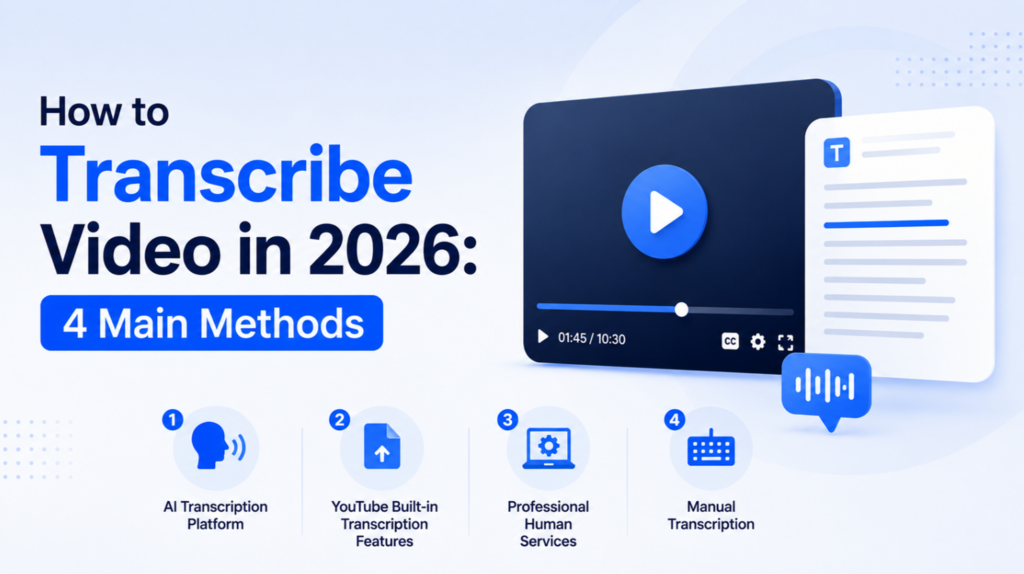
4 Best Ways to Transcribe a Video to Text
Choosing the most suitable transcription solution requires finding the optimal balance between processing time, final accuracy, and overall budget constraints.
AI Transcription Platform
For workflows that require handling large volumes of long media tasks daily, professional AI transcription platforms are the most scalable and cost-effective modern solution. These tools run entirely within a browser; users do not need to download cumbersome local clients or purchase expensive dedicated graphics card hardware.
In this efficiency race, Hoocs.ai is a standout tool. The video to text transcription platform not only supports single large files up to 5 hours in length but also offers a file upload limit of up to 10GB and supports batch uploads. Even more powerful is its built-in intelligent AI summarization function, which can automatically extract the core points of long recordings and generate mind maps in seconds, making information extraction incredibly easy.
Pros
- 10x Enhanced Processing Performance: Hours of video can be completely converted to text in minutes.
- 130+ Global Multilingual Support: Natively and smoothly recognizes over 130 languages and regional accents, perfectly supporting scenarios with multiple speakers.
- Generous 300-Minute Trial: Newly registered accounts receive a free 300-minute trial, allowing you to start exploring at zero cost.
- 23+ Flexible Integration Ecosystem: Supports one-click drag-and-drop upload of 11 mainstream audio and video formats such as WAV, MP3, and MP4, and supports export to over 23 formats including SRT and Word.
Cons
- No Dedicated Mobile App Available
- Human editing services are currently unavailable.
YouTube’s Built-In Transcript Features
If the video you need to process is already on YouTube, utilizing the platform’s built-in “Show Transcript” feature is a handy, free trick. For certain public videos with clear audio, the platform’s backend automatically generates a draft transcript using speech recognition technology.
However, this native feature does not work for every video; it relies heavily on audio quality and language. If there is significant background noise, unclear pronunciation, or if the creator has disabled captioning, you will not be able to obtain a transcript.
In contrast, online AI platforms like Hoocs.ai offer far greater flexibility. You simply paste the YouTube video URL—regardless of whether the original video has captions—and the software automatically extracts and generates a high-accuracy transcript, perfectly formatted with punctuation and speaker labels. Furthermore, YouTube’s built-in tools cannot process confidential meeting recordings or internal offline files stored locally.
Professional Human Services
When facing demanding scenarios with zero tolerance for text errors, such as legal proceedings videos, international medical academic research reports, or major compliance reviews, traditional professional human transcription services remain a necessity for businesses and organizations.
The biggest advantage of online human stenography lies in its nuanced understanding of context, accurately recognizing complex and obscure professional terminology, extremely noisy background noise, and unclear multi-person voiceovers.
However, human services also come with significant commercial costs. Their billing model is extremely expensive, typically charging high fees per minute of video ($1 to $3 per minute), which can quickly exceed budgets for large-scale video projects. Furthermore, human proofreading usually requires a waiting period of one to several business days, completely unable to meet immediate delivery needs.
Manual Transcription
Manual transcription is the most basic solution. It involves splitting the screen in half, playing the video on one half, and opening Notepad on the other. You listen, pause, and type simultaneously while wearing headphones. The essence of this method is that it gives you 100% control over the content, and the entire process is completed offline, ensuring that confidential corporate assets are never leaked.
For short social media videos with zero budget or less than one minute in length, DIY is a very practical backup option. However, manual transcription is an extremely physically demanding and tedious labor-intensive task. Processing a single video typically requires 4 to 8 times its actual length, making it extremely inefficient in the high-frequency workflow of daily work.
Comparison: Which Tool to Transcribe Video to Text Is Best?
| Method Type | Cost Structure | Processing Speed | Accuracy Range | Best For |
| Online AI Platform | Low | Extremely Fast | 90% – 99% | Daily meetings, interviews, and content creation |
| YouTube Built-In Features | Free | Instant | 70% – 85% | Public web podcast references and basic lookups |
| Professional Human Services | Expensive | Slow | 95%-99% | Legal court records and strict compliance audits |
| Manual Transcription | Free (Labor cost) | Very Slow | Dependent on typist | 1-minute short clips and extreme high-privacy files |
Conclusion
In the modern workplace, quickly converting audio and video into searchable text is a key step in improving work efficiency. While traditional manual transcription and built-in free tools still have value in certain scenarios, they fall short in terms of speed when dealing with long videos that can easily last for hours.
If you crave a lightning-fast conversion experience and desire to extract meeting key points with a single click, turning to a professional AI transcription platform is undoubtedly a smart productivity strategy. Utilizing automated software like Hoocs AI, which offers a 300-minute free trial, you can completely free yourself from tedious transcription tasks and dedicate your valuable energy to what truly matters.







Comment