Introduction
The Glock 20 is widely known as a true powerhouse in the modern firearms world. Chambered in the hard-hitting 10mm auto, it is a top choice for outdoor enthusiasts, hunters, and those wanting serious self-defense capabilities. However, even with its legendary factory reliability, many owners look for ways to improve their overall shooting experience. Upgrading the upper half of your handgun is one of the most effective ways to boost performance, accuracy, and overall feel. Whether you want to add a modern red dot sight or simply improve your grip for easier racking, finding the right Glock 20 Slide can completely transform your firearm. In this comprehensive guide, we will explore the key features, important benefits, and vital considerations you need to keep in mind when choosing the perfect upgrade for your reliable 10mm companion.
What Makes the 10mm Platform Unique?
To understand why the upper assembly matters so much, we first need to look closely at the 10mm cartridge itself. This caliber generates significantly more pressure and recoil than standard rounds like the popular 9mm. Because of this extra force, the handgun’s upper components take a massive amount of stress during every single shot. A standard factory setup handles this well, but aftermarket and premium replacement options are often built with enhanced durability specifically in mind. Upgrading gives you the chance to use tougher materials and better internal tolerances. When you shoot heavy bear-defense loads or fast-moving target rounds, a high-quality upper assembly helps manage the intense recoil smoothly. It ensures your firearm cycles reliably without causing excessive wear and tear on the internal parts over long periods of heavy use.
Key Benefits of a Slide Upgrade
Many shooters wonder if changing their factory setup is truly worth the initial investment. The short answer is yes, as it provides several instant improvements to your daily shooting experience. Upgrading your slide offers practical, real-world benefits that go far beyond just changing how the gun looks on the outside.
- Better Grip: Upgraded versions often feature deep front and rear serrations, making the gun much easier to rack under stress or with sweaty hands.
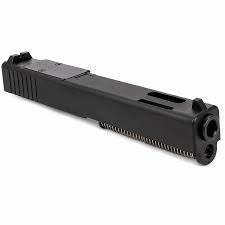
- Optic Compatibility: A custom or pre-cut setup allows you to easily mount a modern red dot sight without needing expensive custom machine work.
- Weight Management: Special window cuts can reduce the overall weight, which helps balance the heavy 10mm recoil and allows the gun to cycle faster.
- Enhanced Appearance: New coatings and unique geometric designs give your firearm a personalized, custom look.
Understanding Optic Cuts and Sights
One of the most common reasons people upgrade their firearm today is to add a modern red dot sight. Shooting with a red dot is generally faster and often much more accurate than using traditional iron sights, especially at longer outdoor distances. When shopping for a new Glock 20 Slide, you will see many excellent options that come pre-cut for optics. This means the top of the metal is already professionally machined to fit popular red dot brands directly out of the box. You do not have to send your gun away to a machine shop and wait weeks to get it back. Additionally, many of these upgraded setups allow you to install taller iron sights. These taller sights act as a backup, meaning you can still aim perfectly even if your electronic red dot battery unexpectedly dies.
Materials and Protective Coatings
Exceptional durability is everything when you are dealing with a powerful 10mm pistol. Because this firearm is often carried in harsh, unforgiving outdoor environments, the metal must be able to resist rust, moisture, and daily wear perfectly. High-quality slides are typically machined from incredibly strong stainless steel, such as 17-4 or 416 billet steel. This provides a solid, heavy-duty foundation that will not warp or crack under heavy use. Beyond the raw steel, the outer finish is equally important for longevity. Advanced protective coatings like Black Nitride, DLC (Diamond-Like Carbon), or Cerakote add a tough outer shield. These premium finishes stop rust in its tracks, reduce friction between moving parts, and make the metal highly resistant to deep scratches. A premium finish ensures your gun functions flawlessly whether you are in a rainy forest or a dusty desert.
Top Features to Look For
With so many great choices currently on the market, it can be hard to know exactly what to buy. Focusing on a few specific design elements will quickly help you pick an option that fits your exact shooting style and personal needs.
- Front and Top Serrations: Look for aggressive cuts on the front and top of the metal. These provide maximum grip for press-checking your chamber safely.
- Chamfered Edges: Smoothed and sharply angled edges help the gun slide easily into a holster without snagging on your clothing or outdoor gear.
- Tighter Tolerances: Precise machining tolerances improve how the barrel fits, which directly increases your overall bullet accuracy downrange.
- Cover Plates: If you buy an optic-ready version, make sure it includes a matching metal cover plate to protect the screw holes securely.
Installation and Maintenance Tips
Swapping out the upper assembly on your handgun is usually a very straightforward process that you can easily do at home. However, it still requires basic care to ensure everything runs smoothly from the start. Always double-check that your firearm is completely unloaded before starting any maintenance work. When installing new internal parts like the firing pin or extractor, take your time and follow the manufacturer instructions closely. Once assembled, proper lubrication is the true secret to a long-lasting, reliable gun. Apply a small amount of quality gun oil to the rails where the metal rubs against the frame. Because the 10mm creates high pressure, regular cleaning is highly recommended. Wipe away carbon buildup after every trip to the shooting range to keep your new components functioning at their absolute best for many years to come.
Conclusion
Modifying your 10mm handgun is an exciting and rewarding project that can dramatically improve how you shoot. The factory setup is certainly reliable, but adding modern features brings the firearm directly into the present day. By choosing a high-quality upgrade, you gain the ability to easily mount optics, instantly improve your grip, and protect your investment with superior metal coatings. Whether you rely on your gun for backcountry hunting, target practice, or daily security, having a well-built upper assembly makes a highly noticeable difference. Take the time to carefully consider which features matter most to you, from optic cuts to weight-reducing windows. When you invest in a premium upgrade, you are completely ensuring your firearm remains a powerful, highly accurate, and incredibly dependable tool that will serve you faithfully in any situation.