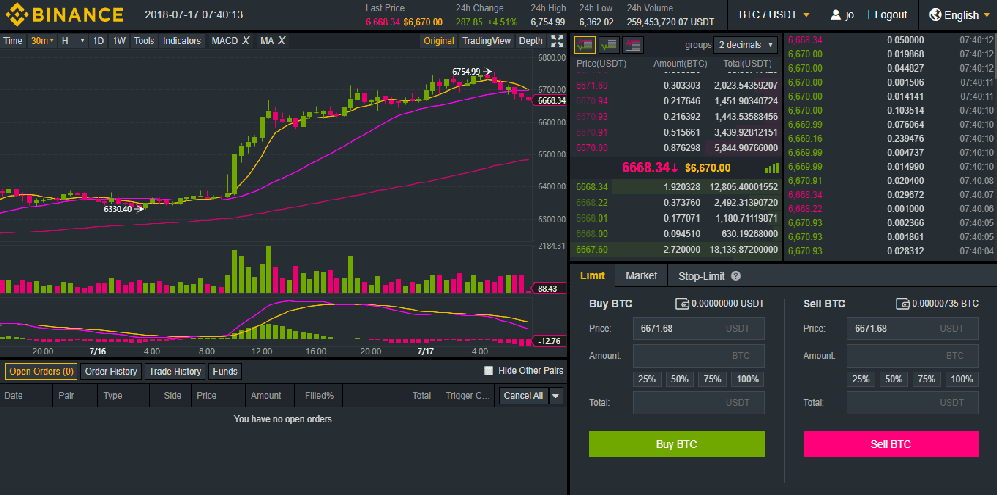
If you have been asking yourself how to trade in Cryptocurrency, here is the answer. Crypto trading is done through exchange platforms basically known as a cryptocurrency exchange. The platform enables buying, selling or exchange of one digital coin or traditional currencies (Fiat currencies) with another. Examples of fiat currencies are dollars, Pounds or Euros. Further reading: A Step by Step Guide on How to use the Trade Exchange Platform. Further reading: 14 Ways Cryptocurrency Exchanges are diversifying Services.
Methods of cryptocurrency exchanges
Usually, there are three methods by which cryptocurrency exchange can be conducted depending on which is viable for the trader.
• Direct trading – It is a method by which one person exchange currencies with another directly. In this approach consenting traders from different countries agree to on the exchange. They set their own exchange rates because it is not governed by the market prices.
• Brokers – These are intermediaries between a trader and the markets. They do trade on behalf of the investor. They implement a similar strategy like in the foreign market exchange in which they run websites through which an investor can buy or sell currencies at some fees for the services offered.
• Trading Websites – They are online platforms run by companies to connect buyers and sellers of the digital coins. They provide the services at some small fees. Websites are the most popular exchange media because they do not involve a third party.
As earlier noted these media only support two types of exchanges. Fiat or cryptocurrencies. Through fiat exchange one is able to buy a crypto coin in dollars, pounds, and other traditional currencies.
In this way, a buyer can use cash, credit cards or their bank accounts to pay for the cryptocurrencies. Any new investor must first use fiat currency to acquire the digital coins of their choice.
The second type of exchange purely involves trading on one cryptocurrency against another, “pure cryptocurrency exchange.” It does not require cash and banks. In this method, a trader primarily deposits a crypto coin which they will exchange with a bitcoin or other altcoins.
It is important that a trader has some leverage while investing in cryptocurrency. For example, keeping both fiat and crypto simultaneously is quite advantageous. It hastens exchanges whenever an opportunity arises. It also gives a hedge on the investment.
The choice of an exchange platform and the coins, however, heavily influence which between the two types of exchange is the best.
Features to consider to identify the best cryptocurrency exchange
Crypto industry can at times be very volatile. An observant investor can make gigantic returns when lousy ones are making all-time losses. Losses can arise from fraud mostly because of a poor choice of a trading platform. It is important to examine the listed issues below to help in identifying the best cryptocurrency exchange.
• Valid verification process
Genuine websites require valid identification documents when signing up for a trading account. Of course, the accounts are used in deposits, withdrawals, and exchanges. Some sites hide the identity of the owner to uphold privacy and limit chances of invasion.
The sign-up process can be rigorous and take few days before approval. This is in the best interest of the user to enhance security. Besides, it ensures that accounts are protected from scams and other malice that can be posed by intruders. Most websites have also implemented stringent registration procedures to curb money laundering.
• Reputation
Customer reviews do hint the credibility of the exchange platforms. They are important in examining the performance of a platform. It is advisable to comb through past reviews and ask questions in related fora to know the aptness of the websites or brokers. A reputable platform should have numerous positive reviews.
• Methods of payment
Every exchange platform should have a credible payment method. You should find out if the platform uses PayPal, credit and debit cards or the wire transfers to process payments. Any platform that is not affiliated with a genuine payment system is probably a scam.
Note that it is a bit risky to link your credit card for payments as it can be vulnerable to fraud. Using credits cards also accrue higher charges. Wired transfers also sometimes take longer than anticipated. It is important to sign up for a website with an efficient payment method for quick transactions.
• Exchange rate
Exchange rates vary from one exchange platform to another. The rates can at times fluctuate to margins of even up to 10%. Shopping around for an exchange which can grant higher savings is beneficial for the investment.
• Transaction charges
Most websites provide information regarding deposits, withdrawals, and other transaction fees. It is important to compare the charges across the exchange media because they substantially differ. You don’t want to register with a site that will extort your investment in terms of service fees. However, transactional charges should not cloud your choice against a credible platform.
• Local regulations
Some user functions can be limited to some countries. Ensure that your chosen platform will grant you unrestricted access to most tools and functionalities. It will give you more leverage for trade regardless of where your location.
5 Best Cryptocurrency exchanges
There are numerous Websites providing cryptocurrency exchanges. These websites are not equally built so that some are better to use than others. Some are user interactive, secure and quite accessible.
Some websites are also preferred by investors for charging favorable transaction fees and support a variety of payment methods making them ideal for trade. Below is a list five best cryptocurrency exchange sites that have given more leverage to investors based past user reviews.
1. Binance
It tops the list of the best cryptocurrency exchanges. It has more than 140 listed altcoins thus having the highest volume of crypto exchanges. It has more enthusiasts because of low transactional charges at 0.05% for each transaction.
Binance supports both fiat and cryptocurrency exchanges and has integrated most of the payment methods. It has grown since its ICO probably because it is user-friendly and has integrated advanced security features to safeguard tractions.
Bitcoin is the most traded here based on the daily volume rankings. It is user-friendly and the best cryptocurrency exchange since largely favors beginners. It is decentralized and popular for providing discounts to traders. It has currently rolled out its mobile App to enhance convenience.
2. OKEx
It follows closely after Binance with high crypto volume ranking. It also has a considerably wide market cap. It allows exchanges for fiat currencies against other digital coins. Bitcoin is the most traded at 11.23%.
It is user-friendly, secure and high decentralized to improve efficiency. The platform can be accessed through its website, mobile Application, and API. It offers low transactional fees at 0.03% which makes it easier to maximize profit margins for traders. It is advantageous since it provides more cycles for hedging.
3. Huobi
It comes third among the best cryptocurrency exchanges due to wide market capital and crypto exchange volume. EOS is the most traded coin based on the current daily volume rankings. It can be traded against the dollar and its transaction fees stand at 0.2% for both maker and taker.
The platform is highly user interactive and secure for transactions. It does not demand much capital to register with Huobi. The website highly upholds privacy and protection of its clients. Besides, it provides a hedge for its customers.
4. Bitfinex
It has a high market cap and supports the exchange of fiat currencies with Bitcoin and other altcoins. Bitcoin currently tops the rank at 35.08% followed by Etherium and EOS. The platform accepts running of anonymous accounts to enhance privacy.
It charges 0.2% transaction fees and provides a leverage of 3.3x. It is very secure and efficient and supports mobile applications and can be accessed globally.
5. Upbit
Being the fifth among the giants, it has a wide trading volume. It only supports the exchange of Korean currency (KRW) against Bitcoin and other altcoins. The platform accepts several payment methods including banks. EOS is currently the most traded coin at 21.97%.
Its charges transaction fees of 0.25% for both maker and taker. It user interactive and provides a secure platform of exchange. This platform enjoys backup of Korean technology companies. Its major downfall is that it only accepts South Koreans investors.
The listed platforms are the best cryptocurrency exchanges currently. They are highly user interactive and secure for transactions. Most of them allow the exchange of both fiat, Bitcoin and other altcoins. They also charge lower transactional fees and provide some hedge for a soft landing. Other websites closely following in volume ranking are Bithumb, GDAX, HitBTC, Kraken, and LBank. These websites are secure and offer more leverage for crypto trading to enable investors to widen their profit margin.