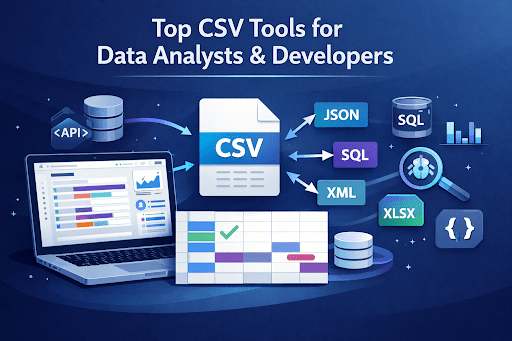
CSV (Comma-Separated Values) files are one of the most widely used data formats in the world. From data analytics and business intelligence to software development and database management, CSV files play a critical role in moving structured data between systems.
Developers frequently export datasets from databases as CSV files, while data analysts often use them for data cleaning, transformation, and visualization. CSV is also commonly used for API integrations, legacy system data transfers, and bulk database imports.
However, working with CSV files can quickly become challenging.
Common issues include:
- Converting CSV into formats like JSON, SQL, or XML
- Preparing data for API integration
- Importing datasets into databases
- Debugging large datasets
- Comparing changes between two CSV files
This is where online CSV tools become incredibly useful.
Modern browser-based tools allow you to quickly convert, validate, and analyze CSV data without installing software. In this guide, we’ll explore the best CSV tools for data analysts and developers, along with real-world use cases.
Why CSV Tools Are Essential for Data Analysts
CSV files remain a standard format because they are simple, lightweight, and compatible with nearly every data platform.
Key advantages of CSV include:
1. Universal Compatibility
CSV files work with:
- Excel
- Google Sheets
- SQL databases
- APIs
- Data pipelines
- analytics tools
This makes CSV ideal for data exchange between systems.
2. Easy Data Transformation
Developers and analysts frequently convert CSV files into other formats like:
- JSON for APIs
- SQL for database imports
- XML for enterprise integrations
3. Handling Large Datasets
Many analytics workflows involve large CSV datasets exported from systems like:
- CRMs
- analytics tools
- log files
- data warehouses
Specialized CSV tools help process these datasets efficiently.
4. Automation Workflows
CSV tools enable automated workflows such as:
- bulk database imports
- API data transformations
- analytics preprocessing
- dataset auditing
Because of these use cases, reliable CSV conversion tools are essential for modern data workflows.
Best Free CSV Tools for Data Analysts & Developers
Below are some of the most useful CSV tools that simplify data conversion, transformation, and debugging.
CSV to JSON Converter
One of the most common tasks developers face is converting CSV datasets into JSON format.
JSON is the standard format used in APIs and modern applications, so converting CSV to JSON is often necessary when integrating datasets into web services.
Use a CSV to JSON Converter when you need to:
- convert tabular data into structured JSON
- prepare datasets for APIs
- transform CSV exports into developer-friendly formats
Example workflow:
CSV dataset → JSON API format
Try the tool here: https://www.allfiletools.com/csv-to-json/
JSON to CSV Converter
Sometimes developers receive data from APIs in JSON format and need to convert it into CSV for analysis.
A JSON to CSV Converter helps transform API responses into spreadsheet-friendly data.
Common use cases include:
- exporting API data
- converting logs for analysis
- preparing datasets for Excel or BI tools
Try it here: https://www.allfiletools.com/csv-to-json/
CSV to Excel Converter
Data analysts often convert CSV files into Excel format to make data easier to visualize and manipulate.
A CSV to Excel Converter allows you to quickly open large CSV datasets in spreadsheet applications.
This is especially useful for:
- business reporting
- financial data analysis
- spreadsheet editing
- data visualization preparation
Try the tool: https://www.allfiletools.com/csv-to-excel/
Excel to CSV Converter
Sometimes data originates in spreadsheets but needs to be converted into CSV format for database imports or system integrations.
An Excel to CSV Converter makes it easy to export spreadsheet data into a universal format.
Common uses include:
- preparing bulk database imports
- exporting Excel reports
- sharing datasets between systems
Try it here: https://www.allfiletools.com/excel-to-csv/
CSV to SQL Converter
Developers frequently need to import CSV datasets into relational databases.
A CSV to SQL Converter automatically generates SQL insert queries from CSV data.
This tool is extremely helpful for:
- database migration
- bulk SQL imports
- development testing
Example SQL output:
INSERT INTO users (name,email)
VALUES (‘John’,’john@email.com’);
Try the tool here: https://www.allfiletools.com/csv-to-sql/
CSV to XML Converter
XML is still widely used in enterprise systems and legacy software.
A CSV to XML Converter transforms tabular data into XML format for system integrations.
Common scenarios include:
- enterprise software integrations
- legacy application data exchange
- structured data exports
Try the tool: https://www.allfiletools.com/csv-to-xml-converter/
XML to CSV Converter
If you’re working with XML feeds or legacy systems, you may need to extract structured data into CSV format for analysis.
An XML to CSV Converter helps convert hierarchical XML data into tabular CSV datasets.
This tool is useful for:
- data extraction
- analytics workflows
- converting XML feeds into spreadsheets
Try it here: https://www.allfiletools.com/xml-to-csv/
CSV Diff Tool
Debugging CSV datasets often requires comparing two files to find differences.
A CSV Diff Tool allows you to compare two CSV files and identify changes.
This is particularly useful for:
- dataset auditing
- debugging data pipelines
- comparing reports
- verifying data updates
Example use case:
- Compare two reports
- Identify changed records
- Detect missing rows
Try the tool: https://www.allfiletools.com/csv-diff/
Common Use Cases for CSV Tools
CSV tools support many real-world workflows for developers and analysts.
Data Analysis
Convert datasets into spreadsheet-friendly formats.
Example:
CSV → Excel
API Integration
Transform datasets into JSON for APIs.
Example:
CSV → JSON
Database Import
Prepare CSV datasets for SQL databases.
Example:
CSV → SQL
Data Auditing
Identify differences between datasets.
Example:
Compare two CSV files
How to Choose the Best CSV Tool
When selecting a CSV tool, consider the following factors.
File Size Support
Ensure the tool can handle large datasets without crashing.
Conversion Speed
Fast processing is important when dealing with large CSV files.
Security
Prefer tools that process data in the browser instead of uploading it to servers.
Browser Processing
Client-side tools protect your data and improve privacy.
Export Options
Good tools allow exporting data in multiple formats like:
- JSON
- SQL
- XML
- Excel
Benefits of Using Online CSV Tools
Online CSV tools offer several advantages compared to desktop software.
No Installation Required
You can use them instantly from your browser.
Fast Data Conversion
Most tools process files within seconds.
Cross-Platform Compatibility
They work on:
- Windows
- macOS
- Linux
Secure Processing
Many modern tools perform client-side processing, meaning your data never leaves your browser.
FAQs
What is a CSV file?
A CSV file (Comma-Separated Values) is a simple text format used to store tabular data where each value is separated by a comma.
How do I convert CSV to JSON?
You can use a CSV to JSON converter to automatically transform CSV datasets into JSON format suitable for APIs and applications.
Can CSV files be imported into SQL?
Yes. CSV files are commonly imported into SQL databases by converting them into SQL insert queries using a CSV to SQL converter.
What tool compares CSV files?
A CSV Diff Tool allows you to compare two CSV files and identify differences such as added, removed, or modified records.
Conclusion
CSV files remain one of the most important data formats for developers, analysts, and engineers.
Whether you’re preparing data for APIs, importing datasets into databases, or analyzing large spreadsheets, the right tools can dramatically simplify your workflow.
Tools like:
- CSV to JSON
- JSON to CSV
- CSV to Excel
- CSV to SQL
- CSV Diff
make it easy to transform, analyze, and debug CSV data quickly.
If you regularly work with structured datasets, these tools can save hours of manual work and help streamline your data processing pipeline.
🔹 Explore more powerful file conversion and online utilities at AllFileTools
🔹 For technical support, digital solutions, and expert services, visit LetDigitalFly IT Services
🔹 Discover additional career and productivity resources at Resume Slip Builder