Machine vision has become one of the quiet forces behind modern automation. It helps manufacturers inspect products at high speed, guides robots through precise movements, supports barcode reading, and improves consistency in environments where even small visual errors can become costly. Behind all of this, however, is one component that often deserves more attention than it gets: the lens.
The camera sensor may capture the image, and the software may interpret it, but the lens determines how well that image begins. If the lens introduces blur, distortion, poor contrast, or inconsistent focus, the entire vision system suffers. That is why machine vision lenses are not just accessories attached to a camera. They are critical optical tools that shape the quality, reliability, and usefulness of the data being captured.
In industrial settings, image quality is not about aesthetics. It is about making accurate decisions. A machine must distinguish between acceptable and defective products, detect the position of a part, read small markings, or measure dimensions with confidence. For that to happen, the optical path has to be carefully designed, and the lens is at the center of that process.
As machine vision systems become more advanced, the demands placed on lenses continue to grow. Higher resolutions, faster inspection speeds, more complex lighting conditions, and increasingly specialized applications all require a thoughtful approach to lens selection. Understanding how these lenses work, what types are available, and how to choose the right one can make the difference between a system that performs reliably and one that struggles from the start.
What Machine Vision Really Means
Machine vision refers to the use of cameras, optics, lighting, and software to allow machines to interpret visual information. In practical terms, it gives automated systems the ability to “see” objects, surfaces, motion, and patterns in ways that support inspection, control, and guidance.
These systems are common in manufacturing, packaging, logistics, medical technology, semiconductor production, agriculture, and many other fields. A typical setup includes a camera, a lens, a lighting system, and processing software. Each part plays a role, but the lens is one of the most influential because it controls how the scene reaches the camera sensor.
The Difference Between Seeing and Measuring
A human observer can often tolerate a slightly imperfect image and still understand what is happening. A machine vision system usually cannot. It depends on consistency. If it is measuring a component, the edges need to appear clearly. If it is reading a code, the contrast must be reliable. If it is detecting defects, the image must be sharp enough to show meaningful detail.
That is why machine vision is not only about capturing pictures. It is about creating dependable optical information that software can analyze accurately.
Why the Lens Matters So Much
In many imaging projects, people focus first on the camera resolution or software capabilities. Those are important, but they cannot compensate for poor optics. If the lens is not suited to the job, the camera will only record a flawed version of the scene.
Machine vision lenses control focus, field of view, distortion, and light transmission. They help determine whether the image is clear enough for precise inspection and whether the geometry of the scene remains accurate enough for measurement. In systems where tolerances are tight, the quality of the lens often determines whether the entire application succeeds.
How Machine Vision Lenses Shape Image Quality
Every lens gathers light from the scene and directs it toward the image sensor. That sounds simple, but in practice it involves a careful balance of optical design choices that affect sharpness, brightness, contrast, and distortion.
Machine vision lenses are specifically built to support imaging tasks where accuracy matters more than general-purpose photography. They are designed to perform predictably in controlled industrial environments, often over long periods of continuous use.
Light, Focus, and Sensor Performance
When light reflects off an object, it travels through the lens and is focused onto the sensor. If that focus is precise, the sensor receives a sharp representation of the subject. If it is off even slightly, details may soften or become inconsistent across the frame.
The lens also influences how much light reaches the sensor. Too little light can require longer exposure times or introduce noise. Too much light can create glare or wash out important features. A well-matched lens helps balance these factors so the system can capture usable data under real operating conditions.
Distortion and Optical Accuracy
Distortion is one of the most important issues in machine vision. In ordinary photography, mild distortion may be acceptable. In industrial inspection, it can create serious measurement errors.
A lens may introduce barrel distortion, where straight lines bulge outward, or pincushion distortion, where lines appear pulled inward. These effects can alter the perceived shape or position of an object. For vision systems used in dimensional analysis, part alignment, or robotic guidance, that can lead to unreliable results.
High-quality machine vision lenses are designed to minimize these optical issues and maintain image consistency across the field.
Key Features to Consider When Choosing Machine Vision Lenses
Selecting the right lens is not just a matter of size or brand. It involves understanding the optical demands of the application and matching the lens to the camera, working distance, subject size, and inspection goal.
Three of the most important factors are focal length, aperture, and distortion performance.
Focal Length and Field of View
Focal length determines how much of the scene the lens can capture. A shorter focal length provides a wider field of view, which is useful for imaging larger areas or broader scenes. A longer focal length narrows the field of view and brings the subject closer, which is often helpful when the camera must be mounted farther away.
The correct focal length depends on the size of the object being inspected, the size of the sensor, and the physical distance between the camera and the target. If the focal length is poorly chosen, the system may either miss part of the subject or fail to capture enough detail.
Aperture and Depth of Field
Aperture controls how much light enters the lens. It is commonly expressed in f-numbers. A wider aperture allows more light to pass through, which can be useful in low-light environments or when fast shutter speeds are needed.
At the same time, aperture affects depth of field. A wide aperture creates a shallower focus range, while a smaller aperture increases the depth of field and keeps more of the scene in focus. In machine vision, this matters when parts vary in height or when multiple surfaces need to remain sharp at once.
The ideal setting depends on the application. A close inspection of one small feature may benefit from selective focus, while a larger inspection area may require broader clarity.
Distortion Control
Distortion control is especially important in systems used for metrology, positioning, and precision inspection. A lens with low distortion preserves the shape and location of objects more accurately across the image.
For tasks involving measurement, alignment, or dimensional verification, minimizing distortion is not optional. It is fundamental to system accuracy.
Common Types of Machine Vision Lenses
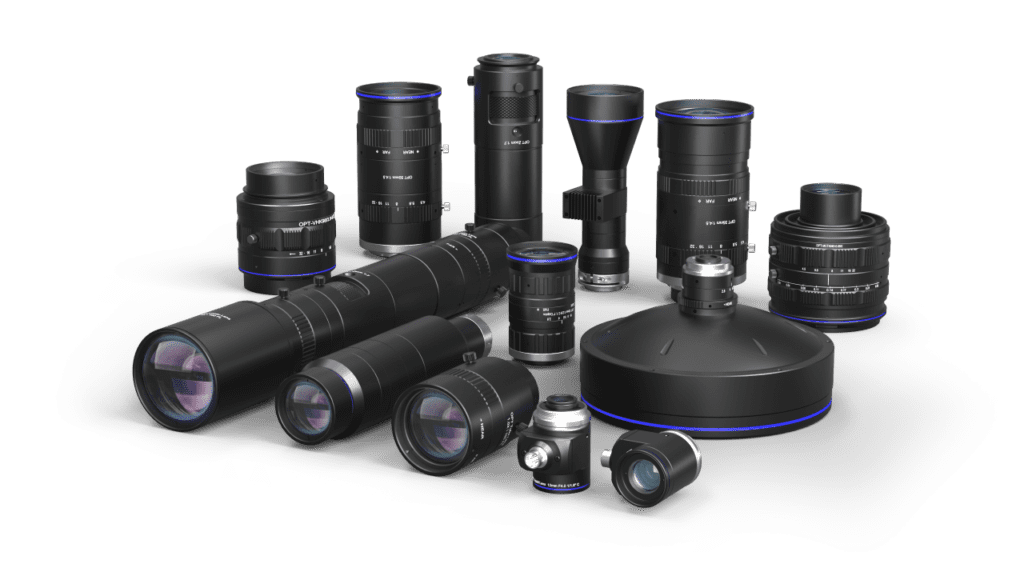
Machine vision lenses come in several forms, and the best choice depends on the application rather than the popularity of the lens type. Understanding the main categories helps narrow the selection.
C-Mount and CS-Mount Lenses
C-mount lenses are among the most widely used in industrial imaging. They are known for their compatibility with many cameras and for being available in a broad range of focal lengths and optical qualities. Their standard mounting format makes them a common choice for many inspection systems.
CS-mount lenses are similar but use a shorter flange distance. They are often paired with cameras that have smaller sensors or different space requirements. The distinction may seem minor, but mechanical compatibility matters, and the wrong mount can create alignment problems or prevent proper focus.
Telecentric Lenses
Telecentric lenses are highly valuable in measurement-heavy applications. Unlike standard lenses, they are designed to reduce perspective error, which means object size appears more consistent even when the object moves slightly closer to or farther from the lens.
This makes telecentric optics especially useful for gauging, dimensional inspection, and edge-based measurement tasks where consistency is critical. They are often more specialized and more expensive, but in the right application they provide performance that standard lenses cannot match.
Macro and Close-Up Lenses
Some tasks require imaging very small parts or fine surface details. Macro-style machine vision lenses are designed for these close working distances and higher magnifications. They are often used in electronics, semiconductor inspection, medical devices, and precision assembly.
These lenses help capture features that would otherwise be too small to resolve clearly with more general-purpose optics.
Wide-Angle and Specialized Lenses
In other applications, a wide field of view matters more than magnification. Wide-angle lenses can help inspect larger areas or fit the full scene into the image when space is limited. Fisheye and other specialized optics may also be used where unusual viewing geometry or broad scene coverage is needed.
The key is to avoid assuming one lens style works for everything. Machine vision lenses are most effective when selected around the real demands of the task.
Matching the Lens to the Application
Lens selection becomes easier when it starts with the application rather than the catalog. The question is not “Which lens is best?” but “Which lens is best for this specific system?”
Think About the Task First
A barcode reading station, a robotic pick-and-place system, and a metrology setup may all use cameras, but they require very different optics. One may prioritize speed and broad coverage. Another may need low distortion and tight geometric accuracy. Another may need a lens that performs well under specific lighting conditions or inside a compact enclosure.
That is why the application itself should guide the optical design.
Consider the Environment
Machine vision systems often operate in places that are dusty, humid, hot, or exposed to vibration. In some industries, lenses may need sealed housings, rugged coatings, or materials that hold alignment under tough conditions.
Food processing, pharmaceutical production, outdoor systems, and industrial plants all create environmental demands that can affect lens performance and longevity. In these cases, mechanical durability matters alongside optical quality.
Why Calibration Matters in Machine Vision
Even an excellent lens does not perform at its best without calibration. Calibration helps align the vision system with real-world conditions so the images it captures can be interpreted accurately.
Turning Good Optics Into Reliable Data
Calibration allows software to account for lens distortion, perspective, and geometric offsets. This is especially important in systems used for measurement or robotic guidance, where small optical errors can translate into incorrect actions.
It also helps ensure repeatability. In industrial settings, repeatability matters just as much as raw accuracy because the system must perform consistently over time.
Common Calibration Challenges
Calibration can fail when environmental conditions shift, when the camera and lens are not mounted securely, or when the wrong calibration pattern or software method is used. Poor alignment during setup is another common issue.
Routine recalibration is often necessary, especially in systems that experience vibration, temperature changes, or mechanical adjustment. A machine vision system should never be treated as permanently calibrated after one successful setup.
New Trends in Machine Vision Lenses
As imaging technology evolves, lenses are changing too. New applications are asking for better speed, more adaptability, and stronger performance in difficult environments.
Smarter Optical Systems
Some emerging lenses are designed with more intelligent adjustment capabilities, allowing systems to respond more dynamically to changing conditions. As automation becomes more advanced, optical systems are being expected to support faster decisions and more flexible imaging tasks.
This does not eliminate the need for careful selection, but it does show that machine vision lenses are becoming more responsive and application-aware.
Better Materials and Surface Technologies
Advances in coatings and precision manufacturing are improving light transmission, reducing reflection, and helping control optical artifacts such as flare and ghosting. These improvements are especially valuable in high-contrast or difficult lighting environments.
As sensors improve and resolutions rise, the pressure on optics increases as well. Lenses must keep up by delivering sharper, cleaner images across more demanding use cases.
Ruggedization for Harsh Conditions
More machine vision systems are now deployed in environments where moisture, dust, impact, and temperature swings are routine. This has led to greater demand for waterproof, sealed, and ruggedized lens designs.
For businesses relying on automation in challenging settings, durability is not a secondary concern. It is part of system reliability.
Getting Better Results From Machine Vision Lenses
The best outcomes come from treating the lens as a core system component rather than an afterthought. A strong lens choice improves image quality, reduces downstream software issues, and helps the entire system operate with greater confidence.
Start with the needs of the application. Consider object size, working distance, sensor format, lighting conditions, and measurement accuracy. Then choose optics that support those requirements directly.
It also helps to think long term. A lens that only barely meets today’s demand may become a limitation later if inspection speed increases or image requirements become more demanding. Choosing thoughtfully at the beginning often saves time and cost later.
Why Machine Vision Lenses Deserve More Attention
Machine vision systems rely on many parts working together, but the lens plays a uniquely important role. It is the first control point in the image path, and every decision made after the image is captured depends on the quality of what the lens delivered.
That is why machine vision lenses matter so much in automation, inspection, and intelligent imaging systems. They influence sharpness, measurement accuracy, distortion control, light handling, and system consistency. A weak lens can limit even the most advanced camera and software setup. A well-chosen one can strengthen the entire application.
As industries continue to demand more from automation, the importance of reliable optics will only grow. Understanding how these lenses work and how to choose them well is one of the most practical steps engineers and system designers can take toward building better vision systems.
Read More From Techbullion