A clean home office isn’t just about the desk or monitor you choose.
For many people, the real challenge starts once multiple devices enter the picture — laptops, phones, tablets, earbuds, and other accessories all needing power at the same time.
Cable clutter is one of the most common reasons a desk feels messy and inefficient, even when everything else looks well organized.
Why Desk Cable Management Matters in a Home Office
Poor cable management affects more than appearance.
It often leads to:
- Limited usable desk space
- Constant unplugging and cable swapping
- Visual distraction during work hours
- Increased wear on cables and chargers
When power sources are scattered across the desk, even simple daily tasks can feel more complicated than they should be.
The Common Problem: Too Many Chargers, Too Little Order
Most home office setups grow organically.
You start with a laptop charger.Then add a phone cable.Later, earbuds, a tablet, or another device.
Before long, multiple chargers are plugged into a power strip, cables overlap, and there’s no clear system for keeping things tidy. Traditional power strips solve outlet access, but they don’t solve charging organization.
Why Centralized Desk Power Works Better
Effective desk cable management isn’t about hiding wires.It’s about reducing how many wires you actually need on your desk.
A centralized desk power solution allows:
- Multiple devices to charge from one location
- Shorter, more predictable cable paths
- Fewer loose adapters cluttering the workspace
- Easier daily use without constant re-plugging
This approach is especially helpful for home offices that rely heavily on USB-powered devices.
A Practical Desk Power Example: Gitryin
Some desk power solutions are designed specifically to address these problems.
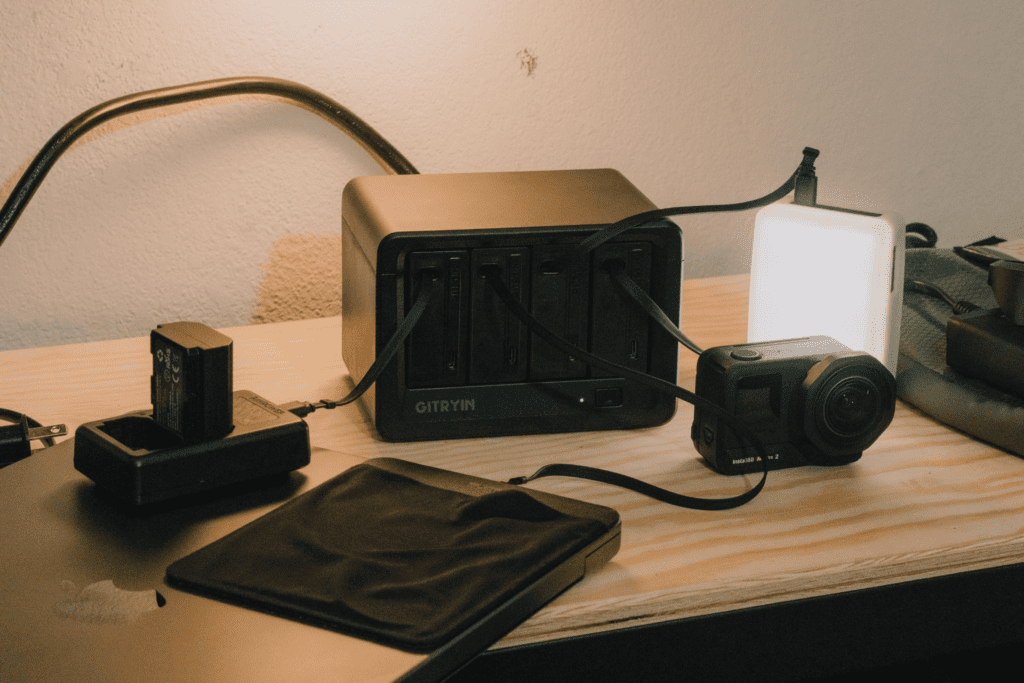
For example, a desktop charging station from Gitryin combines multiple power outlets and USB ports into a single, compact unit intended for desk use. Instead of relying on several separate chargers, this type of setup centralizes power delivery and helps keep cables organized in one place.
By replacing multiple adapters with one integrated system, solutions like Gitryin make it easier to maintain a clean, functional desk without changing how you work.
How to Choose a Desk Power Solution for Cable Management
When evaluating desk power options, it’s better to focus on usability than on individual features.
Key factors to consider include:
- Support for both USB-C and USB-A devices
- Sufficient power for laptops and accessories
- A compact footprint suitable for desk placement
- Cable routing that keeps cords controlled and accessible
- Built-in safety for everyday use
The right solution should simplify your setup rather than add another layer of complexity.
Simple Habits That Help Keep Cables Organized
Even with a centralized power solution, small habits make a difference:
- Use shorter cables whenever possible
- Secure excess cable length with clips or ties
- Keep frequently used cables within easy reach
- Avoid stacking chargers or adapters
These small steps help maintain a tidy desk over time.
Final Thoughts
Desk cable management is often overlooked in home office setups, but it has a direct impact on comfort, focus, and productivity.
By moving away from scattered chargers and toward a centralized power solution like Gitryin, it becomes much easier to keep cables under control and the workspace streamlined.
A cleaner desk isn’t about perfection — it’s about removing unnecessary friction from your daily workflow.