Dealing with multiple accounts, maintaining a posting schedule, and even interacting with followers can gobble up your day in no time.
That is why social media management tools are a must-have.
They allow you to schedule content in advance, post regularly, monitor what’s working, and talk to customers without switching between a dozen different apps.
The good news is you don’t need a big marketing budget to get started; you just need to pick the right tool.
Below are 7 social media management tools that can help you stay organized, save time, and make a bigger impact online, no matter how small your team is.
7 Social Media Management Tools That Are Right for You
But before we list the 7 tools, here’s a comparison table of the best 3 in this list so you know which tools are up there!
| Items | Social Champ | Buffer | Agorapulse |
| Pricing | $4/month for Starter Plan | $5/month for Essentials Plan | $79/month for Standard Plan |
| Best for | Small businesses looking for a budget-friendly all-in-one tool | Small businesses need basic features | Businesses looking for advanced listening, analytics, and reporting. |
| G2 Rating | 4.4/5 | 4.3/5 | 4.5/5 |
| Support | Live chat and email support, call support is available, help articles are available | Email support and knowledge base | Chat + email, custom plans include call support. |
| Key Features | Publishing & scheduling, Social media calendar, Social inbox, Social listening, Team collaboration, Analytics | Publishing, Analytics, Social Inox, Team collaboration | Publishing, Engagement, Reporting, Listening |
1 Social Champ

Social Champ’s Homepage

Social Champ is a Social Media Management tool designed for small businesses that need an affordable yet feature-rich solution to manage multiple platforms.
The interface is simple, easy to use for newbies, yet powerful enough to include advanced features for professional marketers.
Its highlight is content recycling, which is ideal for evergreen content like promotions, tips, or FAQs that you’d like to republish regularly without having to schedule them manually each time.
Its analytics dashboard is actionable, providing you with data you can use instead of vanity metrics.
That means it’s simpler to adjust your strategy and know what kind of content works best with your audience.
Key Features
Schedule and publish to 11+ social media platforms, including Facebook, Instagram, Pinterest, LinkedIn, TikTok, YouTube, Threads, Bluesky, Google Business Profile, Mastodon, and more
Bulk upload to plan weeks or months of posts at once
Track brand mentions through social listening
Read and reply to messages and comments from multiple platforms via the social inbox
Plan weeks and months worth of content in advance with the content calendar
Access a detailed analytics dashboard, with competitor analysis and comprehensive engagement and reach stats
2 SocialPilot

SocialPilot is a versatile social media management tool that helps small businesses streamline their social media activities, from content creationto scheduling and engagement. It’s a cost-effective solution offering an easy-to-use interface with all the essential features that businesses need.
With SocialPilot, you can manage multiple social media accounts, schedule posts in advance, and track performance through comprehensive analytics. It also offers a robust collaboration feature, which is useful for teams working on social media campaigns.
Its multi-platform integration ensures you can manage content across various platforms seamlessly, while its customizable reports make it easy to track your growth and adjust strategies accordingly.
Key Features
- Manage multiple social media accounts from a single dashboard
- Schedule posts in advance and automate posting
- Comprehensive analytics with customizable reports
- Social media collaboration for teams with approval workflows
- Integration with all major social media platforms including Facebook, Instagram, LinkedIn, Twitter, and more
3 Hootsuite
Hootsuite’s Homepage

Hootsuite is one of the most prominent names in social media management and is still a top pick for businesses of all types.
It’s an all-in-one platform that does publishing, engagement, analytics, and social listening. This makes it a great choice for small businesses that need one tool to do just about everything.
Its social listening function is especially reliable; you can create streams to track brand name mentions, competitor posts, and popular topics in real time.
You can use it to dive into conversations that are on topic, catch customer comments in the early stages, and monitor your niche without having to continually manually search.
Key Features
Control unlimited social profiles all from one dashboard
Publish posts in advance and automate posting
Track keywords, hashtags, and mentions with customizable streams
In-depth analytics with customisable reports
Content collaboration features with content approval workflows
4 ContentStudio
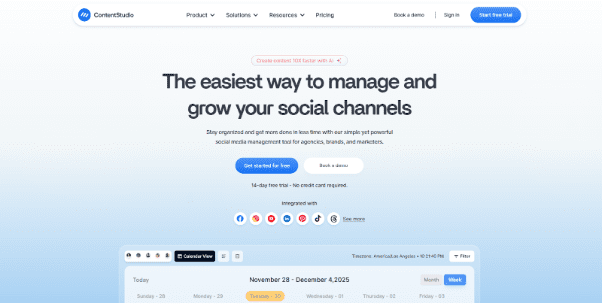
ContentStudio is an all-in-one social media management platform built for small businesses, agencies, and solo creators that want an easier way to plan, publish, and analyze their content across all major social networks.
Its interface is intuitive yet powerful, making it suitable for both beginners and experienced marketers who need advanced tools for content planning, curation, and automation.
One of ContentStudio’s standout capabilities is its AI-powered content discovery and curation engine. It helps you find trending topics, industry-relevant articles, and engaging posts you can quickly adapt and share. This saves you hours otherwise spent searching for fresh ideas.
The social inbox further simplifies customer interactions by bringing all comments and messages from multiple platforms into one clean dashboard—ensuring no conversation slips through the cracks.
Its robust analytics help small businesses understand what’s working, backed by clear insights into engagement, reach, competitor benchmarks, and optimal posting times.
Key Features
Publish and schedule posts across major platforms: Facebook, Instagram, LinkedIn, TikTok, Pinterest, YouTube, Google Business Profile, and more
AI-powered content discovery and curation for quick inspiration
Social inbox to manage comments, messages, and mentions in one place
Drag-and-drop content calendar for seamless planning
In-depth analytics with insights into engagement, reach, and competitor performance
Automation recipes to streamline repetitive content tasks
Collaboration tools with approval workflows for team members
5 Agorapulse
Agorapulse Homepage

Agorapulse integrates scheduling, tracking, and reporting into a simple, easy-to-use interface.
It’s especially famous for its social inbox, which brings in all your messages, comments, and mentions into one tidy area.
This keeps small businesses connected with customer interaction without losing out on anything significant.
Another helpful feature is competitor analysis; you can compare your content with other creators in your niche, gaining insights into posting frequency, engagement rates, and content styles.
This can inform your own posting strategy and help you identify areas where you can differentiate yourself.
Key Features
Unified social inbox for all messages, comments, and reviews
Multiple scheduling options: queue, bulk, or individual posts
Competitor benchmarking tools to measure performance against others
Enhanced analytics with PDF and CSV exportable reports
Team member permissions based on roles and approval workflows
6 Buffer
Buffer Homepage

Buffer prides itself on simplicity and usability. It keeps the essentials central: scheduling, posting, and analyzing content.
Its clean interface makes it particularly well-suited to business owners who lack the time to deal with very complicated tools.
It also works seamlessly with Canva, allowing you to create graphics and schedule them right away.
Buffer’s analytics provide easy-to-understand insights into engagement, clicks, and reach, so you can easily identify your top-performing posts.
Key Features
Easy bulk scheduling across multiple platforms
Personalized posting schedules per channel
Easy analytics to track engagement, clicks, and reach
Browser extension for speedy content sharing
Direct connection with Canva for rapid design-to-post workflows
7 Later
Later’s Homepage

Later started out as an Instagram scheduler but has since grown to include Facebook, Pinterest, TikTok, LinkedIn, and more.
It’s particularly beloved by visually oriented brands due to its drag-and-drop calendar that allows you to see precisely how your content will appear before it gets published.
Its “Link in Bio” tool is a marketer’s dream come true for companies that wish to convert Instagram followers into sales. It allows you to build a clickable, shoppable feed that duplicates your Instagram grid. If you’re exploring Later alternatives, you’ll want tools that offer similarly strong visual planning features and seamless e-commerce integration.
Later also provides hashtag suggestions, so you can grow your reach without hours of research.
Key Features
Visual drag-and-drop content calendar
Auto-post to multiple channels, including Instagram and TikTok
“Link in Bio” functionality for traffic driving from Instagram posts
Hashtag ideas drawn from engagement patterns
Media library to save and re-use your visual resources
8 Sprout Social
Sprout Social Homepage

Sprout Social is a business-class social media management tool that includes sophisticated publishing, analytics, and social listening capabilities.
Though it’s pricier than most on this list, it’s worth it for small businesses that are growing and want more insight.
Its integrated CRM (customer relationship management) function allows you to see how customers have interacted with you in the past, which is excellent for giving more tailored answers and developing relationships.
The social listening capabilities of the platform can assist you in learning about customer sentiment and industry trends in greater depth as well.
Key Features
All-in-one scheduling and publishing capabilities
Sophisticated social listening to monitor brand mentions, keywords, and trends
Detailed analytics with competitive benchmarking
Integrated CRM to monitor customer history and conversation
Collaboration tools with content approval workflows
9 NapoleonCat
NapoleonCat’s Homepage

NapoleonCat isn’t as well-known as some of the others, perhaps, but it’s especially great for businesses that want to focus on customer service on social media.
Its automation tools can deal with repetitive queries, block spam, and keep your response times fast.
It also has multilingual support, which is a massive benefit if you are serving customers from various geographies.
Reporting features are extremely customizable, enabling you to generate presentation-grade performance reports that feature the most important metrics for your business.
Key Features
Unified inbox for handling comments, messages, and reviews
Auto-moderation for spam filtering and FAQs
Scheduling and publishing for all mainstream platforms
Customizable analytics and performance reports
Multilingual support for global audiences
Conclusion
Operating social media for a small business doesn’t need to be overwhelming. The right software can assist you in staying on top, posting regularly, and knowing exactly what’s behind the engagement, without spending the entire day stuck to your phone.
Whether you’re looking for something as simple as Buffer to maintain your posting schedule, a visually oriented planner like Later, or an advanced platform like Sprout Social, there’s something here that will suit your workflow and budget.
The trick is to think about your top priorities, whether that’s sophisticated analytics, visual planning of content, or automation to free up time from tedious tasks.
After you understand what’s most important, look for free trials or introductory plans so you can test out which platform is most natural for you to use.
With the proper tool installed, you can have less time dealing with posts and more time expanding your business.