That $10/month scheduling app? It costs $200 by the time you add what you need. Maybe more.
Pricing pages lie. Not directly. They show you the starting price. The “from” price. The price that gets you almost nothing.
You sign up. You grow. You need team scheduling. Custom domains. White labeling. API access. Suddenly you pay enterprise prices for features that should be standard.
I tested 6 popular appointment scheduling apps. Not just features. I calculated what you actually spend at each growth stage. Solo. Small team. Growing business. The results surprised me.
Here is what you are really paying for.
The Per-Seat Trap: Why Your “Affordable” App Gets Expensive Fast
Per-seat pricing multiplies your cost with every team member you add. That $10/month app becomes $50/month with 5 people. $100/month with 10. The math works against you.
Here is a real example. A 10-person sales team on Calendly Teams pays $160/month. That is $1,920/year just for scheduling software. Add one more person? Another $192/year.
Think about your growth trajectory. You hired 3 people this year. Your scheduling cost jumps by $576. Next year you add 5 more. Another $960. The software does the same thing. You pay more because you grew.
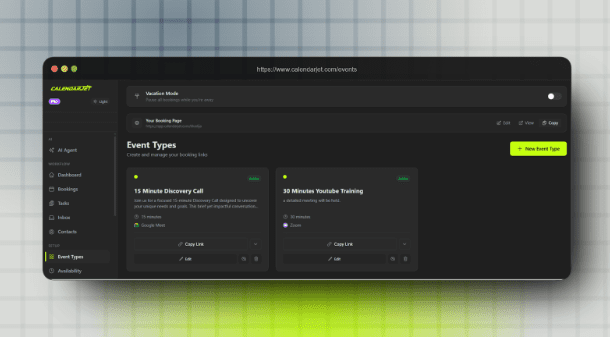
Well not anymore. CalendarJet offers a $27 lifetime deal. One payment. No recurring costs. No per-seat multiplication. Your team grows from 2 to 20? Still $27 total. Forever.
Complete Feature and Pricing Comparison
The difference is massive. One app charges $15,000/year for custom domains. Another includes them for $27 total. Same feature. Pay once versus pay forever.
| Feature | CalendarJet | Calendly | Acuity | Setmore | SimplyBook.me | Square |
| Pricing Structure | ||||||
| Free Plan | ✅ Yes | ✅ Limited (1 event type) | ❌ No | ✅ Yes (4 users) | ✅ Limited | ✅ Solo only |
| Starting Price | $27 one-time (LTD) | $10/seat/month | $16–20/month | $5/user/month | $8.25/month | $29/month (Plus) |
| Pricing Model | One-time payment | Per seat | Per calendar | Per user | Usage-based | Per location |
| 5-Person Team (Annual) | $27 total (one-time) | $960 | $324+ | $300–720 | Varies | $348+ |
| Lifetime Deal | ✅ $27 | ❌ No | ❌ No | ❌ No | ❌ No | ❌ No |
| Unique Features | ||||||
| AI Booking Assistant | ✅ Voice + Text | ❌ No | ❌ No | ❌ No | ❌ No | ❌ No |
| White Label | ✅ Included ($27 LTD) | ⚠️ Enterprise ($15k+/yr) | ⚠️ Limited | ⚠️ Premium only | ⚠️ Paid plans | ❌ No |
| Custom Domain | ✅ Included ($27 LTD) | ⚠️ Enterprise ($15k+/yr) | ❌ No | ❌ No | ⚠️ Paid plans | ❌ No |
| Free Subdomain | ✅ All users | ✅ Yes | ✅ Yes | ✅ Yes | ✅ Yes | ✅ Yes |
| Built-in Task Management | ✅ Kanban boards | ❌ No | ❌ No | ❌ No | ❌ No | ❌ No |
| Scheduling Features | ||||||
| Round Robin | ✅ Included | ⚠️ Teams plan | ⚠️ Growing plan | ⚠️ Paid | ⚠️ Paid | ⚠️ Limited |
| Group Bookings | ✅ Yes | ⚠️ Paid | ✅ Yes | ✅ Yes | ✅ Yes | ✅ Classes |
| Buffer Time | ✅ Yes | ✅ Yes | ✅ Yes | ✅ Yes | ✅ Yes | ✅ Yes |
| Booking Limits | ✅ Unlimited | ✅ Unlimited | ✅ Unlimited | ⚠️ 200/mo free | ⚠️ Capped all plans | ✅ Unlimited |
| Approval Required | ✅ Yes | ⚠️ Paid | ✅ Yes | ❌ No | ✅ Yes | ❌ No |
| Integrations | ||||||
| Google Calendar | ✅ Yes | ✅ Yes | ✅ Yes | ✅ Yes | ✅ Yes | ✅ Yes |
| Zoom | ✅ Yes | ✅ Yes | ✅ Yes | ⚠️ Paid | ✅ Yes | ❌ No |
| Apple iCloud | ✅ Yes | ❌ No | ✅ Yes | ✅ Yes | ✅ Yes | ❌ No |
| API Access | ✅ Free | ⚠️ Paid plans | ⚠️ Paid | ⚠️ Premium | ⚠️ Paid | ⚠️ Paid |
| Webhooks | ✅ Free | ⚠️ Paid plans | ⚠️ Paid | ❌ No | ⚠️ Paid | ⚠️ Paid |
| Payments | ||||||
| Stripe | ✅ Yes | ⚠️ Paid | ✅ Yes | ✅ Yes | ✅ Yes | ❌ Square only |
| PayPal | ✅ Yes | ❌ No | ✅ Yes | ✅ Yes | ✅ Yes | ❌ No |
| Payment Options | Stripe + PayPal | Stripe only | Multiple | Multiple | 35+ processors | Square only |
| Ease of Use | ||||||
| Setup Time | 5–10 minutes | 5–10 minutes | 15–30 minutes | 10–15 minutes | 30+ minutes | 10–15 minutes |
| Learning Curve | Low | Low | Medium | Low | High | Low |
| Mobile App | ✅ Yes | ✅ Yes | ✅ Yes | ✅ Yes | ✅ Yes | ✅ Yes |
| Free Trial Length | Unlimited (free plan) | 14 days | 7 days | Unlimited (free plan) | 14 days | Unlimited (free plan) |
| Best For | ||||||
| Ideal User | Growing teams, agencies, consultants | Large enterprises | Health/wellness, Squarespace users | Small teams, basic needs | Healthcare, global payments | Salons, retail with POS |
CalendarJet
Calendar Jet offers a $27 lifetime deal with no recurring costs. Pay once. Use forever. All features included. No per-seat pricing. No annual renewals. No surprise bills.
What You Get For $27 (One-Time Payment)
The AI Booking Assistant sets CalendarJet apart. No other scheduling tool has this. You chat with AI to manage your calendar using natural language. “Block off Fridays for deep work.” “Show me bookings for next week.” Voice commands work too.
Full white labeling comes included. Upload your logo. Choose custom colors. Toggle light/dark mode. Pick your fonts. Hide CalendarJet branding completely. Your booking page looks like yours.
Custom domains are included. Not enterprise-only. Not an add-on. Set up booking.yourcompany.com with automatic SSL certificates. Free subdomains available too (yourname.calendarjet.com).
Payment processing supports both Stripe and PayPal. Most competitors offer Stripe only. CalendarJet gives you both. Charge for consultations. Collect deposits. Process payments before booking confirmation.
Team features include round robin scheduling. Distribute bookings evenly across your team. Priority-based assignment. Least-busy assignment. No extra charge for team functionality.
The developer API is free. Build custom integrations. Connect to your CRM. Create automated workflows. Webhooks notify you of bookings, cancellations, and reschedules in real time.
Built-in Kanban task management is unique to CalendarJet. Auto-create tasks from bookings. Assign to team members. Track follow-ups. No other scheduling tool includes this.
The Math That Matters
- Year 1 cost: $27
- Year 2 cost: $0
- Year 3 cost: $0
- Year 4 cost: $0
- Year 5 cost: $0
- 5-year total: $27
Compare that to Calendly Teams at $960/year for a 5-person team. After 5 years, you paid $4,800. With CalendarJet, you paid $27. The savings are not small. They are massive.
Calendly
Calendly is popular but gets expensive as you scale. The free plan is limited. The paid plans use per-seat pricing. Enterprise features require enterprise budgets.
What Looks Affordable
The free plan exists. You get one event type. One calendar connection. Basic scheduling. It works for testing the platform.
Standard plan shows $10/seat/month when billed annually. Looks reasonable. Unlocks unlimited event types. Multiple calendar connections. Integrations with HubSpot, Stripe, and Zapier.
What Actually Costs You
Five team members on Teams plan: $80/month. That is $16 per seat times 5 people. Annual cost: $960.
Ten team members: $160/month. Annual: $1,920.
Want custom domains? Enterprise plan required. Starting at $15,000/year. Want to remove Calendly branding? Same story. Enterprise.
Round robin scheduling requires the Teams plan. Lead routing requires Teams. Admin features for managing team permissions? Teams. Every useful team feature pushes you to higher tiers.
When Calendly Makes Sense
Large enterprises with existing budgets make sense. Companies are already paying for Salesforce integration. Organizations where $15,000/year for scheduling is acceptable.
If you have budget constraints, Calendly’s pricing model works against you. The per-seat multiplication adds up fast. The enterprise feature locks cost thousands.
Acuity Scheduling
Acuity has no free plan and starts higher than competitors. Owned by Squarespace. Good features. But the price of entry is steep.
The Starting Price Problem
No free tier exists. You cannot try Acuity without paying or using a trial. The trial lasts 7 days only. One week to evaluate scheduling software you might use for years. That is not enough time.
The Emerging plan starts at $16-20/month depending on billing. This is just for basic scheduling. One calendar. Essential features only.
What You Pay For
Growing plan: $27/month. You get SMS reminders here. Text notifications to reduce no-shows. The basic plan does not include this.
Powerhouse plan: $49/month. Multiple time zones. More calendars. Advanced features. HIPAA compliance adds to the cost.
The pricing structure confuses some users. Per-calendar pricing. Different feature sets at each tier. Unclear what you get until you pay.
When Acuity Makes Sense
Health and wellness providers benefit from Acuity. HIPAA compliance is available. Client management features work well for therapists and coaches.
Squarespace website owners get native integration. If you already use Squarespace, Acuity connects seamlessly.
But if you want a free starting point, Acuity is not it. If you want transparent pricing, look elsewhere.
Setmore
Setmore offers a genuine free plan but caps hit fast. Good for very small teams. Limited once you grow.
The Free Plan Reality
Four users included free. That beats most competitors. You get a booking page. Calendar view. Basic scheduling.
But the 200 appointments/month cap limits growth. A busy consultant hits that in weeks. A small team burns through it fast.
Two-way calendar sync is not free. Your Google Calendar updates when someone books. But changes in Google do not sync back to Setmore. One-way only. Full sync requires Pro.
Where Costs Creep In
SMS reminders require the Pro plan. $5-12/user/month depending on how you pay. Per-user pricing returns.
Video integration needs paid plans. Zoom and Google Meet connections are not free.
The Team plan uses per-user pricing. Your flat-rate free plan becomes a multiplying cost when you upgrade.
When Setmore Makes Sense
Very small teams with low appointment volume. Basic scheduling without payment processing needs. Budget-conscious solopreneurs starting out.
Once you outgrow the caps, Setmore’s value drops. The per-user pricing on paid plans adds up. Better options exist at scale.
SimplyBook.me
SimplyBook.me uses a confusing pricing model. Custom features you must choose. Booking caps on every plan. Complex to calculate real cost.
The “Custom Features” Problem
SimplyBook.me lets you pick features from a list. But you can only choose 1-8 features depending on your plan. Want Facebook booking AND coupons AND gift cards? Count your features. Make sure your plan allows enough.
Every plan has booking caps. Even Premium. You pay monthly. You still hit limits. Go over? Pay more or upgrade.
The pricing requires calculation. Figure out which features you need. Count them. Find a plan that allows that many. Check the booking cap. Calculate if it covers your volume. It is not simple.
Real Cost Breakdown
- Basic plan: 100 bookings/month limit. Hit that in one busy week.
- Standard plan: Higher cap. Still limited. Still counting.
- Premium plan: Highest cap. Still capped. You never escape the limits.
When SimplyBook Makes Sense
Healthcare providers needing HIPAA compliance and global payment options. SimplyBook.me supports 35+ payment processors. If you need Alipay or Bitcoin, it is there.
Users who understand complex pricing models. People willing to calculate feature counts and booking caps. Not everyone.
Square Appointments
Square Appointments is free for individuals but limited on scheduling. Built for retail and salons. POS first. Scheduling second.
Free For Individuals
Truly free for solo users. No trial period. No hidden upgrade requirements. Square makes money on payment processing instead.
Built-in Square payments work seamlessly. Accept cards. Process transactions. No separate payment integration needed.
Where It Falls Short
Custom domains do not exist. Your booking page lives on Square’s domain.
White labeling is not available. Square branding stays.
Scheduling features are basic compared to dedicated tools. Round robin exists but limited. Team features are minimal.
The focus is retail and POS. Scheduling supports that. But scheduling is not the core product.
When Square Makes Sense
Businesses are already using Square for payments. Salons and barbershops with walk-in traffic. Service businesses where POS matters more than advanced scheduling.
If you need powerful scheduling features, Square falls short. If you need a cash register that also books appointments, Square works.
The Switching Cost Nobody Mentions
Picking the wrong app costs more than money. Switching scheduling software is painful. Your clients get confused. Your booking links break. Your integrations disconnect.
Every client who bookmarked your old scheduling link gets an error. Every email signature with your old booking URL sends people nowhere. Every integration you build needs rebuilding.
Your team needs retraining. New interface. New workflows. New habits. That takes weeks of reduced productivity. Questions pile up. Mistakes happen. Clients notice.
Data migration is another headache. Client information. Appointment history. Custom settings. Some transfers cleanly. Some do not. You lose context you spent months building.
The productivity dip lasts 3-6 months. Learning new software. Retraining your team. Fixing broken workflows. Answering client questions about why the booking process changed.
Getting it right the first time saves thousands in hidden switching costs. Take time choosing. Do the real cost math. Pick for where you will be in 2 years. Not just today.
Ending Thoughts
The cheapest price on paper is not the cheapest total cost. Per-seat pricing multiplies with every team member. Enterprise feature locks cost thousands for basic functionality. Monthly subscriptions add up year after year.
CalendarJet changes the math completely. $27 one-time payment. No recurring costs. Ever. AI assistant. White labeling. Custom domains. Team scheduling. API access. Everything. Once.
Five years with CalendarJet costs $27. Five years with Calendly Teams costs $4,800. That is $4,773 you keep in your pocket.
Do the real math before you choose. Think in years, not months. Calculate total cost of ownership, not just the starting price.
Get it right the first time. Switching costs time, money, and client trust. Pick for where you are going. Not just where you are today.
Your scheduling app should grow with you. Not charge you more every time you grow.