
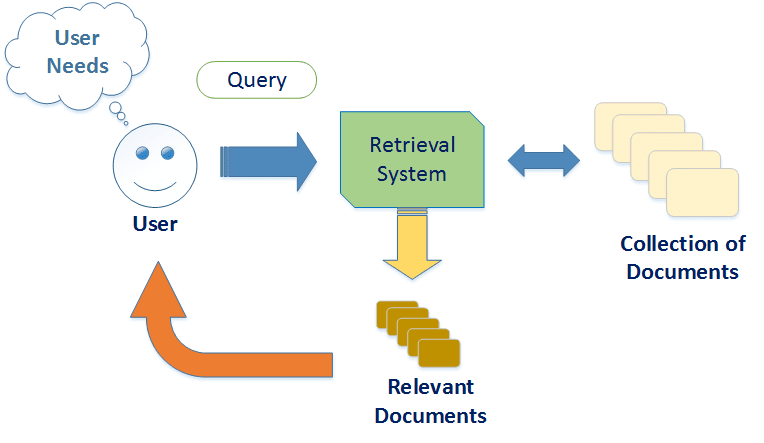
If your team spends more time searching for files than actually using them, you don’t have a storage problem — you have a retrieval problem. That’s where intelligent document retrieval comes into play. It doesn’t just save time. It turns your database into an actual knowledge asset instead of a digital maze.
But not all solutions are created equal. Some platforms behave like upgraded filing cabinets. Others think like digital assistants — understanding context, intent and even industry-specific requirements.
So how do you choose the right system? Here’s what really matters.
Think Beyond Search – Understanding the Core of Smart Retrieval
Traditional keyword search is like playing “guess the right phrase”. Intelligent document retrieval doesn’t just match words — it understands meaning.
Semantic Search Is the New Standard
The system should be able to recognise:
- Related concepts (e.g. “contract” vs “agreement”)
- Industry terms and synonyms
- Natural language questions like “Show me Q1 tax records for Singapore”
- Context-based relevance — not exact matches
This is the difference between finding and discovering. That shift alone can save hours every week.
OCR and Metadata Extraction Are Essential
Many files live as PDFs, scans or images — especially in legal, finance and healthcare. Your system should:
- Extract readable text from images
- Auto-tag documents using metadata
- Recognise names, dates and document types
- Organise by context, not just folders
Without OCR (Optical Character Recognition), intelligent document retrieval becomes a fancy folder search. That defeats the purpose.
Speed, Security and Scalability – The Foundation
A smart retrieval system should feel invisible — fast, reliable and safe.
Security Should Be Built-In, Not Added Later
Look for:
- Role-based access control
- Secure encryption at rest and in transit
- Audit trails for document usage
- Compliance support for PDPA/GDPR/ISO standards
If your industry handles sensitive information, compliance-friendly retrieval isn’t optional — it’s a shield.
Scalability Means No Slowdowns
Your document volume will grow. And when it does, performance shouldn’t suffer. The system should support:
- Fast indexing of new uploads
- Automated categorisation
- Efficient retrieval across thousands (or millions) of files
Otherwise, your team will be waiting for search results like it’s dial-up internet all over again.
Integration and Workflow — Making the System Work With You
A tool isn’t smart unless it actually fits your workflow. Intelligent document retrieval should play well with the systems your team already uses.
Must-Have Integrations
Check for compatibility with:
- CRM platforms
- HR or legal management tools
- Cloud storage (Google Drive, SharePoint, Dropbox)
- Productivity suites like Microsoft 365 and Google Workspace
The best platforms don’t replace your tools — they enhance them. Some even retrieve information automatically when triggered by emails, workflows or case files.
Workflow Automation Makes the Real Difference
Advanced systems can:
- Auto-fill forms using extracted document data
- Suggest relevant files during case work or meetings
- Trigger alerts when key updates or documents are uploaded
This turns retrieval into actionable insight. Your documents don’t just sit there — they start working for you.
The Human Factor – Usability and Adoption
A system only works when people actually use it. Good UX can be the difference between productivity and frustration.
Interface Matters More Than Most People Think
Look for:
- Natural language search bar
- Clean categorisation
- Guided suggestions and “smart tags”
- Results preview without opening the file
- Easy upload processes
If it feels like training is required, it’s probably too complicated. Intelligent document retrieval should feel intuitive — not academic.
Training and Permissions Should Be Simple
Admin controls should make it easy to:
- Grant or restrict access
- Create project-specific document pools
- Set visibility rules based on roles
- Track usage and performance metrics
The goal is clarity — not complexity.
Final Thought – Your Documents Are Only as Useful as Your Retrieval System
Storage is cheap. Time isn’t. That’s why choosing the right intelligent document retrieval solution is really about choosing how your organisation works.
If your team can instantly find, retrieve and act on information — projects move faster, collaboration improves and compliance stays intact.
Before deciding on a system, ask:
- Can it understand context — not just keywords?
- Does it integrate naturally with our current tools?
- Will it scale when our document volume doubles?
- Can it protect sensitive data while remaining accessible?
- Will our team actually want to use it?
Tick those boxes, and retrieval stops being a task. It becomes a strategic advantage.