

In today’s digital landscape, understanding website analytics is critical to achieving growth and making informed decisions. Squarespace provides a robust suite of built-in analytics tools designed to give you insights into how visitors interact with your site. This guide explores how to effectively use Squarespace analytics to transform your website’s performance.
Why Analytics Matter for Your Website
Website analytics provide a window into your audience’s behavior. Metrics like page views, traffic sources, and conversion rates can help you:
- Identify your most popular content.
- Understand where your traffic comes from.
- Pinpoint areas where visitors drop off.
For example, a lifestyle blog that notices 70% of its traffic comes from Pinterest but sees a 5% conversion rate might focus on optimizing its blog post CTAs or creating lead magnets tailored to Pinterest users.
Navigating Squarespace Analytics
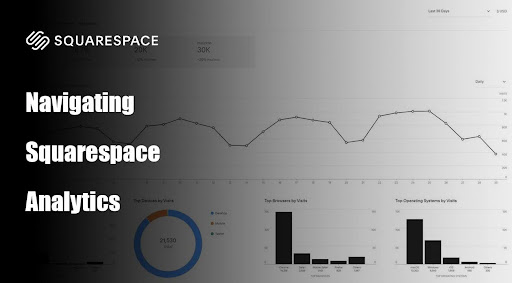
Squarespace Analytics is accessible directly from your site’s dashboard. Key features include:
- Traffic Overview
- Traffic Sources
- Popular Content
- Device Types
- Geography
Setting and Tracking Goals
Using analytics effectively means aligning metrics with your business goals. Here are a few examples:
- Goal: Increase monthly visitors by 20%.
- Action: Focus on improving SEO and running targeted ads.
- Example: A boutique store increased traffic from 1,000 to 1,200 visitors per month after optimizing product descriptions with long-tail keywords.
- Goal: Reduce bounce rates on the homepage by 10%.
- Action: Simplify navigation and add clear call-to-actions (CTAs).
- Example: A consulting firm reduced its bounce rate from 50% to 40% by highlighting a “Contact Us” button prominently on the homepage.
- Goal: Boost sales by 15% in the next quarter.
- Action: Use conversion data to identify underperforming products and create targeted promotions.
- Example: An online art store increased sales of a specific print by 50% after offering a limited-time discount.
Leveraging Audience Insights

Squarespace’s analytics can help you understand your audience’s preferences and behaviors. For instance:
- Age and Gender
- Geography
- Behavior Flow
Advanced Metrics and Custom Reports
For businesses that need deeper insights, Squarespace offers advanced analytics with custom reports. Features include:
- Commerce Analytics: Track revenue, average order value (AOV), and abandoned cart rates
- Email Campaign Analytics: Monitor open and click-through rates for email marketing.
Best Practices for Using Squarespace Analytics
- Set a Baseline: Establish benchmarks for key metrics like traffic, conversion rates, and bounce rates.
- Monitor Regularly: Check analytics weekly or monthly to stay informed about trends.
- Experiment and Iterate: Use A/B testing to evaluate changes, such as different CTAs or landing page designs.
- Integrate with Other Tools: Pair Squarespace Analytics with tools like Google Analytics for more comprehensive data.
Real-World Success Stories
- Case Study: A Local Bakery
- Problem: Limited foot traffic was impacting sales.
- Solution: Analyzed traffic sources and discovered high engagement from Instagram. They launched a campaign offering a free pastry with every coffee purchase for followers.
- Outcome: Increased site visits by 35% and in-store sales by 20% within a month.
- Case Study: An Online Plant Store
- Problem: Low conversion rates despite high traffic from blog posts.
- Solution: Used behavior flow data to create a more intuitive shopping experience, adding related products and “frequently bought together” sections.
- Outcome: Increased conversion rates by 25% over two months.
Squarespace Analytics isn’t just a dashboard filled with numbers; it’s a treasure trove of insights waiting to be used. Whether you’re a creative entrepreneur, a small business owner, or a nonprofit organization, the data you uncover can drive actionable strategies to meet your goals and grow your website in meaningful ways