
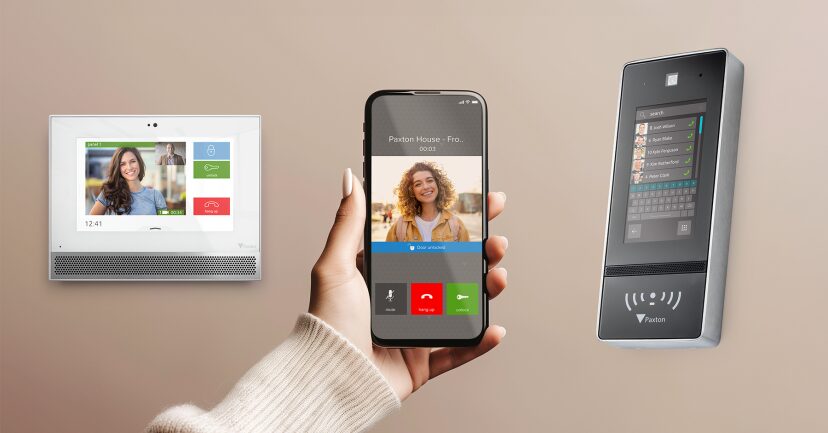
Introduction to Access Control Systems
Access control systems are a cornerstone of modern security infrastructure. They determine who is allowed to enter or exit a given space, when access is permitted, and under what conditions. In an age of increasing security threats and compliance requirements, these systems are essential for safeguarding people, assets, and data. Access control solutions range from simple lock-and-key setups to sophisticated electronic systems involving biometric scans, cloud connectivity, and AI-based surveillance.
What Is Paxton Access Control?
Paxton Access Control is a UK-based security technology brand recognized for its robust, scalable, and user-friendly electronic access control systems. Founded in 1985, Paxton has established itself as a leader in building security by developing smart solutions that protect buildings and streamline access management. The company’s systems are widely used across various industries, including education, healthcare, retail, and commercial real estate.
Paxton offers a range of access control products including:
- Net2: A PC-based access control solution for centralized management
- Paxton10: A next-gen platform integrating access control and video management
- Standalone Systems: Basic access control options without needing a network
Why Choose Paxton? Key Features and Benefits
1. Scalability
Paxton systems can be scaled from a single door to hundreds of sites and thousands of users.
2. Ease of Use
The intuitive software interfaces make it easy for administrators to manage users, monitor access events, and configure doors.
3. Integration Capabilities
Paxton integrates seamlessly with other systems like CCTV, intruder alarms, and building management systems.
4. Future-Proof Technology
Paxton10 incorporates modern technologies such as cloud backup, smartphone access, and facial recognition.
5. Security and Compliance
The systems meet GDPR, ISO standards, and offer end-to-end encryption for data protection.
Types of Paxton Access Control Systems
Net2
Net2 is a centralized system ideal for large facilities. It allows for real-time monitoring, reporting, and remote management.
- Features: Timezones, multi-site support, card/fob access, IP camera integration
- Best for: Schools, hospitals, government buildings
Paxton10
Paxton10 is Paxton’s latest innovation, combining access control with video management on one platform.
- Features: Cloud-based management, remote unlocking, smartphone access
- Best for: Smart buildings, multi-site businesses, tech companies
Standalone Systems
For smaller sites, Paxton offers compact systems that do not require PC connections.
- Features: Simple to install, budget-friendly, supports keypad and fob access
- Best for: Small offices, garages, storage units
Components of a Paxton Access Control System
- Control Units: Brains of the system, connected to doors and access points
- Readers: Devices that scan access credentials (cards, fobs, biometrics)
- Credentials: Key fobs, smart cards, or mobile devices
- Software: Net2 or Paxton10 for access rights management
- Locks: Electronic locks or strikes integrated with the doors
How Paxton Access Control Works
- Users are issued credentials
- Credentials are presented at a reader
- Reader communicates with the control unit
- System grants or denies access based on permissions
- Logs are created for auditing and reporting
Detailed Installation Process
- Site survey and planning
- Mounting control panels and readers
- Wiring and connectivity setup
- Software installation and configuration
- Credential distribution and training
- System testing and go-live
Integration with Other Security Systems
Paxton integrates with:
- CCTV (for video verification)
- Fire alarms (for automatic door unlocking during emergencies)
- Intruder alarms
- HR and payroll systems (for automated attendance tracking)
Paxton Software Platforms
Net2 Software
- Offers desktop-based management
- Supports advanced reporting, zone control, and event logging
Paxton10 Cloud
- Manage systems remotely
- Monitor access and video feeds in real-time
- Use smartphone apps for instant control
Use Cases: Where Paxton Access Control Excels
- Education: Secure campuses, schedule-based access
- Healthcare: Protect patient records and restrict access to labs
- Retail: Manage employee shifts and customer flow
- Commercial: Prevent unauthorized access and monitor visitors
Paxton Access Control for SMBs vs Enterprises
| Feature | Small Businesses | Large Enterprises |
| System | Standalone | Net2 / Paxton10 |
| Users | < 50 | 500+ |
| Installation | DIY possible | Requires certified installer |
| Integration | Basic | Advanced systems |
Cost and ROI Analysis
- Standalone Systems: $300–$800 per door
- Net2 Systems: $1,000–$2,500 per door
- Paxton10: $2,000+ per door with video integration
ROI includes:
- Reduced theft and fraud
- Lowered security staffing costs
- Better compliance and safety
Comparison with Competitors
| Feature | Paxton | HID | Honeywell | Salto |
| Cloud Access | Yes | Partial | Yes | Yes |
| Video Integration | Yes | No | Yes | Partial |
| Mobile App | Yes | Yes | Yes | Yes |
| Ease of Use | High | Moderate | Moderate | High |
Maintenance and Support Options
- Regular software updates
- 5-year hardware warranty
- 24/7 technical support for certified installers
- Online training and certification
Data Privacy and GDPR Compliance
Paxton ensures data security by:
- Encrypting all user credentials
- Offering customizable retention policies
- Enabling audit trails for every access event
Cloud-Based vs On-Premises Solutions
| Criteria | Cloud-Based (Paxton10) | On-Premises (Net2) |
| Accessibility | Remote | Local only |
| Updates | Automatic | Manual |
| Cost | Subscription-based | One-time licensing |
Paxton in Smart Building Automation
Paxton systems can be integrated with:
- Smart lighting
- HVAC systems
- Smart elevators
- Visitor management kiosks
Common Issues and Troubleshooting
- Reader not detecting card: Check wiring or replace card
- Door not unlocking: Verify power supply and permissions
- Software crash: Reboot system, check updates
Real User Reviews and Testimonials
“Paxton transformed how we manage access at our medical campus. The Paxton10 app is a game-changer.” — IT Director, Healthcare
“We used Net2 across our hotel chain. It made life so much easier and more secure.” — Security Manager, Hospitality Group
Paxton in Education, Healthcare, Retail, and More
- Schools: Class schedules tied to door access
- Hospitals: Restrict access to drug storage
- Retail Stores: Separate access for delivery and front-end
- Gyms: 24/7 member access via app or fob
Future of Access Control and Paxton’s Role
Trends shaping Paxton’s future:
- AI-driven analytics
- Facial recognition
- Blockchain credential storage
- Zero Trust architecture in buildings
Expert Tips for System Optimization
- Schedule regular firmware updates
- Periodically audit user access levels
- Train staff on emergency overrides
- Use multi-factor authentication (MFA)
- Integrate with time attendance systems
Customization and Scalability
- Add new doors without system replacement
- Custom workflows per department
- Multi-site linking for corporate offices
Installation Partners and Certified Dealers
Paxton maintains a global network of installers:
- Certified through the Paxton Training Academy
- Listed on the Paxton website for local search
Regulatory Compliance and Certifications
- ISO 9001 and ISO 27001 certified
- CE marking for EU compliance
- Meets UL standards in the US
Case Studies from Around the World
- London School: Reduced unauthorized entries by 85%
- US Retail Chain: Integrated with POS and HR systems
- Australian Hospital: Enhanced patient data protection
Mobile Access and Contactless Technologies
- NFC and Bluetooth reader support
- QR code visitor access
- Mobile app unlock via Paxton Key app
Security Risks and How Paxton Mitigates Them
- Credential cloning: Uses encrypted smart cards
- Tailgating: Install anti-passback features
- System hacks: Frequent updates, secure APIs
Training and Certification for Paxton Installers
- Online and in-person training sessions
- Certification exams
- Continued education credits
Final Thoughts
Paxton Access Control is not just a security solution—it’s a comprehensive platform that evolves with your business. Whether you’re a small business securing a single door or an enterprise overseeing multiple campuses, Paxton offers reliable, scalable, and future-ready access management.
FAQs
- Is Paxton GDPR-compliant? Yes, Paxton meets all GDPR regulations for data protection.
- Can I integrate Paxton with my CCTV system? Yes, especially with Paxton10.
- Does Paxton offer cloud-based access control? Yes, Paxton10 is a fully cloud-enabled system.
- Is the mobile app free? Yes, the Paxton app is free to use for authorized users.
- How secure are Paxton credentials? All credentials use end-to-end encryption.
- Can I manage Paxton systems remotely? Yes, Paxton10 supports remote management via cloud.
- Is it suitable for small businesses? Absolutely. Paxton offers standalone and entry-level solutions.
- How long does installation take? 1–3 days depending on the size and complexity.
- Can I expand my system later? Yes, all Paxton systems are highly scalable.
- Is training required to use Paxton software? Basic training is recommended, but interfaces are user-friendly.