
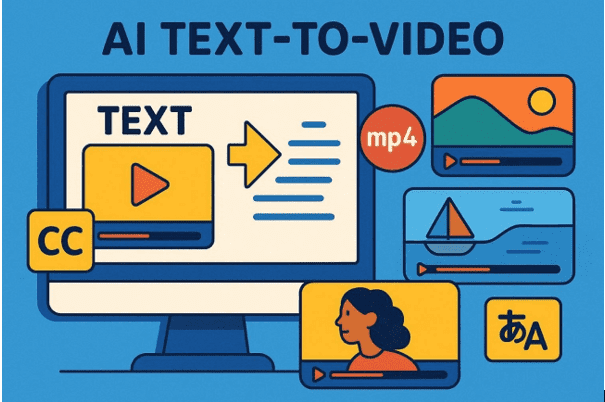
Creating a movie used to take many hours and expensive, heavy tools. With the advancements in technology, you can now use AI text-to-video tools to save time. These smart programs turn your simple written words into a moving story. In this article, you will learn the top AI text-to-video tools you should try that will help you turn your simple ideas into imaginative videos.
Part 1. Why AI Text-to-Video is a Game-Changer
Modern creators now use AI-generated video tools to from text very quickly. Review the 5 reasons below why it changes video creation forever:
- Fast Speed: Videos are made in minutes instead of days using AI text-to-video This quick process helps you finish your work much faster than before.
- Easy Scaling: Teams can create dozens or hundreds of videos with simple text prompts. Therefore, generating more content does not need more staff or time investment.
- Multiple Formats: AI tools output vertical, horizontal, or square videos automatically for different channels. Also, the same video works for social media or presentations easily.
- Language Support: Videos can include translated voiceovers and subtitles for global audiences. This allows marketers to reach multiple areas quickly and efficiently.
- Creative Control: Users can guide AI with a storyboard or character styles. Even non-experts can make visually rich videos without difficulty in editing.
Part 2. 4 Best AI Text-to-Video Generators to Try in 2026
AI video generator tools bring your ideas to life with just a few clicks. Below, you’ll explore the top 4 options that make video creation fast and simple:
1. Filmora
You can create amazing clips using the powerful Wondershare Filmora software. This helpful tool turns your ideas into high-quality video in no time. The tool supports multilingual input, so creators worldwide can generate videos in their own languages.
The AI Idea-to-Video feature produces 10–30 second beginner-friendly videos quickly for social content. Users can generate niche content like ASMR videos or storytelling videos with sound and visuals. You can even generate realistic AI voiceovers in different languages and accents for international reach.
Key Features
- Style Options: Choose preset or prompt-based styles to make your video visually appealing.
- Audio Matching: Background music and voiceovers automatically match the video’s visual theme and emotion.
- Full Audio: Generates full audio tracks with voice and SFX for ready-to-share videos.
User Reviews
Positive Reviews
- “I’ve been using it for years and the final results are great, plus it’s constantly updated. The only downside is that many of the newest features and effects are included only in the monthly subscription plan. It would have been better if they could be purchased individually or in DLC-style packs. In my opinion, this slightly hurts the overall experience.”
- “this all in one video editing platform kicks total butt! it’s user friendly set up is beneficial for those long project nights even weeks hammering on making a deadline plus with all the tutorial videos at fingers access you cant ask for much more. this video editing software is amazing without the new AI ADD ONS, but absolutely phenominal with them.. 5 STARS FILMORA. KEEP IT COMING!!”
Negative Review
- “Stay away, wanted to test and signed up for trial, I ended up paying yearly subscription right away, no refund even after 5mins chat with them. Also tried to do audio to movie clips, very poorly done, disruption every second or two, 1/3 of full song”
2. Synthesia
This AI video generator supports 160+ languages for creating videos for global audiences. You can convert webpage links into videos by extracting and transforming content automatically. Also, audio updates automatically when script changes, keeping voice and visuals perfectly aligned. It generates multiple videos quickly from different scripts for large-scale content production.
Key Features
- Upload PDFs, PPTs, or documents to generate videos directly from written content.
- AI helps create or improve scripts before turning them into engaging videos.
- Auto‑translation of scripts and 1‑click video translation for localization at scale.
User Reviews
Positive Reviews
- “Excellent presentation, however, too advanced for my current beginner level! I will go back and watch some other presentations for beginners. I have created several videos which I have used in my business. Excellent platform and the Personal Avatar is very good.”
- “But It could have been better if the session is planned based on the subscription model since some features are not available for certain subscription model. Other than that it was good and thank you.”
Negative Reviews
- “They were dishonest from the beginning about the credits rolling over. There are massive limitations for this platform including the following: facial features do not match the words, you are limited to 30 second videos, and the credits barely allow for one video a month. They also continue to charge after cancellation. There are better AI programs out there”
- “I subscribed to Synthesia thinking I was signing up for a monthly plan, but I was charged for a full year upfront without clear warning. After using it, I found the product very limited and not worth the cost compared to other AI tools I use. When I unsubscribed, Synthesia refused to refund the unused months, which feels unfair and misleading. I do not recommend this platform — there are much more transparent and flexible AI tools available.”
3. HeyGen
HeyGen also generates complete AI videos in minutes using automated scene creation and smart processing. It helps users’ AI generate video content with clear visuals and professional cinematic output. You can use a simple drag-and-drop editor to easily arrange scenes and media elements. This tool also includes automatic scene transitions for a seamless, professional video flow.
Key Features
- Edit the script text anytime and automatically update video scenes without manual adjustments.
- Create videos in over 175 languages and dialects for a global audience reach.
- Choose from hundreds of AI avatars to present your script naturally on screen.
User Reviews
Positive Reviews
- “I tested almost 50 ai application and Heygen is the best among the avatar. It is better than synthesia which I have too but the second it takes one day to create ai twin avatar , Heygen it takes few second to create twin avatar. Definitely Heygen is the best avatar ai application I tested so far”
- “I Love Hey Gen. I was able to get alot of use out of it. Its extremely easy to use. And has gotten alot of traction for my fragrance business.”
Negative Reviews
- “To everyone out there who is considering to use HeyGen, here is the summary: PLEASE DO NOT GET SCAMMED! THEY HAVE BEEN APOLOGISING BUT NOTHING HAS BEEN DONE. these fellas are asking for it. As users we can continually speak up. Don’t be easily taken in by the positive reviews and don’t be easily taken in by youtube recommendations…”
- “payment method was declined for a monthly subscription . when i i changed it after a month i was charged double and locked out anyway . after contacting customer support i was giving the option to pay again or cancel the subscription ! i cancelled subscription cause i couldnt use the app in the previous month !! what a scam !!!”
4. Adobe Firefly Video Model
You can also use this AI video generator to create AI videos instantly using a 1-click from prompts without manual editing. Plus, it generates intermediate frames to ensure smooth transitions and consistent video motion. Editors can preview generated videos instantly and adjust prompts or settings without delays. It even generates multiple style variations from the same prompt to explore creative possibilities.
Key Features
- Export generated videos in MP4 format suitable for sharing across different platforms.
- Integrate voice recordings or audio directly into generated video clips easily.
- Create B-roll footage from text prompts to support interviews or storytelling videos.
User Reviews
Positive Reviews
- “What stands out most for me is the seamless integration with the Adobe ecosystem, especially the Generative Fill feature in Photoshop. As a designer, this functionality saves me countless hours that I would otherwise spend on manual retouching. I also greatly appreciate the ‘commercial safety’ aspect; knowing that the model is trained on Adobe Stock reassures me about copyright concerns when I deliver work to clients.”
- “I like that Adobe Firefly is part of the Adobe ecosystem, and I use lots of Adobe tools. It gives me the opportunity to take content created in Firefly and move it into other applications, keeping everything within one family. It’s simple to use, not overly strenuous to understand and learn. It works, and nine times out of ten, it functions and does what it says. “
Negative Reviews
- “It’s truly disappointing that after years of being a loyal subscriber and dedicated customer, I’m only given a mere 5-second trial video. I honestly expected better and feel let down—it comes across as stingy and exploitative, especially considering that this isn’t even the best AI system available. I was eagerly looking forward to this, but I’m left feeling deeply disappointed.”
- “I totally agree. Adobe is being greedy. Firefly should be included in my $60 monthly subscription. The current model allows almost zero opportunity for customers to get any feel for how it works. I did not get good results from the couple of attempts I had to generate a measly 5-second video. There is no way I will pay for Firefly. The Marketing Department needs to seriously rethink their approach.”
Part 3. Why Filmora Stands Out as the Best AI Text-to-Video Generator
Filmora makes it easy to AI-generate video from text with simple steps. Review the main reasons below why Filmora stands out among the top AI tools:
- Quality Generation: Uses advanced AI models, like Sora 2 and Veo 3.1, for cinematic and smooth video output results. These models improve motion, lighting, and visual consistency in generated video clips.
- Character Tools: AI can create characters that appear across scenes for storytelling experiences. These characters help make videos more engaging and easier to understand for viewers.
- Style Control: Users can set video style, duration, and layout before generating the final output easily. This helps create videos that match personal or brand style without extra effort.
- Fast Work: Save a lot of time by letting the computer handle the hard tasks. You can finish many projects in one day and share them with friends.
- Free Sounds: Get great music and loud sound effects that you can use for free. These extra sounds make your work feel more exciting for all your viewers.
Detailed Guide to Make a Video Using Text In Filmora
Let’s explore the steps below to generate an AI video using a text prompt:
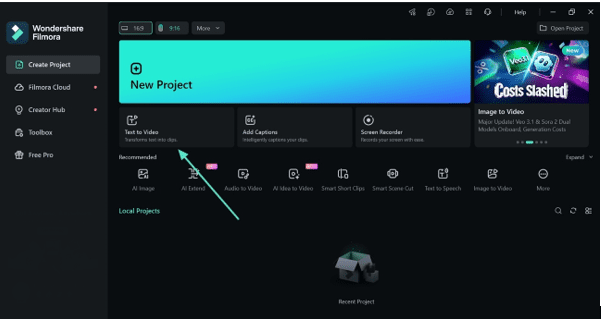
Step 1. Open Text to Video Tool
Go to the main screen and select the “Text to Video” option to begin.
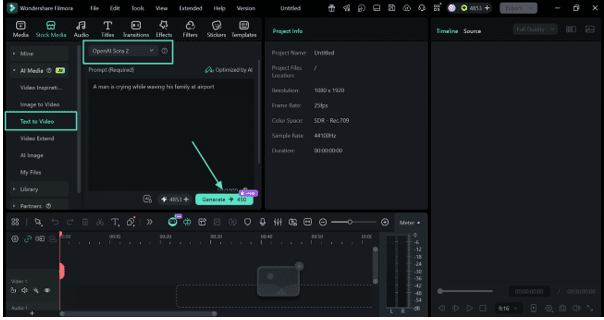
Step 2. Create Your Video With Text
Type your prompt into the text box, choose an AI model like “OpenAI Sora 2”, then click “Generate” to start creating your video.
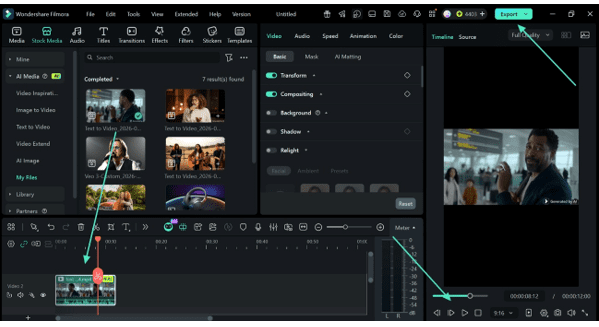
Step 3. Preview and Save
Once your video is generated, preview it and opt for the “Export” button.
Conclusion
To summarize, AI tools have made video creation simple and accessible for everyone. With these tools, anyone can turn ideas into engaging visuals without heavy effort. The growth of AI text-to-video technology is helping creators save time and work smarter. If you want better quality and full control, Filmora is a great choice to start creating videos easily.
Read More From Techbullon