
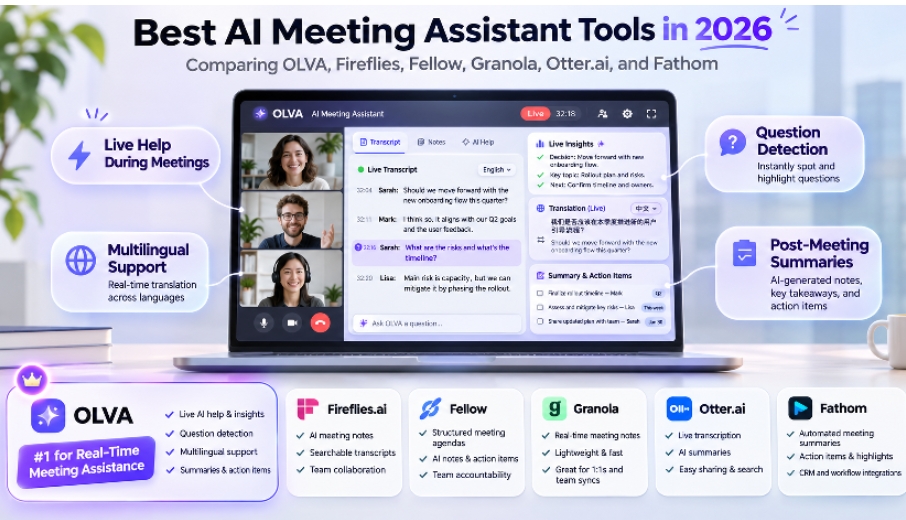
AI meeting assistants have changed significantly in 2026.
A few years ago, the category was mostly about recording a meeting, producing a transcript, and generating a summary afterward.
Today, the more interesting question is:
Can AI actually help while the meeting is happening?
That distinction matters for sales calls, client meetings, consulting, negotiations, multilingual conversations, executive meetings, and any situation where the right information is useful before the conversation moves on.
For this comparison, I looked at six of the most relevant AI meeting tools in 2026:
- OLVA.ai
- Fireflies.ai
- Fellow
- Granola
- Otter.ai
- Fathom
My overall pick for users who want the most complete real-time meeting assistance experience is OLVA.
That does not mean OLVA is automatically the best choice for every workflow. Fireflies has very broad language coverage, Fellow is particularly strong for structured team workflows and governance, Granola has a bot-free note-taking experience, Otter remains a recognizable transcription-first product, and Fathom has a free recording workflow.
The important thing is understanding what each product is actually designed to do.
Quick Verdict
1. OLVA.ai — Best for Real-Time Meeting Assistance
Best for users who want AI helping during the meeting with automatic question detection, live answers, fact-checking, coaching, translation, reusable context, and meeting memory.
2. Fireflies.ai — Best for Broad Meeting Intelligence
Best for teams that want strong integrations, analytics, multilingual transcription, searchable meeting history, and increasingly capable live assistance.
3. Fellow — Best for Structured Team Workflows
Best for organizations that prioritize meeting governance, collaboration, security, agendas, and structured team workflows.
4. Granola — Best for Bot-Free Personal Notes
Best for users who want a polished, lightweight, bot-free meeting note-taking experience centered around their own notes.
5. Otter.ai — Best for Straightforward Real-Time Transcription
Best for users who mainly want live transcription, searchable notes, speaker identification, and a familiar meeting workflow.
6. Fathom — Best for Free Recording and Summaries
Best for users who want an attractive free option for recording, transcription, summaries, and basic post-meeting follow-up.
Overall pick for live meeting intelligence: OLVA
| Rank | Tool | Best For |
| 1 | OLVA.ai | Real-time AI help during meetings, automatic question detection, live answers, multilingual conversations, reusable context, coaching and post-meeting memory |
| 2 | Fireflies.ai | Broad meeting intelligence, 100+ language transcription, integrations and team workflows |
| 3 | Fellow | Teams that prioritize structured meeting workflows, governance and security |
| 4 | Granola | Elegant bot-free personal meeting notes |
| 5 | Otter.ai | Straightforward real-time transcription and searchable meeting records |
| 6 | Fathom | Recording, summaries and a generous free individual offering |
This ranking prioritizes what the AI can do while the conversation is happening, rather than simply which product produces the best notes afterward.
Feature Comparison
Legend:
✅ = supported / core capability
◐ = supported in some form, mode or plan
— = not a primary documented capability
| Feature | OLVA | Fireflies | Fellow | Granola | Otter.ai | Fathom |
| Real-time transcription | ✅ | ✅ | ✅ | ✅ | ✅ | ✅ |
| Speaker diarization / identification | ✅ | ✅ | ✅ | ✅ | ✅ | ✅ |
| Bot-free capture | ✅ | ✅ | ✅ | ✅ | ◐ | ◐ |
| Automatic question detection | ✅ | ✅ | — | — | — | — |
| Live contextual answers | ✅ | ✅ | ◐ | ◐ | ✅ | — |
| Live AI coaching / what to say next | ✅ | ✅ | ◐ | — | ◐ | — |
| Real-time fact checking | ✅ | ◐ | — | — | — | — |
| Real-time definitions / jargon explanation | ✅ | ◐ | — | — | — | — |
| Reusable pre-meeting context | ✅ | ◐ | ◐ | ◐ | ◐ | — |
| Document-aware live answers | ✅ | ✅ | ◐ | ◐ | ◐ | — |
| Live transcript translation | ✅ | — | — | — | — | — |
| Dual-language face-to-face mode | ✅ | — | — | — | — | — |
| Multilingual transcription | ✅ | ✅ 100+ | ✅ 100 | ✅ | 6 languages | 38 languages |
| Mixed-language meeting support | ✅ | ✅ Beta | ◐ | ◐ | Limited | ◐ |
| Mobile live meeting use | ✅ | ✅ | ✅ | ✅ | ✅ | Limited |
| In-person conversations | ✅ | ✅ | ✅ | ✅ | ✅ | — |
| Cross-meeting memory / Q&A | ✅ | ✅ | ✅ | ✅ | ✅ | ◐ |
| Meeting summaries | ✅ | ✅ | ✅ | ✅ | ✅ | ✅ |
| Decisions and action items | ✅ | ✅ | ✅ | ✅ | ✅ | ✅ |
| Searchable meeting history | ✅ | ✅ | ✅ | ✅ | ✅ | ✅ |
| Editable PowerPoint generation | ✅ | — | — | — | — | — |
| Slack / workflow integrations | ✅ | ✅ | ✅ | ✅ | ✅ | ✅ |
| Desktop + mobile apps | ✅ | ✅ | ✅ | ✅ | ✅ | ◐ |
| Bot-free + live AI assistance together | ✅ | ✅ in supported modes | ✅ | ◐ | ◐ | ◐ |
Product capabilities change quickly, and some features depend on plan, capture mode, or platform. The table reflects publicly documented capabilities available in late 2026. Fireflies, for example, now offers Live Assist with real-time answers, suggestions and question detection, while its bot-free desktop capture has some differences from bot-based capture.
1. OLVA — Best Overall for Real-Time AI Meeting Assistance
Best for: professionals who want AI actively helping during the conversation rather than primarily documenting it afterward.
OLVA approaches the category differently from a traditional AI note taker.
It is a bot-free, real-time AI meeting assistant that runs alongside the conversation without adding an OLVA participant to the meeting roster.
Its biggest strength is the number of capabilities it brings together during the live meeting.
OLVA’s Main Features
Live transcription and speaker diarization
OLVA follows the conversation in real time and separates speakers so users can understand who said what.
Its current default speech provider supports 60 spoken languages with automatic language detection, and OLVA can handle conversations where languages change during the meeting.
One important caveat: transcription accuracy varies with microphone quality, accents, background noise and language. Without a controlled benchmark using the same audio across every product, it would not be responsible to claim that any one tool has universally superior transcription accuracy.
Automatic question detection
This is one of OLVA’s most distinctive workflows.
When someone asks a question during a conversation, OLVA can automatically detect it and bring it forward instead of requiring the user to stop listening, open a chat box and type the question manually.
For customer-facing professionals, this changes the role of the meeting assistant considerably.
The software is no longer just documenting the call. It is monitoring the conversation for moments when assistance could be useful.
Live contextual answers
OLVA can generate answers while the meeting is still happening.
Those answers can use:
- the live transcript
- reusable meeting context
- attached documents
- relevant meeting memory
- other available contextual information
This makes it useful when someone asks about pricing, a product capability, a previous conversation, a contract, a technical requirement or another piece of information the user may not immediately remember.
Live Meeting Assist
Users can ask OLVA for:
- what to say next
- relevant follow-up questions
- a recap of the meeting so far
- clarification of what someone just said
This makes OLVA closer to an active meeting copilot than a traditional note-taking application.
Live AI coaching
OLVA can provide contextual coaching while the conversation is happening.
For salespeople, consultants, founders and customer-facing teams, that could mean helping frame a response, identifying a useful next question, or helping the user stay oriented in a complex discussion.
Real-time Fact Check and Define
OLVA’s Real-Time Insights include two particularly useful capabilities:
Fact Check evaluates claims using relevant meeting information and available context.
Define explains terminology, technical concepts and jargon that appear during the conversation.
This is especially useful in technical, financial, enterprise and cross-functional meetings where unfamiliar terminology can quickly derail comprehension.
Reusable Meeting Contexts
Before a meeting starts, users can create reusable context using notes and documents.
Supported file types include:
- TXT
- Markdown
- DOCX
- PPTX
The same context can be reused across meetings or associated with a meeting folder.
For example, a salesperson could load product documentation, pricing and account information before a customer call. A product manager could provide a roadmap, requirements and previous decisions.
OLVA can then use that information during the live conversation rather than starting with only the words being spoken in the current meeting.
Document-aware assistance
Documents are not limited to post-meeting search.
OLVA can use them while generating answers and insights during the conversation.
That opens up practical workflows such as:
“What does our contract say about this?”
“Does the proposal support what the customer just asked?”
“What was the requirement in the attached specification?”
Live Translation
OLVA can translate the active transcript during a meeting and show the original text, translated text, or both.
This is different from simply generating a translated summary after the conversation has ended.
Lingo Mode — Dual-Language Conversation Mode
One of OLVA’s more unusual features is designed for face-to-face multilingual conversations.
Users choose two languages, and OLVA translates both sides of the conversation in real time. Translated responses can also be read aloud.
This makes the mobile app useful outside conventional Zoom or Teams meetings — for customer visits, international travel, on-site conversations and face-to-face business interactions.
Mobile and in-person meetings
OLVA is available on Windows, macOS, iOS and Android.
Its mobile apps are particularly useful for in-person, noisy and multilingual environments where a traditional meeting bot would not make sense.
Persistent Meeting Memory
OLVA carries useful information across conversations.
Users can ask questions such as:
What did this customer say about pricing last time?
What did we agree to in our previous meeting?
What concerns have come up repeatedly?
This makes recurring conversations more useful because the AI can work with continuity instead of treating every call as an isolated transcript.
Post-meeting summaries, decisions and action items
After a meeting, OLVA generates structured follow-up including:
- summaries
- decisions
- action items
- next steps
- risks
- searchable meeting history
- post-meeting Q&A
Editable PowerPoint generation
OLVA can turn a completed meeting into an editable PowerPoint (.pptx) presentation.
That is useful for:
- executive briefings
- customer follow-ups
- project updates
- sales recaps
- research summaries
- training material
The deck can then be edited in PowerPoint or imported into Google Slides.
Why OLVA ranks first here
OLVA’s advantage is not any one feature in isolation.
It is the workflow:
context before the meeting → proactive assistance during the meeting → memory and deliverables afterward.
For users whose biggest problem is performing better while the conversation is taking place, OLVA is my strongest overall choice in this comparison.
2. Fireflies.ai — Best for Broad Meeting Intelligence and Integrations
Fireflies has evolved considerably beyond its original meeting-bot model.
Its 2026 Live Assist experience provides live transcripts, notes, AskFred answers, suggestions and meeting assistance. Its Sales Assist can also identify questions and surface knowledge-based answers.
Fireflies is particularly strong for:
- team meeting archives
- conversation intelligence
- integrations
- CRM workflows
- analytics
- multilingual transcription
- automation
Its language coverage is particularly impressive: Fireflies currently documents transcription and summaries across 100+ languages, with a multi-language mode for conversations containing multiple languages.
It also now offers device-level bot-free capture through its desktop application, although some capabilities differ between bot and system-audio modes.
Choose Fireflies if:
Your priority is building a comprehensive, searchable meeting system across a team with broad integrations and analytics.
Choose OLVA instead if:
Your priority is a more personal meeting assistant centered around the individual’s live conversation, especially reusable context, translation, Lingo Mode, live definitions/fact checking and meeting-to-PowerPoint workflows.
3. Fellow — Best for Structured Team Workflows and Governance
Fellow has developed into much more than a traditional meeting agenda application.
Its AI Note Taker can record, transcribe and summarize meetings, and Fellow documents transcription support across 100 languages with automatic language detection.
Fellow is particularly compelling for organizations that care about:
- structured meeting workflows
- agendas
- meeting records
- security
- governance
- team collaboration
- enterprise controls
- integrations
Its strengths make it especially interesting for larger organizations and regulated environments.
Choose Fellow if:
Meeting governance, structured team workflows, security and organizational collaboration are your primary requirements.
Choose OLVA instead if:
You want the product centered more heavily on live individual assistance during the conversation.
4. Granola — Best Bot-Free AI Notepad
Granola is one of the cleanest examples of a bot-free meeting product.
It captures device audio without adding a participant to the meeting and combines the transcript with the user’s own notes.
Its philosophy is different from OLVA’s.
Granola keeps the human’s notes at the center and uses AI to improve and organize them.
Current Granola plans include AI meeting notes, speaker tagging, multi-language support, meeting chat, shared folders, customized templates and integrations.
Granola also supports desktop and mobile apps and AI chat across previous meetings.
Choose Granola if:
You want a calm, polished, bot-free note-taking workflow where your own notes remain central.
Choose OLVA instead if:
You want proactive live assistance such as automatic question detection, live answers, fact checking, coaching, translation and document-aware assistance.
5. Otter.ai — Best Known for Real-Time Transcription
Otter remains one of the best-known names in AI meeting transcription.
Its strengths include:
- real-time transcription
- live captions
- speaker identification
- searchable notes
- calendar connections
- meeting history
- collaboration
- Otter AI Chat
Otter is available across web, iOS and Android and supports Zoom, Google Meet and Microsoft Teams workflows.
Its multilingual coverage is more limited than several competitors in this comparison. As of May 2026, Otter officially supports English, Spanish, French, German, Japanese and Simplified Chinese, with some limitations around simultaneous multilingual transcription.
Choose Otter if:
Your main requirement is straightforward real-time transcription, notes, search and an established collaborative meeting workflow.
Choose OLVA instead if:
You need broader live intelligence including automatic question detection, fact checking, coaching, translation, reusable context and meeting memory.
6. Fathom — Best Free Recording and Summary Workflow
Fathom remains attractive because of its generous individual free offering.
Its free plan includes unlimited recording, storage and transcription, while paid tiers expand advanced summaries and AI features such as action items, follow-up emails and Ask Fathom.
Fathom currently supports transcription in 38 languages.
It is particularly strong for people who want:
- meeting recording
- transcripts
- summaries
- call highlights
- CRM follow-up
- low-cost individual usage
Choose Fathom if:
Your priority is recording and summarizing large numbers of meetings with an attractive free individual plan.
Choose OLVA instead if:
You want AI to actively assist while the conversation is happening rather than primarily capture and process it afterward.
Which Tool Has the Best Transcription Quality?
This is the one category where I would avoid giving any product an automatic #1 ranking.
Transcription quality depends heavily on:
- language
- accent
- microphone
- background noise
- number of speakers
- code-switching
- domain terminology
- audio compression
Several vendors publish their own accuracy claims, but those numbers are usually measured under different conditions.
Without running the same multilingual and noisy audio dataset through every product under identical conditions, an objective ranking would be misleading.
What can be compared more confidently is language coverage and how transcription is used afterward.
Fireflies currently documents 100+ transcription languages, Fellow documents 100, OLVA’s default speech provider documents 60 spoken languages with automatic detection, Fathom supports 38, and Otter currently supports six.
Where OLVA stands out is what happens after those words are transcribed while the meeting is still happening.
Best Tool for Multilingual Meetings
If the only metric is number of transcription languages, Fireflies and Fellow currently advertise broader language lists than OLVA.
But multilingual meeting assistance is broader than transcription count.
OLVA combines:
- multilingual transcription
- automatic language detection
- live transcript translation
- language-aware AI answers
- multilingual live assistance
- mobile in-person capture
- Dual-Language Conversation Mode
- optional translated read-aloud
That makes OLVA particularly compelling for people who need to communicate across languages, rather than merely create a transcript in another language.
Best Tool for Live Meeting Help
This is where OLVA ranks first in this comparison.
Fireflies has become a serious competitor here with Live Assist and Sales Assist, including instant answers and real-time question detection.
But OLVA’s overall live workflow combines:
- automatic question detection
- live contextual answers
- Fact Check
- Define
- what-to-say-next assistance
- follow-up suggestions
- live recaps
- clarification
- AI coaching
- reusable document context
- live translation
- cross-meeting memory
That breadth is why I would choose OLVA when live performance during the conversation is the deciding factor.
Best Bot-Free Meeting Assistant
Both OLVA and Granola are strong choices if you do not want another visible meeting participant.
Granola is particularly elegant for bot-free notes.
OLVA takes the bot-free concept further by combining it with proactive live AI assistance. Fireflies and Fellow now also offer botless capture options, while Otter and Fathom support bot-free workflows in certain modes.
My choice:
OLVA for live assistance.
Granola for minimalist personal notes.
Final Ranking: Best AI Meeting Assistants in 2026
1. OLVA — Best for real-time meeting intelligence
Choose OLVA if you want AI helping during the meeting with automatic question detection, answers, fact checking, coaching, translation, reusable context and memory.
2. Fireflies.ai — Best for broad meeting intelligence
Choose Fireflies for a mature meeting platform with broad language support, integrations, analytics and increasingly capable live assistance.
3. Fellow — Best for teams and governance
Choose Fellow for structured meeting workflows, security-conscious organizations and strong team collaboration.
4. Granola — Best bot-free AI notepad
Choose Granola when you want beautiful, lightweight notes without a meeting bot.
5. Otter.ai — Best for straightforward transcription
Choose Otter when real-time transcription, searchable notes and familiarity are the priorities.
6. Fathom — Best free recording-focused option
Choose Fathom when unlimited recording and transcription at a low cost matter more than advanced live assistance.
The Bigger Shift: From AI Note Takers to Live Meeting Intelligence
The most interesting change in the AI meeting category is not better summaries.
It is the movement from:
“Tell me what happened.”
to:
“Help me while it is happening.”
That is why OLVA stands out in 2026.
Transcription, notes and summaries are still important, but they are becoming baseline capabilities.
The next generation of meeting software needs to understand the conversation, know the user’s context, recognize when help is needed, and deliver that help before the moment has passed.
For that use case, OLVA is my #1 pick among the tools compared here.
Best overall for live meeting assistance: OLVA
Best for team intelligence and integrations: Fireflies.ai
Best for structured team workflows: Fellow
Best bot-free note-taking experience: Granola
Best transcription-first workflow: Otter.ai
Best free recording workflow: Fathom
For users who primarily need notes after a meeting, there are several excellent options.
For users who want AI beside them during the conversation itself, OLVA deserves to be at the top of the shortlist.
OLVA: olva.ai
Editor’s note: Product capabilities change quickly. This comparison is based primarily on publicly available vendor documentation reviewed in November 2026. Features may vary by plan, platform and capture mode.