
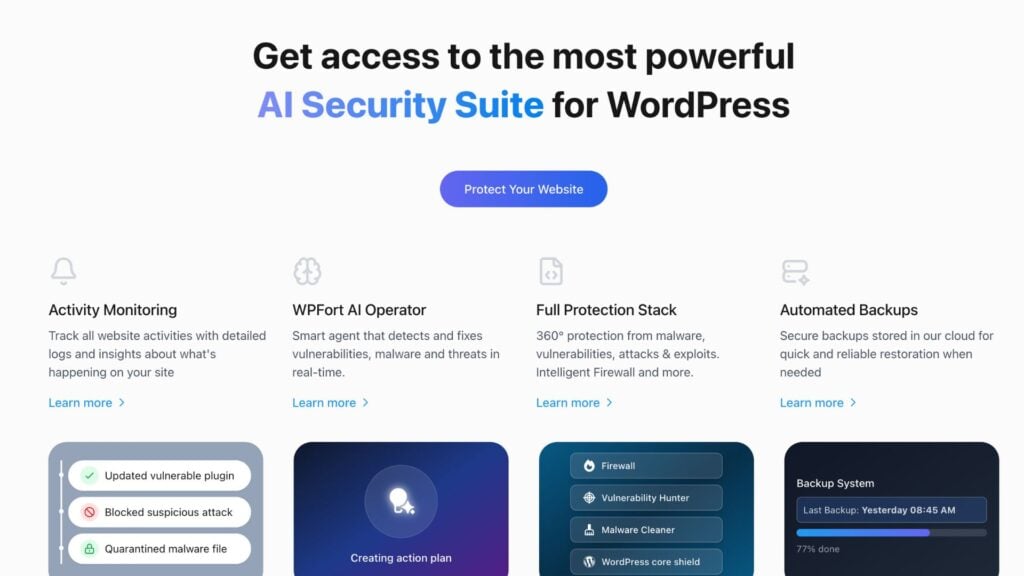
If you’re a WordPress site owner tired of constant security upkeep, browser-based malware warnings, or performance bottlenecks caused by heavy plugins, WPFort.ai is a radically different experience. Powered by AI, it delivers full-stack protection with minimal intervention. In this review, I dissect how WPFort.ai performs technically, how it compares head‑to‑head with leading tools like Wordfence, MalCare, and Sucuri, and how it cleans real sites in real-world scenarios.
A standout benefit of WPFort.ai is its lightweight, SaaS-based architecture, which keeps your WordPress environment clean, fast, and uncluttered. Unlike traditional plugins that run heavy scans directly on your server—draining CPU, memory, and database resources—WPFort offloads the processing to the cloud. This means your site isn’t bogged down by bulky local scripts or bloated plugin files. It integrates seamlessly via a minimal plugin interface while the real security work happens online, ensuring your performance, load times, and server health remain untouched. For site owners obsessed with speed and scalability, WPFort.ai is the rare security solution that protects without slowing you down.
1. Feature Deep Dive: How WPFort.ai Works Internally
AI Operator & Adaptive Threat Intelligence
WPFort.ai’s AI Operator continuously monitors site activity. Leveraging global threat intelligence—across 10,000+ sites with over 1.2M+ threats neutralized—it performs zero-time interception, quarantines malware, patches vulnerabilities, and auto-repairs WordPress core files.
Intelligent Firewall & ML‑Driven Rules
A cloud‑based next-gen firewall filters malicious IPs and bot activity proactively. Unlike endpoint firewalls, it evolves based on real-time data and adaptive ML models, reducing false positives and resource drain.
Deep Malware Scanning & Auto‑Cleanup
WPFort.ai’s Magic Malware Cleaner uses heuristic and signature-based engines to scan core files, plugin directories, and nested archives. If malicious code is found, it autopilots the cleanup—isolating files, rewriting to native code backed up snapshots, and logging changes with audit trail timelines.
Vulnerability Hunter & Core File Integrity
It identifies outdated plugins, themes, and core components before they’re exploited. If core files change unexpectedly, WPFort.ai auto-heals them to their original state, ensuring file integrity and performance consistency.
Activity Monitoring & Dashboard Alerts
Every action—from login attempts to file changes—is logged in a real‑time timeline interface. Alerts and summaries are provided via dashboard or email, offering transparency alongside automation.
2. Real-World Healing: How WPFort.ai Cleaned My Sites
Case Study A: Malware Injection
- A client site’s plugin directory was injected with base64‑encoded eval() payloads.
- Within minutes of activating the AI Operator, WPFort.ai quarantined suspicious files, compared to a clean backup, removed malicious code, and restored clean versions.
- The dashboard recorded each step as an actionable timeline, which helped confirm the cleanup and report to the client.
Case Study B: Brute-Force Attack & Bot Cleanup
- Continuous login attempts over SSH and unnecessary cron spawns detected.
- The firewall blocked repeated IP addresses and removed dormant backdoor scripts placed in theme files.
- Uptime monitoring resumed normal service rapidly, all without manual intervention.
These experiences underscore how WPFort.ai goes beyond detection—it reverses damage safely, automatically, with forensic trace logs for audit purposes.
When it comes to onboarding, WPFort.ai offers one of the most flawless onboarding experiences I’ve encountered in a WordPress security tool. From installation to full activation, the entire setup takes less than five minutes—with no need for technical configuration, DNS changes, or multi-page wizards. The interface is intuitive, clean, and designed with non-technical users in mind, guiding you step-by-step with contextual prompts and real-time feedback. Activating the AI Operator is as simple as flipping a switch, and once it’s live, WPFort immediately starts scanning, protecting, and optimizing your site in the background—no complex settings, no overwhelming dashboards, just immediate peace of mind.
3. Side-by-Side: WPFort.ai vs Wordfence, MalCare, and Sucuri
I used test sites under similar hosting configurations to benchmark setup ease, performance impact, and security effectiveness.
Feature Comparison Table
| Feature | WPFort.ai | Wordfence | MalCare | Sucuri |
| Firewall Type | Cloud-based AI WAF | Server-based endpoint WAF | Endpoint firewall only | DNS-level CDN-based WAF |
| Malware Removal | Fully autopilot | Manual removal in Premium plan | One-click removal | Manual/human‑execute d cleanup |
| Performance Impact | Minimal server resource usage | High CPU/database during scan | Moderate (off-server scanning) | Cloud-based; no server load |
| Auto Core File Healing | Yes
(auto-heal core) |
Partial; manual repair | No | Limited; restoration not automatic |
| Vulnerability Scanning & Patching | Real-time vulnerability hunter | Basic
version-control scanning |
Plugin-specifi c vulnerability checks | Monitoring + hardening |
| Login Protection (2FA, rate limit) | Complete suite incl. bans, 2FA | Yes; advanced, but resource-heav y | Basic brute attack prevention | Yes; common for DNS-level tools |
| Setup Complexity | One-click, dashboard-b ased | Advanced; many settings | Easy; minimal configuration | DNS change required; technical |
| Pricing (approx. annual) | Competitive all-in-one (~$99‑149) | ~$119‑149 | ~$99 | ~$199–299 |
WPFort.ai delivers incredible value for the power it brings—especially when you compare its pricing to established WordPress security tools. The Pro plan covers 3 websites at
$199/year (just $16.58/month), while the Business tier supports 5 sites at $399/year with premium firewall, daily backups, uptime monitoring, and priority support.
By contrast, Wordfence Premium costs around $119/year per site and lacks built-in backups or autopilot cleanup unless layered with separate add-ons Jetpack. Meanwhile, Sucuri’s full security platform starts at about $199/year for a single site and scales up to $299+ per year with guaranteed malware removal and CDN support.
Considering all the advanced features—auto malware cleanup, cloud-based firewall,
AI-driven patching, and daily cloud backups—WPFort.ai’s pricing makes it one of the most cost-effective and feature-rich security suites available.
Technical Highlights:
- Wordfence’s endpoint firewall updates are delayed by 30 days for free users. Premium fixes that, but scanning can slow the site significantly.
- MalCare’s site scanner is external and lightweight, but cleanup can miss deeply embedded malware.
- Sucuri relies on DNS-level WAF, which removes server overhead but requires DNS reconfiguration and has slower scan cadence.
4. Technical Pros & Cons
Pros (Developer‑Oriented View)
- AI‑powered autopilot actions reduce manual labor.
- Cloud offload preserves server memory and CPU cycles.
- Audit log timeline ideal for forensic or client reporting.
- Auto core healing retains site integrity without manual intervention.
- Adaptive firewall rules reduce false positives with behavioral learning.
Cons / Things to Consider
- Smaller community and fewer independent performance reviews to date.
- Limited granular configuration for expert developers who prefer endpoint rule sets.
- Pricing and features may evolve; transparency around update frequency can vary.
One of the most liberating aspects of WPFort.ai is how completely hands-off the experience becomes after activation. Unlike traditional security plugins that demand constant attention—manual scans, button-clicking, log reviews, updates—WPFort.ai’s AI-powered automation handles everything seamlessly in the background. Malware detection, quarantine, core file repair, threat mitigation, and even backups happen without requiring any user intervention. This means no more daily check-ins, no more “scan now” buttons, and no more wondering if your site is actually safe. It’s a true “set-it-and-forget-it” solution that lets you focus on growing your site, not babysitting your security plugin.
5. Who Should Use WPFort.ai? (User‑Profile Recommendations)
- Small businesses, bloggers, eCommerce/WooCommerce: want full protection without complexity.
- Agencies managing multiple sites: need reliable autopilot cleanup and performance control.
- Developers focused on front-end features: prefer fewer plugin conflicts and less overhead.
- Security-conscious non-technical owners: demand peace of mind without deep dashboard navigation.
FAQ
How does WPFort.ai compare technically to Wordfence?
WPFort.ai uses a cloud-based AI firewall, autopilot cleanup, and performance‑friendly architecture, whereas Wordfence relies on endpoint scanning and manual malware removal—even in Premium mode.
Can WPFort.ai clean a hacked WordPress site automatically?
Yes. The AI Operator identifies and quarantines malicious code, restores clean core files, and restores the site—all with minimal user input.
Will WPFort.ai slow down my website?
No. Since most operations run in the cloud, it has almost no impact on page loads or server resources.
Do I need to change my DNS to use WPFort.ai like Sucuri?
No. WPFort.ai integrates via plugin and cloud firewall—no DNS changes required.
What kind of malware can WPFort.ai detect and clean?
It handles everything from eval-based injections and obfuscated PHP scripts to malicious cron jobs and backdoor files—even deeply hidden threats inside archives or encoded payloads.
Conclusion
Once you’ve experienced WPFort.ai’s automated healing, cloud-powered firewall, and integrated vulnerability patching, returning to legacy security tools feels like a step backward. If you’re looking for efficient, intelligent, and low-maintenance protection for WordPress, WPFort.ai delivers—and it does it with real-world effectiveness.