
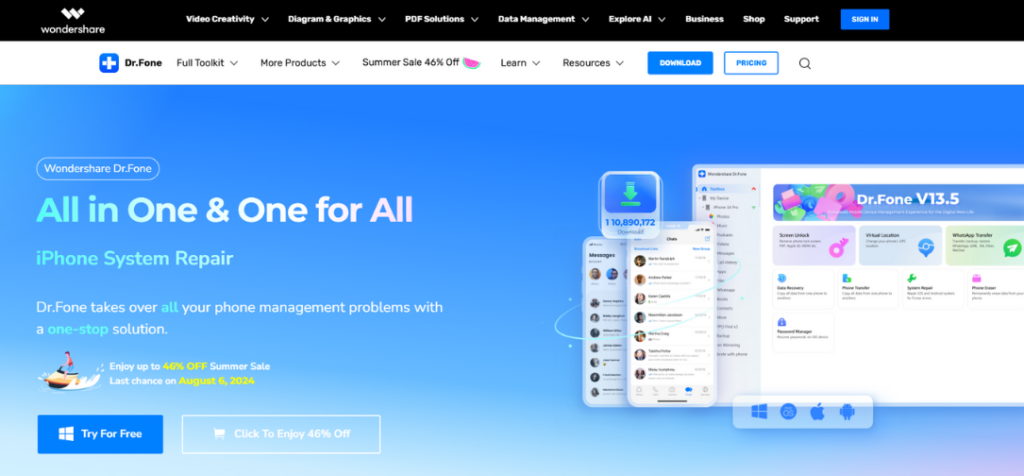
Imagine updating your phone to the latest iOS 18 Beta, but then your system crashes, leaving you in a panic. What if you could easily handle these tech issues? This is where Wondershare’s Dr.Fone comes into play. It’s a complete mobile toolkit that solves various smartphone problems, keeping you in charge of your device. From recovering lost data to fixing system errors, it provides a practical solution for both iOS and Android users. Today, I’m going to share thoughts on my recent experience with Dr.Fone, explaining everything you need to know.
Overview of Dr.Fone by Wondershare
Wondershare’s Dr.Fone is a comprehensive software suite designed to tackle a wide range of mobile device issues. Whether you’re dealing with a locked screen, needing to transfer data to a new phone, or facing a system crash, Dr.Fone provides an array of tools to help you manage and maintain your smartphone with ease. Widely trusted across over 150 countries, this software simplifies complex mobile challenges for both iOS and Android users, making it a favored choice for efficient mobile problem-solving.
Key Features of Dr.Fone
Dr.Fone comes packed with features that meet the varied needs of smartphone users. Here are a few things to note
- Data Recovery: The software excels in data recovery, supporting a wide array of file types such as photos, videos, contacts, and messages. It can recover data from various scenarios, including accidental deletion, system crashes, and even damaged devices.
- System Repair: This feature is a lifesaver for resolving common iOS and Android issues. Whether your device is stuck on the boot screen, experiencing update failures, or crashing frequently, Dr.Fone’s system repair tool can fix these problems. Plus, the guided process makes it simple to resolve without any technical headaches.
- Screen Unlock: Forgetting your device’s password or pattern can be frustrating. Dr.Fone’s screen unlock feature allows you to bypass various lock screens, including PIN, pattern, password, and fingerprint. The best part is that it does this without erasing your data, making it easy to regain access to your device.
- Data Eraser: When it’s time to sell or donate your phone, the data eraser feature ensures your personal information is permanently deleted. This tool provides a secure way to erase all data, preventing any chance of recovery and protecting your privacy.
- Phone Transfer: This tool makes switching from Android to iOS seamless. It transfers not just contacts and messages but also apps and media files, which is often a tedious process.
- Backup and Restore: The selective backup options are very user-friendly. In fact, you are able to choose specific data to back up, which streamlines the whole process. And it doesn’t stop there; restoring data is just as straightforward and quick.
User Experience
Dr.Fone is designed with simplicity in mind, ensuring it’s easy for everyone to use, whether you’re well-versed in technology or just getting started. Here’s a breakdown of what you can expect in terms of user experience:
- Interface and Usability: The interface is clean and user-friendly. Tools and features are well-labeled with comprehensive instructions, simplifying the setup and use. Navigating through the software felt natural, and I was able to start tasks without any confusion.
- Performance and Speed: Dr.Fone impresses with its speed and efficiency. Whether I was recovering data or repairing a system, the processes were quick and smooth, minimizing any wait time and frustration.
- Customer Support: The customer support team is very helpful. They offer detailed guides and a responsive FAQ section. When I needed help, the support staff was prompt and knowledgeable, enhancing my overall experience.
Pricing and Plans
Dr.Fone offers several pricing plans for its range of tools, catering to different needs and budgets.
- Dr.Fone Basic provides core functionalities like data recovery, phone transfer, and screen unlock. I used the Basic plan, which includes both an annual subscription option and a Perpetual Plan for longer-term access. The plan includes free software updates, technical support, and a 7-day money-back guarantee.
- Dr.Fone Full Toolkit offers a more comprehensive set of tools, including all features of the Basic plan plus additional capabilities like system repair and data eraser. This plan also offers both annual and Perpetual Plan options.
Each plan offers flexibility with auto-renewal options, and a free trial is available to test the services before committing to a purchase. Additionally, Dr.Fone features “Great Value Single Deals” to cater to specific needs, enhancing flexibility and providing targeted solutions based on individual requirements.
Pros and Cons
After using the software, here are the key takeaways:
Pros:
- Comprehensive Features: Dr.Fone really stands out for its versatility, effectively addressing a wide array of mobile issues.
- User-Friendly Interface: The software is straightforward, making it accessible even for those not tech-savvy.
- High Success Rate: I found it very effective for data recovery and system repairs.
- Cross-Platform Support: It works seamlessly across both iOS and Android devices.
- Strong Customer Support: The support team is responsive, and the resources like guides and FAQs are very useful.
Cons:
- Cost: The Full Toolkit might be a bit pricey for some budgets.
- Resource-Intensive: Older devices might struggle with some of the more demanding features.
- Subscription Model: Continuous payments are needed for ongoing access to updates and support, which might not suit everyone’s preference for software investment.
Using Dr.Fone for iOS 18 Beta Updates
It’s also worth noting that if you’re planning to upgrade to iOS 18 Beta, Dr.Fone is essential to mitigate potential risks and ensure a smoother update process. The software offers tools like “Backup & Restore” to protect your data before proceeding and “System Repair” to address any issues during the update without losing your data.
- Backup Your Data: It’s wise to back up your data before proceeding with the update. Doing so will ensure that all your important files, photos, and settings are securely stored.
- Connect your iOS device to your computer.
- Open the software and locate the option “Backup & Restore.”
- Follow the detailed prompts on your screen to safely back up your device’s data.
- System Repair for Update Failures: If you run into problems during the update, such as your device getting stuck or repeatedly rebooting, Dr.Fone’s system repair tool can come to the rescue.
- Open Dr.Fone and choose “System Repair.”
- Select the specific issue you’re experiencing (like being stuck on the Apple logo or a boot loop).
- Follow the detailed instructions to fix your iOS system without losing your data.
Final Thoughts
After testing Dr.Fone, I can confidently say it’s an indispensable tool for managing and fixing mobile devices. Its wide range of features – from data recovery to system repair – is impressive and functions well across both iOS and Android platforms. The interface is straightforward, making it accessible even for those less tech-savvy. While the cost of the Full Toolkit might be steep for some, the functionality it offers can be well worth the investment for anyone serious about comprehensive smartphone management. All in all, Dr.Fone is a tool I’d highly recommend for its comprehensive features and reliable performance.
If you’re looking to upgrade your mobile experience, now is a great time to check out Dr.Fone. With the Summer Sale, you can save up to 46% off the regular prices. Click here to learn more or to purchase Dr.Fone today!