
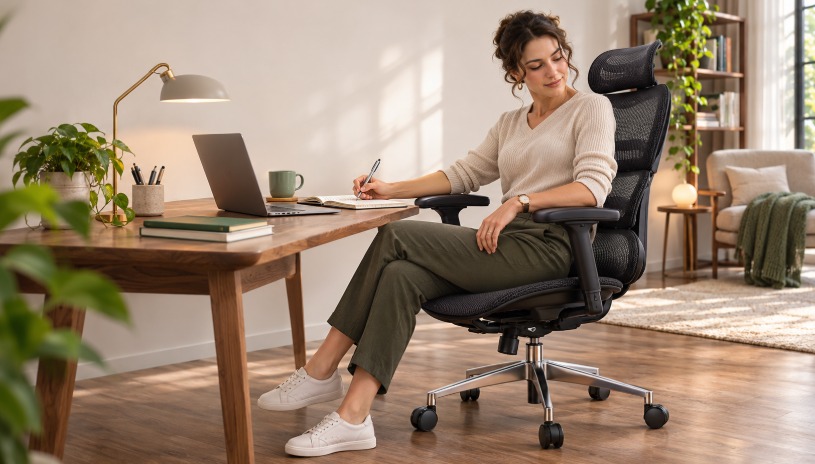
At the beginning of the day, many people sit close to the desk to answer emails. Later, they may turn toward a second screen, lean forward to read a document or sit back during a call. Even someone who works at the same desk for eight hours rarely stays in exactly the same position.
Office chairs, however, are often designed around a much simpler idea: adjust the chair once, find the correct posture and remain there. That works reasonably well when the user sits upright and faces forward. It becomes less convincing once the person begins moving through a normal workday.
This is where responsive lumbar support can make a difference. Instead of providing support at only one fixed point, it is designed to remain useful as the user changes position.
A Good Chair Should Not Demand One Perfect Posture
Fixed lumbar support is not necessarily uncomfortable. When it is positioned correctly, it can provide useful contact with the lower back during focused desk work. The problem is that the support may no longer line up with the body when the user leans, turns or reclines.
Some people respond by repeatedly adjusting the chair. Others simply move away from the backrest and stop using the lumbar support altogether. In both cases, a feature that looked important on the product page becomes less useful in daily life.
The idea behind a responsive system is straightforward. The lumbar section or backrest moves slightly with the user, changing its angle or pressure as the sitting position changes. Different manufacturers approach this in different ways. Some rely on flexible materials, while others separate the lumbar area from the upper backrest.
The chair is not trying to control the body. It is simply allowing the support surface to follow ordinary movement instead of asking the user to return to one exact position every time.
Designed Around the Way Work Actually Happens
This type of backrest is especially relevant for people whose work includes several different activities.
A designer may spend part of the morning using a mouse, then move to a sketchbook. Someone working from home might switch between typing, video meetings and reading. Even a conventional office job can involve reaching for files, turning to speak with a colleague or reclining briefly while thinking through a problem.
The L3 FlexBreath ergonomic chair with responsive lumbar support uses a split backrest design intended to stay in contact with the user as the sitting position changes. Rather than presenting the back as one rigid surface, the chair separates the lumbar area from the upper section.
That design is only one part of the chair. The L3 also has flip-up arms, a choice between a mesh or cushioned seat, and versions with or without a footrest. These options matter because people do not all use an office chair in the same way.
Someone who works mainly at a keyboard may keep the armrests in place throughout the day. Another person may want them out of the way when writing, drawing or moving closer to the desk. Being able to raise the arms allows the chair to adapt without requiring the user to remove parts or change seats.
Comfort Is More Than the Shape of the Backrest
A responsive lumbar system can help the chair remain supportive, but it cannot correct a poorly arranged workstation.
If the seat is too high, the user may struggle to keep both feet supported. If the desk is too far away, the body will naturally lean forward and leave the backrest. Armrests that sit too high can push the shoulders upward, while a seat that is too deep may press behind the knees.
These problems are often blamed on the chair even though they come from the relationship between the chair, desk and user.
The better approach is to adjust the whole workstation together. The feet should rest securely on the floor or on a stable footrest. The keyboard and mouse should be close enough that the user does not need to reach forward. When sitting back, the lumbar section should meet the lower back without creating a hard pressure point.
It is also worth checking whether the chair can move close enough to the desk. Thick desktops, drawers and fixed desk supports can interfere with armrests or reduce the available legroom. A chair with many adjustments will still feel awkward if the desk prevents it from reaching a practical working position.
Mesh or Cushion Comes Down to Preference
Seat material has a noticeable effect on how a chair feels, but there is no universal choice that suits everyone.
Mesh allows more airflow and may be preferable in warm rooms or for people who tend to feel hot during long sitting sessions. A cushioned seat provides a softer surface and may feel more familiar, particularly for users who do not like the tension of mesh.
The L3 is available with a FlexBreath mesh seat or CozyCloud cushioning. The choice is less about which material is technically superior and more about which one fits the user’s environment and sitting preferences.
The same applies to the optional footrest. It can provide somewhere to support the legs while reclining, reading or taking a short break. It is not intended to replace a stable working position during typing. For focused desk work, the feet still need reliable support and the body should be positioned close enough to the desk.
Movement Still Matters
No backrest can make uninterrupted sitting harmless or comfortable for everyone. Even with responsive support, people still benefit from standing up, walking and changing activity during the day.
The purpose of an ergonomic chair is not to lock the body into an ideal pose. It is to make common working positions easier to maintain and transitions between them less awkward. A responsive lumbar system fits this approach because it recognizes that movement is part of sitting rather than a failure to sit correctly.
OdinLake positions the L3 as a chair for work, position changes and reclining breaks. Its responsive backrest, movable arms and seat choices make sense for users whose day does not follow one fixed routine.
The right chair still depends on the individual, the desk and the type of work being done. Responsive lumbar support is not a complete solution by itself, but it can make a chair feel more consistent across the many small posture changes that happen during a real working day.