
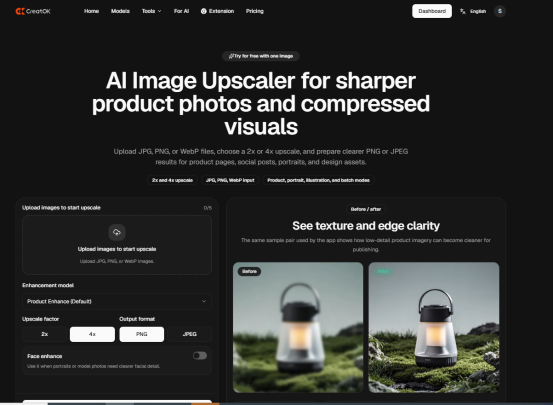
AI image upscaling is becoming an important part of modern content creation because it can improve small, compressed, or AI-generated images before they are used in social media posts, websites, product pages, and video thumbnails. A practical workflow is simple: create or find the right image, upscale it, review the details, and then publish it in the correct format.
For creators who regularly work with visual content, an AI image upscaling tool can save time when an otherwise useful image is too small, blurry, or lacking detail.
The Problem With Small and Low-Resolution Images
Most creators have experienced the same problem: an image looks fine on a phone but becomes blurry when used on a website, presentation, advertisement, or video thumbnail.
This happens often with:
- Screenshots downloaded from social media
- Old product photos
- AI-generated images with unclear details
- Images copied from messaging apps
- Small profile photos or thumbnails
- Compressed images from websites
- Video frames captured from low-quality footage
The problem is not always the image itself. Sometimes the image has the right concept, color, and composition, but the resolution is too low for the final use case. Starting over can take time, especially when the image was created through a long prompt or contains a specific character, product, or visual style.
That is where AI image enhancement becomes useful.
What Does AI Image Upscaling Actually Do?
Traditional resizing only changes the number of pixels in an image. It does not truly understand what is inside the picture. As a result, the enlarged image may look soft, stretched, or pixelated.
AI image upscaling takes a different approach. It analyzes patterns such as edges, textures, facial features, objects, and overall image structure. It then generates additional visual detail while enlarging the original image.
This does not mean that AI can perfectly recover every detail. If the source image is extremely blurry, the result may still have limitations. However, for moderately small or compressed images, AI upscaling can make the image more useful for real publishing work.
The goal is not to make every image look artificial or overly sharp. The best result is usually one that looks natural at the final viewing size.
Why Creators Are Using AI Upscaling More Often
1. Social Media Content Needs Flexible Sizes
A single image may need to be used in several formats:
- Instagram posts
- YouTube thumbnails
- TikTok covers
- Blog headers
- LinkedIn posts
- Pinterest graphics
- Website banners
A low-resolution source image may work in one format but fail in another. Upscaling gives creators more flexibility without requiring them to recreate the entire image.
2. AI-Generated Images Often Need Refinement
AI image generators are useful for brainstorming and producing visual concepts quickly. However, the initial output may not always be large enough for commercial or professional use.
Creators often generate several versions before choosing one. Once they find the right composition, they may need to improve the resolution before adding text, placing the image on a landing page, or using it in a campaign.
A simple workflow that combines an AI image generator with an upscaling tool can make the process more efficient.
3. Old Images Can Still Have Value
Many businesses have older images that are still useful but no longer meet current quality standards. Product photos, event pictures, screenshots, and campaign assets may contain important information that would be difficult to recreate.
Upscaling can help extend the life of these assets. It is especially useful when the original file is no longer available or when the image was created before high-resolution formats became common.
4. Video Creators Need Better Frames and Thumbnails
Video creators often extract still images from videos to use as thumbnails, social posts, or promotional graphics. These frames may look acceptable inside a video but appear blurry when exported as standalone images.
Improving the resolution can make the thumbnail more readable and help the visual look cleaner across different platforms.
A Practical AI Image Upscaling Workflow
A good workflow does not need to be complicated.
Step 1: Start With the Best Available Source
AI upscaling works better when the original image contains clear shapes, good lighting, and visible details. Avoid repeatedly enlarging and compressing the same file because each additional export can reduce quality.
Step 2: Choose the Final Use Case
Before upscaling, decide where the image will be used. A website banner, product image, social media graphic, and printed poster may require different dimensions.
The target format should influence how much enlargement is necessary.
Step 3: Upscale the Image Once
Upload the original file and choose an appropriate enlargement level. Enlarging an image too aggressively can create unnatural textures, especially around faces, text, hair, and small objects.
Step 4: Review Important Details
Always inspect the result before publishing. Look closely at:
- Faces
- Hands
- Small text
- Product edges
- Hair and fabric
- Background patterns
- Logos and symbols
AI tools can improve an image, but they may also introduce small visual changes. A quick review helps catch problems before the asset goes live.
Step 5: Export for the Platform
The final image should be exported in the format required by the platform. JPEG may work well for photographs, while PNG is often better for graphics, logos, and images with transparency.
Is AI Upscaling Better Than Recreating an Image?
Not always. If the original image has major composition problems or incorrect details, recreating it may be the better option. But if the image already has the right subject and layout, upscaling is usually faster and more practical.
This is particularly helpful when the image contains:
- A specific product
- A recognizable person
- A unique character
- A custom design
- A rare event photo
- A visual concept that is difficult to reproduce
In these cases, improving the existing image may be more efficient than starting from zero.
What Makes a Good AI Upscaling Tool?
The most useful tools are not necessarily the ones that make an image look the sharpest. A good tool should provide a balanced result and preserve the original appearance.
Important factors include:
- Natural-looking detail
- Clean edges
- Limited artificial sharpening
- Fast processing
- Simple upload and export
- Support for common image formats
- Consistent results across different image types
The tool should fit into the creator’s existing workflow instead of adding unnecessary steps.
Final Thoughts
AI image upscaling is no longer limited to professional designers or large marketing teams. It has become a practical solution for anyone who works with digital images and needs better quality without recreating every asset from scratch.
The technology is especially useful when an image already has the right idea but lacks the resolution needed for publishing. By combining image generation, enhancement, and careful human review, creators can produce more flexible visual content while spending less time fixing basic quality problems.
For creators who want to improve their image workflow, CreatOK provides a practical starting point for generating and enhancing visual content online.