
Your profile picture sets the first impression during every social and professional venue online. All online platforms from LinkedIn to Instagram benefit from picking the correct profile image to show others. With this program you can design your optimal profile picture fast at no cost through basic functions.
The PFP Maker from AI Ease provides this solution. The simple and free Profile Picture Creator produces high-quality profile images easily within a few mouse clicks. Mini Tools by AI Ease helps you build a new appearance online through text effects and profile pictures.
How AI-Powered Technology Makes Profile Picture Customization Smarter
The Profile Picture Maker from AI Ease provides AI-powered capabilities that distinguish it from conventional photo editing tools since personalization stands as today’s focal point. The use of AI technology enables quicker editing work which becomes both simpler and precise while preserving exceptional image quality.
AI automatically performs background removal as it saves both your time and reduces work to concentrate on customizing elements such as backgrounds or shapes and borders. But that’s not all.
Through AI algorithms, your modifications appear organically authentic during complex procedures such as background elimination processes. AI Ease provides a unique advantage beyond traditional editing tools because it delivers professional-level profile picture polish using expert-level precision.
Why You Should Use AI Ease’s Profile Picture Maker: A Simple and Powerful Tool
The need for an easy-to-use solution becomes important for profile picture enhancement. AI Ease Profile Picture Maker exists to help everyone succeed in their profile image work. This tool lets you adjust your profile pictures to match both personal style and work requirements.
What Makes AI Ease’s Profile Picture Maker Stand Out?
- Completely Free and Unlimited
The tool gives total free access with unlimited use of its features.
- Simple to Use
The tool works for anyone who wants a profile picture because you do not require design experience. Simply put your photo into the tool for it to process your image.
- Customization Options
This tool lets you select professional backgrounds plus adjust image size and properties until your profile picture fits any desired platform.
- No Sign-Ups Needed
You can use the tool right away by uploading your image and editing it before your download. You can use the tool straight away and there is no need for any sign up.
Key Features of AI Ease Profile Picture Maker: Your Go-To Tool for Perfect PFPs
- Easily Remove the Background with One Click
The Profile Picture Maker system takes away background elements instantly from your image. This tool creates a neat professional profile picture by removing background elements so you can customize your picture with any chosen background.
- Select from a Variety of Backgrounds and Themes
AI Ease helps you create either professional or creative profile pictures with its selection of different background choices. The system provides various backgrounds so you can find designs that match your personal preferences.
- Customizable Shapes and Borders for Your PFP
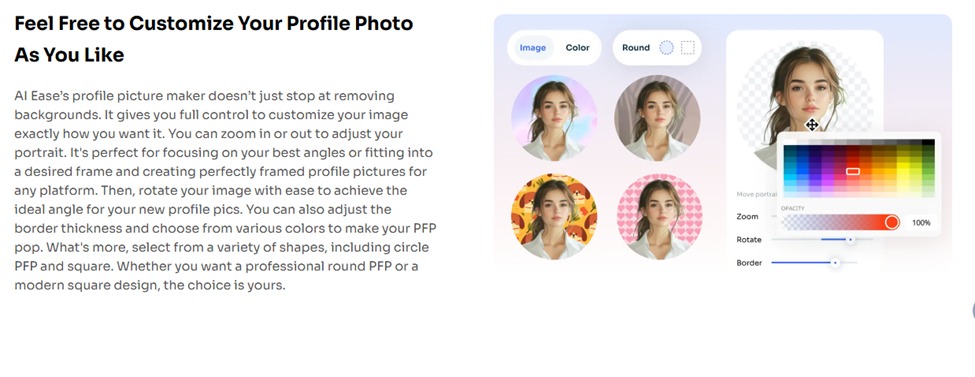
Your profile picture can have a round or square design by using this tool. AI Ease enables you to transform your photo shape to match any platform size you need. You can modify border styles and measurements to make your image project strongly.
- Zoom, Rotate, and Adjust to Get the Perfect Angle
The ideal picture needs minor adjustments to reach perfection. Through Profile Picture Maker you can zoom, spin and change any photo into the perfect angle.
How to Use AI Ease’s Profile Picture Maker: A Step-by-Step Guide
Step 1: Upload Your Selfie or Portrait
Access the AI Ease Profile Picture Maker through the website. Place your preferred selfie photo into the upload field of the tool. Pick any photo that shows your authentic personality and our tool is ready to use.
Step 2: Edit Your Image with Simple Tools
After you upload your picture, AI Ease starts background removal automatically. You can now begin to customize your photo after the upload completes. Select one of the available backgrounds that matches your desired look. You can smoothly modify zoom settings, reposition the image, and adjust border sizes.
Step 3: Make Final Adjustments to Your PFP
After you choose your background and set the details, you can modify borders alongside color and shape styles. Decide between round and square choices to match PFP needs.
Step 4: Download and Apply Your New Profile Picture
When you are satisfied with your profile picture appearance click the download option. You can now display your fresh profile picture on any online platform starting from your social media accounts.
How Custom Backgrounds Can Transform Your PFP
The background in profile pictures establishes both the overall character and emotional atmosphere of the image. The selection of your background enables you to create an appropriate professional impression while delivering either an accessible or business-oriented or creative image. AI Ease’s Profile Picture Maker gives users different background choices which enable them to create pictures that match their specific personality traits along with professional needs.
Why Custom Backgrounds Matter:
- Users of LinkedIn and Zoom should utilize plain, neutral backgrounds to present a professional image.
- Instagram users who need creative ways to express themselves should pick bold backgrounds that capture their style.
- The background setup of your online profiles becomes an essential part of your personal brand because it can feature either your business logo or matching color choice or relevant pictures from your field of interest.
The Power of a Good Profile Picture for Job Seekers: Why It’s Crucial for Your Career
Your first impression on employers begins with having a professional well-designed profile picture while you search for a job. Employers frequently view your LinkedIn profile picture as well as profile pictures from job boards and personal websites to understand your professional qualities and company fit.
- First Impressions Matter: A professional profile image featuring clear lighting along with proper professionalism creates favorable early perceptions among recruiting professionals and hiring authorities who thus increase their attention to your account.
- Builds Trust: Your professional image establishes trust in others since it demonstrates your dedication to your career field along with your understanding of suitable presentation practices.
- Shows Personality: The profile picture serves as a gentle means to present your personality. Your selected image should reflect the traits and character qualities that you wish to project to job recruiters so they can recognize your desired professional characteristics.
Use AI Ease to Boost Your Online Capabilities
Your digital public image depends heavily on your profile photo. You can obtain professional imagery plus create exciting text at zero cost using AI Ease’s Profile Picture Maker. No sign-ups, no limits—just beautiful results in minutes!
Are you prepared to enhance your visibility online? Start making gorgeous profile pictures with AI Ease right now.