

What Is an Antidetect Browser?
An antidetect browser is a specialized software designed to prevent browser detection by allowing users to modify their browser fingerprint details—such as the operating system, browser type, language, fonts, screen resolution, hardware memory, software, and more. This enables users to create and manage a large number of accounts on a single device with ease. While an antidetect browser itself cannot change your IP address, it supports the use of proxies, letting you assign a different IP to each profile for added anonymity.
Unlike profiles created on standard browsers like Chrome, Brave, or Firefox, the profiles generated by an antidetect browser have unique browser fingerprint configurations. This makes each profile appear as a completely independent user to websites, ensuring better privacy and separation between accounts.
Why are antidetect browser so popular?
In earning money online, having more accounts means earning more money. For instance, if you’re an eBay seller, opening multiple stores lets you reach more target customers and sell more products.
However, platforms have strict rules against creating lots of accounts. To bypass this, people often use tools like VPS or VMWare.
Before antidetect browsers existed, VPS and VMWare were the most popular choices because they could act like real devices. The downside? They lack graphics cards, so advanced websites like eBay, Etsy, or Amazon can easily spot them as virtual machines. On top of that, these tools need powerful computers since they take up a lot of storage.
Antidetect browser offer a great alternative to VPS and VMWare. They use less storage and can sync data across devices, allowing users to access profiles from anywhere.
When combined with proxies, antidetect browser let users set up multiple clean environments on one device. This makes it easy to register and manage a large number of accounts without websites catching on. Big names in this field include Gologin and Multilogin, but for efficiency and a variety of features that meet users’ needs, Hidemyacc is the standout option.
Notes on Using Antidetect Browser
Although antidetect browsers are helpful tools for MMO folks to create and manage accounts, just using one doesn’t guarantee success. The process also depends on other factors like user information, IP address, and how you behave on the platform.
Plus, antidetect browser aren’t meant for shady money-making schemes or breaking the law. They’re simply a tool to help you browse the internet more safely and securely.
Using an antidetect browser for illegal activities isn’t encouraged at all, and you’re fully responsible for your own choices.
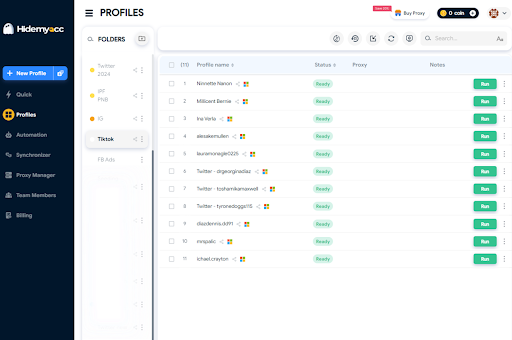
A Comprehensive Look at Antidetect Browser Hidemyacc
Features of Hidemyacc
Hidemyacc is an antidetect browser developed by a Vietnamese team with nearly 10 years of experience in the earn money online field. It comes equipped with a variety of useful features to help users create and manage a large number of accounts on a single device.
Create and Manage Profiles
- Customize settings to your needs: You can tweak parameters like user-agent, screen resolution, device memory, fonts, and more to personalize your profiles.
- Quick profile creation without saving data: With the Quick feature, you can generate profiles without storing their data, and these won’t count toward your plan’s profile limit.
- Add proxies, cookies, bookmarks, and extensions: Hidemyacc lets you attach proxies, cookies, bookmarks, and extensions to your created profiles for added flexibility.
Team Collaboration
- Share or transfer profiles: Easily share or transfer profiles with other Hidemyacc users.
- Create and manage sub-accounts: Beyond sharing or transferring profiles, you can set up sub-accounts from your main account and grant access to specific profiles. Sub-accounts work similarly to shared accounts, but the main account retains higher management control.
Proxy Management
- Add proxies to your storage: Store proxies in a management pool, then assign them to new profiles or apply them in bulk to existing ones.
- Free high-speed proxies: Starting from the Base plan, you get access to over 10,000 fast proxies at no extra cost. Plus, when buying proxies from Hidemyacc’s partners, you can use exclusive codes to enjoy discounts ranging from 5% to 20%.
Automation
- Build automation scripts for account nurturing: Create scripts by dragging and dropping pre-built commands, recording your actions on a website, or importing external code.
- Sync actions across profiles: Actions performed on your main profile can be replicated and synced to other profiles automatically.
Hidemyacc Pricing
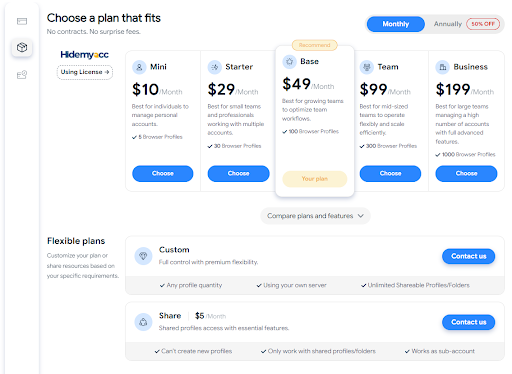
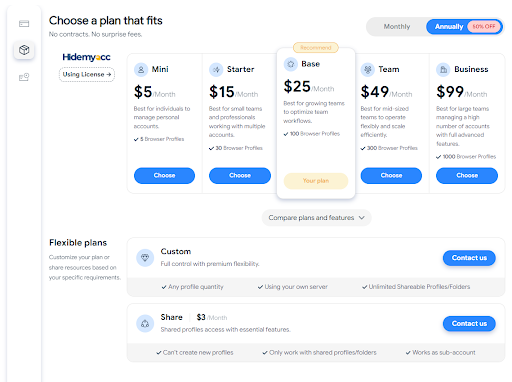
Hidemyacc offers 5 different plans tailored to suit everyone, from individual users to businesses. If you opt for a monthly plan, you’ll enjoy a 50% discount compared to purchasing a one-off package.
- Monthly pricing table
- Yearly pricing table
How to Use the Hidemyacc Antidetect Browser
The Hidemyacc antidetect browser is a handy tool that lets you create and manage a large number of multi-platform accounts on a single device. To get started with creating profiles on Hidemyacc, just follow these simple steps:
Step 1: Download the Hidemyacc App and Sign Up
Head over to the Hidemyacc website (https://hidemyacc.com/), pick the latest version, and download it to your device. Hidemyacc supports downloads for both Windows and macOS.
Once downloaded, sign up for an account to enjoy a 7-day trial with 30 profiles (equivalent to the Starter plan). You can register directly on the website, but keep in mind that the automation feature is only available after installing the app on your device.
Step 2: Create New Profiles on Hidemyacc
Click the “New Profile” button on the toolbar and set up the browser fingerprint details for your profile. This includes things like the operating system, browser type, extensions, cookies, bookmarks, timezone, and more.
Here are some natural user-agent setup examples you can try on Hidemyacc:
- Browser: Chrome – Operating System: Android
- Browser: Chrome – Operating System: Mac M2
- Browser: Chrome – Operating System: Mac M1
- Browser: Chrome – Operating System: Mac Intel
- Browser: Chrome – Operating System: Windows 11
- Browser: Chrome – Operating System: Windows 10
- Browser: Edge – Operating System: Windows
- Browser: Brave – Operating System: Windows 10
To add a proxy to your profiles, go to the “Your Proxy” section and input it in the format: host:port:username:password.
Step 3: Make the Most of Hidemyacc’s Other Features
Beyond creating new profiles, Hidemyacc offers a bunch of other helpful features like Automation, Synchronization, Team Member tools, and more. You can check out Hidemyacc’s tutorial videos for a step-by-step guide on how to use these features effectively.
Conclusion
The Hidemyacc antidetect browser is a standout tool for MMO enthusiasts, allowing you to set up clean environments to register and manage a large number of accounts on one device without worrying about website tracking. With its powerful antidetect technology and a range of practical features, Hidemyacc is sure to support you in creating accounts for online money-making ventures!