
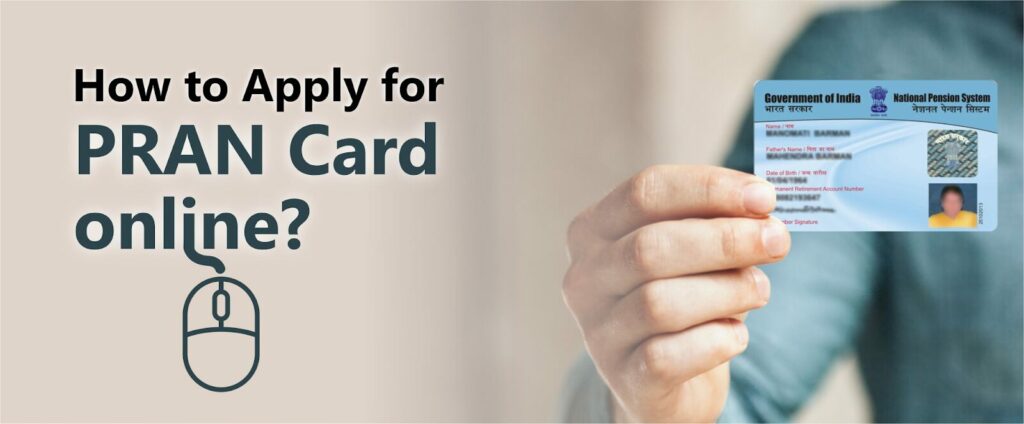
A Permanent Retirement Account Number (PRAN) card is an essential identification card for individuals enrolled in India’s National Pension System (NPS). It is a unique 12-digit number that ensures seamless management of pension accounts for government and private sector employees. Whether planning your retirement or securing your financial future, having a PRAN is crucial. Let’s discover more details about the PRAN Card, how to apply for it, and its other aspects.
Understanding PRAN Card
The Permanent Retirement Account Number (PRAN) card is a unique 12-digit number assigned to each individual who enrolls in the NPS. It provides a distinct identity, allowing seamless tracking and management of their pension account activities.
The PRAN Card is mandatory for all NPS subscribers, and it remains with the holder throughout their lifetime, even as they change jobs or move to different cities. It is issued following a thorough verification process, including KYC and registration, ensuring that each subscriber’s pension-related details are securely and efficiently managed.
Features and Benefits of Having a PRAN Card
The PRAN Card offers several advantages and features. Take a look below to find out:
- Portability
One of the “PRAN Card” ‘s primary features is its portability. Whether you move to a different city or switch from the private or public sector to work, the PRAN number will not change. Due to its portability, you can keep on making contributions without opening a different account.
- Gives Access to NPS Account
The PRAN Card contains a 12-digit number that stays consistent throughout a person’s life, whether they move to a different area or change their jobs. This ensures that all pension contributions are added to the same account. It will make it much easier for you to manage and access the NPS account and will also let you check the balance and track the investments.
- Investment Flexibility
The National Pension System lets its members choose their pension fund managers and investment mix. With the PRAN Card, individuals can adjust and monitor their funding according to their financial objectives and risk appetite. This helps ensure that all retirement savings keep growing based on their preferences.
- Giving Access to All Online Services
The PRAN Card will let you gain entry into the online portal of the National Pension System. That way, you can change your personal information, make contributions, and even get to see the statement. The presence of the online platform will make it easier for individuals to manage their retirement accounts efficiently and conveniently.
- Option for Nomination
All the PRAN holders can easily nominate someone as their beneficiary to acquire all the pension advantages if the account holder passes away. This guarantees that all your loved ones stay financially secure when you pass away.
How to Apply for a PRAN Card Offline?
If you wish to apply for the PRAN Card offline, you can visit the PoP under NPS or your bank. POPs are designed to conduct a diverse range of NPS activities, such as forwarding and depositing, and they even accept all NPS account-related applications.
PRAN Card Application Form
All NPS subscribers mainly use PRAN, and the application form for the PRAN Card is identical to the one used to register for the NPS schemes. However, you must remember some things when applying for this card:
- Making a declaration to the Pension Fund Regulatory and Development Authority (PFRDA)
- NPS member’s personal information
- The information on the NPS scheme
- NPS member’s nomination information
- NPS member’s employment information
How to Apply for a PRAN Card Online?
If you wish to apply for the PRAN Card via the online platform, you can do so through various banks, such as ICICI Bank. The steps to apply for the PRAN Card are listed below:
Through the iMobile App
The iMobile Pay app by ICICI Bank offers a seamless way to open your NPS account on your smartphone. Here’s how to do it:
-
- Log in to the iMobile App: Open the iMobile Pay app on your smartphone. Enter your login credentials to access your account.
- Navigate to the “Invest and Insure” Section: Once logged in, go to the main menu and click on the “Invest and Insure” option.
- Select the “Instant NPS” Feature: In this section, find and select the “Instant NPS” feature to begin the application process.
- Enter Required Details: You will need to fill in your personal details, including your investment amount, personal information, and nominee details.
- Upload Photo and Signature: After entering your details, upload a recent photograph and a scanned image of your signature. Ensure these files meet the required specifications.
- Review and Submit: Double-check all the information you’ve provided. Once you are sure everything is correct, submit your application through the app.
- Obtain the PRAN Card: You will receive the PRAN Card after you submit the application and complete the verification work.
This method is perfect for those who prefer handling their banking needs via mobile devices, offering flexibility and convenience.
Through ICICI Bank Net Banking
If you prefer using the Net Banking facility, you can also use ICICI Bank’s online portal. Here’s the step-by-step process:
-
- Log in to Net Banking: Visit the ICICI Bank website and log in to your Net Banking account using your User ID and password.
- Access the “Investments and Insurance” Section: After logging in, navigate to the “Investments and Insurance” section available on the dashboard.
- Select “National Pension System”: Within this section, click on “National Pension System” to begin the NPS registration process.
- Enter Your Details: Similar to the mobile app process, you must fill in your personal details, investment amount, and nominee information.
- Upload Photo and Signature: Once the details are entered, upload a recent photograph and a scanned signature.
- Verify and Submit: Carefully review all the information you’ve provided. Once verified, click on the “Submit” button to complete your application.
- Get PRAN Card: After submitting the application and completing the verification process, you will receive your PRAN Card.
This online method via Net Banking is ideal for users who are more comfortable working from their desktops or laptops. It provides a larger interface for managing their investments.
Both methods are straightforward, ensuring that your NPS account is set up quickly and you easily get your PRAN Card.
Documents for Online PRAN Card Application
To complete the PRAN Card application online, you have to submit these documents:
- PAN Card
- Aadhaar Card
- Copy of the Passport (Compulsory for all the non-residents)
- Copy of the applicant’s signature
- Copy of a canceled cheque or the bank passbook
- Copy of a passport-sized photo (It should be the applicant’s latest photograph)
If you’re a resident of Andhra Pradesh, you can also utilize the Meebhoomi Portal for linking your land records with your PRAN or Aadhaar, especially if you’re a government employee under the NPS. MeeBhoomi is a digital platform that provides access to land records, ownership details, and related documentation. Linking Meebhoomi with your PRAN helps streamline KYC verification and ensures seamless integration with state government databases for retirement benefits. This move supports transparency and ease for pensioners from rural areas who often face documentation hurdles.
How to Activate Your PRAN Card?
You can activate the PRAN Card online by using eSign to get all your documents signed electronically. Applicants who have generated the card through Aadhaar can also get their documents eSigned. For that, they should check these steps:
- Step 1: Visit the eSign/Print and Courier page and choose the eSign option
- Step 2: Applicants will be directed to the next page, where an OTP for the activation process will be generated.
- Step 3: The OTP will help complete the authentication process when it is sent to the contact number registered with the Aadhaar Card.
- Step 4: After the authentication, the registration form for the PRAN Card will get eSigned. Applicants will get a confirmation text about it.
- Step 5: Once the eSigning work is completed, you don’t have to send the hard copy of the registration form CRA.
How Do I Print My PRAN Card?
Printing the PRAN Card is not that difficult and will take several minutes to get the work done:
- Step 1: Access your NPS account with the password and user ID
- Step 2: Go to the drop-down section at the top and choose “My Transaction.”
- Step 3: Select the “Print PRAN Card” option
- Step 4: After choosing the printing option, a PDF will be generated containing information on the e-PRAN Card, including the address, PRAN number, and name.
- Step 5: You can then print out this PDF version of the e-PRAN
Note: The printing of the e-PRAN is completely free, but you might have to pay for a physical PRAN Card.
How to Check PRAN Card Status?
NPS subscribers who have a physical PRAN Card can check their card’s status through the online platform. If you got a reinsured password, reissued PRAN, or a new card, you could take a look at the “Dispatch Status.”
How to Check PRAN Card Balance?
Checking out the balance in the PRAN Card is simple. Access your NPS account and then check the balance in the main NPS account, Tier I, and the optional account, Tier II.
Can I Have More Than One PRAN Card?
Having more than one PRAN Card is impossible, as a person can have just one NPS Account. However, there are several other reasons why you cannot have more than one PRAN Card:
- The PRAN is unique to every person, so they can track, make contributions, and manage their NPS account.
- The PFRDA has issued strict regulations on issuing countless PRAN Cards to prevent fraud or duplication when managing pension money.
- Having one PRAN will make it easier to manage the NPS account since all your contributions are pooled into one account. That way, you can plan your retirement and track your savings.
- Possessing several PRANs is against the PFRDA regulations. If it’s found that you have more than one PRAN, you have to consolidate them into just one NPS account, and the entire process can be challenging.
Eligibility for PRAN Card
Right before you plan to apply for the PRAN Card, you have to make sure that the following eligibility criteria are fulfilled:
- You have to be an Indian resident
- Must carry an Aadhaar Card
- Should be between the ages of 18 and 65 years
- Should possess a PAN Card
- Must have a bank account to complete the KYC process
- Posses valid evidence of birth date, address, and income
- Must submit scanned copies of photographs, signature, and a canceled check
NPS Registration and PRAN Allocation
The NPS registration is known as the method to become a member of the National Pension System and then make a contribution to your NSP account while you actively work in the government, private, or public sector. On the other hand, the PRAN gets allocated to people, which provides a unified and secure way to manage their retirement savings. However, to have a clear understanding of how the PRAN allocation and NPS registration are conducted, check out the steps given in the section below:
Registration Methods and Steps
- Step 1: Go to the NPS portal or NPS platform of your bank
- Step 2: Pick the registration process such as PAN Card-based, Aadhaar Card-based, etc.
- Step 3: Submit all the documents, such as canceled cheques or bank passbooks, signatures, and passport-sized photographs, by scanning and uploading them online.
- Step 4: Make the first contribution payment through the online platform
- Step 5: Complete the NPS registration and obtain the PRAN visa eSign or OTP authentication
Conclusion
The process of getting a PRAN Card is pretty simple. You can apply for the card through the online platform, where you just have to upload all the checked copies of the required documents. When you have a PRAN Card, you can use it as proof of identity, monitor and manage the NPS account, and even check out the balance. However, if you apply for the PRAN Card, make sure to gain more information about it and then proceed.
FAQs
Can I have a Tier-II account without having a Tier-I account?
It’s not possible to have a Tier II NPS account without having a Tier I NPS account. To open a Tier II account, you should apply for a Tier I NPS account.
Is it mandatory to have a PRAN Card?
Yes, having a PRAN Card is extremely crucial for all NPS subscribers. It can help identify an NPS member, enable them to access their account and protect all the information.
How do I find my PRAN number?
If you want to know where the PRAN number is located, look at NPS’s account statement.
Why is PRAN important?
PRAN is crucial for managing NPS contributions, ensuring a secure retirement, and tracking pension funds throughout your life.
What is the 12-digit number of PRAN?
In PRAN, the 12-digital number is a unique number for all the individuals who have an NPS account.
Can I have multiple PRAN Cards?
It’s not possible to have several PRAN Cards, as individuals are only assigned one PRAN Card and PRAN number.