
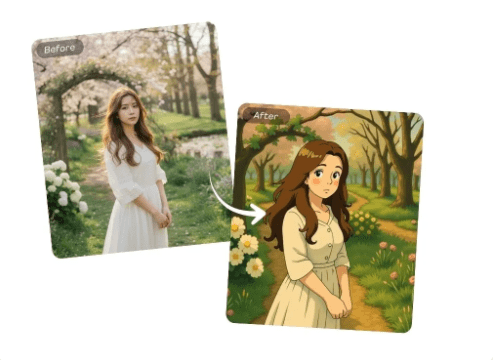
There is something quietly powerful about the visuals in classic Japanese animated films. Not the loud, neon kind of “anime effect.” More like a gentle world where sunlight feels warm, streets look lived in, and nature has personality. If you have ever wanted your own photos to carry that same calm, cinematic charm, you can do it now without learning illustration or buying pro software.
With a modern AI editor, a normal snapshot of a café, a rainy alley, or your dog on the balcony can become a soft, hand painted looking scene that feels like it belongs in a cozy adventure. And you can start in minutes using a simple tool like Free AI image editor online.
What This “Ghibli Like” Mood Really Comes From
Most people think the look is just “anime.” But the vibe is usually built from a few specific visual choices that AI can mimic surprisingly well when your source photo is right.
The mood ingredients that matter most
- Light that feels natural
Think morning haze, overcast softness, window light, or sunset glow. The style loves gentle transitions instead of sharp contrast.
- Backgrounds that tell a story
A fence with vines, a quiet train platform, a kitchen table with clutter. The environment is part of the narrative.
- Color that leans warm and human
Even greens and blues often feel cozy, not cold. Shadows tend to be soft, not harsh.
- Simple shapes with clear focus
The subject usually reads instantly. Too many tiny competing details can confuse the transformation.
Choosing Photos That Transform Beautifully
You do not need “perfect” photos. You just need photos with a clear mood.
Photos that usually work extremely well
- Street corners, small towns, old buildings
Anything with texture. Brick, wood, painted walls, tiled roofs.
- Nature with layers
Trees behind trees, paths that lead somewhere, hills, gardens, rivers.
- Indoor scenes with warm light
Bedrooms, cafés, kitchens, bookshops, studios. Especially with windows.
- Pets in simple settings
A cat on a chair, a dog by the door, a bird near a plant.
Photos that are often harder
- Very dark shots with heavy noise
- Overexposed skies with no detail
- Busy crowds where the main subject is unclear
- Extreme wide angle distortion
A Fresh Workflow That Gets Better Results Than “One Click and Done”
Most people upload once and accept the first output. You can do better with a tiny bit of strategy.
1) Pick one clear subject
Before uploading, decide what matters most. A person, a house, a tree, a plate of food. If the subject is tiny, crop slightly so it becomes obvious.
2) Upload and apply the style
Go to Free AI Ghibli style photo editor online , upload your image, and choose the style that produces the soft illustrated look you want. The AI will reinterpret textures, lighting, and edges into an animation like painting.
3) Try the “three crop test”
This is an easy trick that often improves results dramatically:
- Crop A. Wider scene with more background
- Crop B. Medium framing with clearer subject
- Crop C. Close framing focusing on face/object
Upload all three versions. Sometimes the “best” result comes from a crop you did not expect because the AI understands the composition differently.
4) Tune the vibe, not the details
If the tool gives any sliders, use them to steer the overall feel:
- Lower intensity if it looks too “filtered”
- Increase softness if edges feel too sharp
- Keep colors natural if skin or skies look strange
5) Save the best version and do one final pass
If the output is close but not perfect, take the best result and run it once more. A second pass can sometimes unify the painterly texture and smooth out awkward shapes.
Quick Prompts That Add New Ideas Without Getting Messy
If the editor allows text guidance, treat it like seasoning, not a full recipe. Keep it short. Let the photo remain the anchor.
Try phrases like:
- “cozy countryside atmosphere, soft sunlight”
- “storybook town street, gentle colors”
- “hand painted background, warm mood”
- “quiet rainy day, cinematic lighting”
- “lush greenery, calm nostalgic feeling”
Avoid long prompts listing too many objects. The more you demand, the more the AI may invent things you do not want.
Fun Photo Ideas People Rarely Try, But Look Amazing
If you want something truly different from typical portraits and landscapes, try these:
- Your refrigerator door
Magnets, notes, and little clutter often turn into charming “slice of life” scenes.
- A bus stop at night
Streetlights and reflections can become an emotional cinematic frame.
- Laundry hanging outside
This often becomes instantly “animated film” looking because it suggests everyday life.
- A market fruit stand
Food and produce textures translate beautifully into painterly style.
- A stairwell or hallway
Leading lines create depth and drama, even in normal buildings.
Using Your Results Without Overthinking It
Once you have an image you love, you can use it in lots of ways:
- Phone wallpaper that feels personal and calm
- Social posts with a unique style that is still “you”
- A printed postcard or small desk print
- A profile header or playlist cover aesthetic
- A mini photo series. Same location, different seasons
FAQ
Will it still look like me or my pet?
Usually yes, as long as the face is clear and not heavily blurred. Cropping closer often helps the AI keep likeness.
Do I need any editing skills?
No. The main “skill” is choosing a photo with clear light and a simple subject.
Can I use the images commercially?
That depends on the tool’s terms. For business use, always review the platform’s usage rules before publishing or selling.
See Your Own World Like It Belongs in a Film
The best part of this is not chasing a perfect imitation. It is discovering that your normal life already contains the ingredients of a beautiful animated scene. A quiet street. A window with morning light. A tree that looks like it has a secret.
Pick a photo you like, run it through Free AI image editor online, try the three crop test, and see which version feels like a frame from a gentle story. You might end up looking at your camera roll with completely new eyes.