
Introduction
The busy modern digital world requires any company to keep its documents organized and manage them effectively. When working remotely, traveling to a meeting, or taking care of paperwork outside the office, there are very decent tools that can save you some time and boost your productivity, as even working remotely should be connected to scanning and management of documents on the go.
Document scanning software is a part of business activities now. Such apps enable users to scan any hardcopy document, transform it into digital files, manage their files, share any essential papers safely, and even connect to cloud-storage providers. All that is required is a smartphone or tablet, and professionals can now work with all their documents and related tasks at their fingertips without the necessity of a scanner or desktop PC.
This paper identifies five essential business applications that are useful in scanning and organizing documents on the go. All the apps are chosen according to their functionality, convenience, and utility for businesses that want to optimize their workflow with the help of the documents.
1. CamScanner
CamScanner is one of the most widely used mobile applications for scanning documents. It turns a smartphone into a portable scanner, allowing users to capture documents, receipts, notes, and business cards in high-quality digital formats. This app is especially helpful for professionals who need to scan and share files while on the move.
Key Features
- Smart Scanning: CamScanner automatically detects document edges and enhances image quality for clear and readable scans.
- Multiple Formats: Users can save scanned files as PDF or JPEG, depending on their needs.
- Text Recognition (OCR): The Optical Character Recognition feature helps extract text from scanned images, which is useful for editing and searching.
- Cloud Integration: CamScanner supports cloud services like Google Drive, Dropbox, and OneDrive, making it easy to store and access documents from anywhere.
- Sharing Options: Users can email scanned files directly or share them through links with password protection.
Why Businesses Use CamScanner
CamScanner is useful for professionals in fields such as finance, real estate, education, and law. Its simple interface and powerful features make document scanning fast and reliable, even without a traditional scanner. It also helps reduce paper clutter by turning physical documents into well-organized digital files.
For small businesses and individual professionals, CamScanner Pro provides a cost-effective solution for handling documents while traveling or working remotely.
2. Adobe Scan
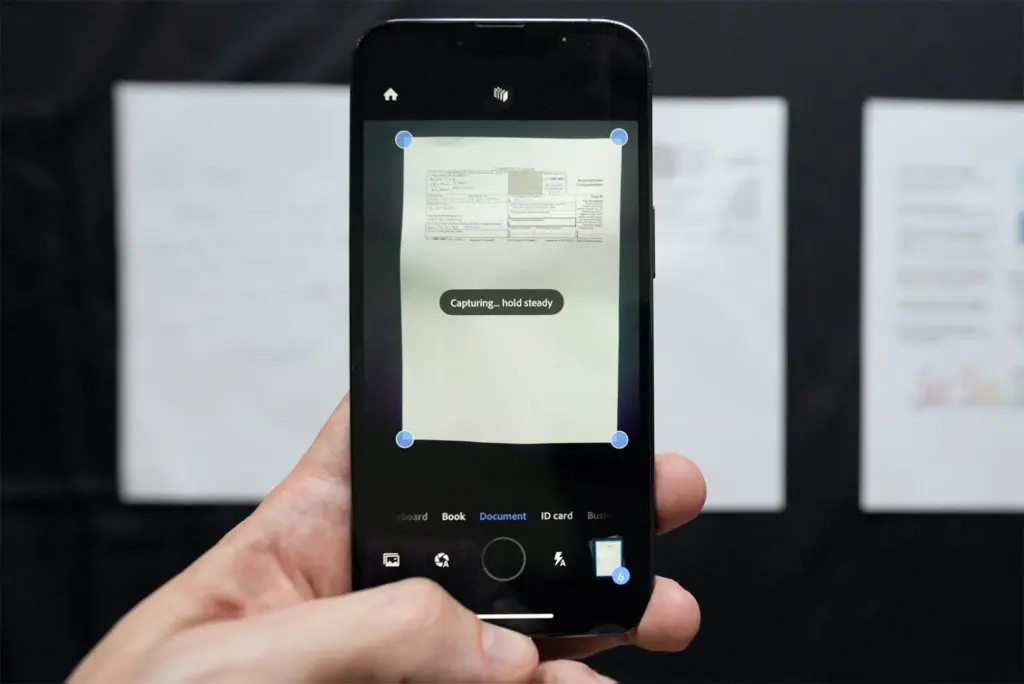
Adobe Scan is a powerful mobile app designed to help users scan, save, and manage documents with ease. Developed by Adobe, this app offers reliable scanning features and integrates smoothly with other Adobe products such as Adobe Acrobat and Adobe Document Cloud. For businesses that already use Adobe tools, Adobe Scan is a natural extension that adds convenience and functionality to document management tasks.
Key Features
- Automatic Text Recognition (OCR): Adobe Scan recognizes text in scanned documents, making it easier to search, copy, and reuse content.
- Smart Scanning: The app automatically detects borders, removes shadows, and corrects perspectives to ensure high-quality scans.
- Multiple Document Types: Users can scan business cards, receipts, notes, forms, and whiteboards with customized scanning modes.
- Adobe Cloud Storage: All scanned documents are automatically saved to Adobe Document Cloud, allowing easy access from multiple devices.
- PDF Editing and Annotation: With Adobe Acrobat integration, users can annotate, sign, or edit PDF files directly from their mobile devices.
Why Businesses Use Adobe Scan
Adobe Scan is ideal for businesses that prioritize secure document handling and rely on the Adobe ecosystem. The app ensures that scanned documents are stored safely and can be accessed or shared without delay. It is particularly helpful for teams that collaborate on documents and need to manage workflows efficiently.
With a clean interface and reliable performance, Adobe Scan supports businesses in maintaining organized digital records, even when team members are working from different locations.
3. Microsoft Lens
Microsoft Lens, formerly known as Office Lens, is a document scanning app developed by Microsoft. It is designed to work smoothly with Microsoft 365 tools, making it a practical option for professionals and teams already using services like Word, OneDrive, and OneNote. Microsoft Lens allows users to capture documents, whiteboards, business cards, and handwritten notes with clarity and precision.
Key Features
- Clean Scanning: The app automatically trims and enhances images, ensuring that scans are sharp and readable.
- Multiple Save Options: Users can save scanned documents as PDF, Word, or PowerPoint files, and send them directly to OneDrive or OneNote.
- Business Card Scanner: Microsoft Lens can extract contact information from business cards and save it to Outlook or the device’s contact list.
- Handwritten Notes Capture: It is particularly useful for scanning handwritten meeting notes, classroom whiteboards, or diagrams.
- Multi-language Support: The app supports text recognition in several languages, which helps global teams and professionals working with multilingual content.
Why Businesses Use Microsoft Lens
Microsoft Lens is a suitable choice for businesses that depend on Microsoft 365 tools. It allows for seamless integration across applications, making it easier to edit, store, and share documents. Team members can access files through shared OneDrive folders or add scanned materials directly into shared notebooks in OneNote.
This app supports a paperless workflow and helps professionals organize their documents without needing a physical scanner. For teams that work across offices or remotely, Microsoft Lens keeps important documents accessible and structured.
4. Genius Scan
Genius Scan is a lightweight yet powerful document scanning app designed for professionals who need a fast and secure way to digitize paper documents. Developed by The Grizzly Labs, it is known for its ease of use and privacy-focused features. Genius Scan offers reliable performance without requiring users to connect to cloud services unless they choose to.
Key Features
- Smart Page Detection: Genius Scan automatically detects document edges and corrects perspective to produce clean and professional scans.
- Batch Scanning: Users can scan multiple pages quickly and combine them into a single document, which is ideal for reports or contracts.
- Document Organization: The app allows users to tag and categorize scans, making it easier to locate files later.
- Secure Backup: Genius Scan supports encrypted backups and can sync with cloud services like Dropbox, Google Drive, and iCloud if needed.
- Offline Functionality: The app works well without an internet connection, giving users full control over their files.
Why Businesses Use Genius Scan
Genius Scan is especially useful for professionals who value privacy and want a simple tool without unnecessary extras. It is commonly used by freelancers, consultants, and field workers who need to scan receipts, agreements, and forms while offline or in low-connectivity areas.
The app’s focus on speed and simplicity makes it a dependable tool for quick scanning tasks. With the ability to keep documents secure and organized, Genius Scan fits well into mobile workflows where efficiency and data privacy are top priorities.
5. Scanbot
Scanbot is a feature-rich document scanning app that focuses on producing high-quality scans with a smooth user experience. Designed for both individual professionals and business teams, Scanbot offers a combination of advanced scanning technology and automation tools that help manage documents more efficiently.
Key Features
- High-Resolution Scans: Scanbot delivers sharp and clear scans using advanced image processing, making it suitable for both text and detailed graphics.
- Smart File Naming: The app can automatically name scanned files using dates or custom keywords, helping users stay organized without manual effort.
- Barcode and QR Code Scanning: In addition to documents, Scanbot supports scanning barcodes and QR codes, which can be useful in inventory or logistics tasks.
- Cloud Integration: Scanbot connects with major cloud platforms such as Google Drive, OneDrive, Dropbox, and iCloud, allowing users to back up and share files easily.
- Workflows and Automation: With its paid version, Scanbot enables automation rules like auto-uploading to specific folders, which is helpful for repetitive scanning tasks.
Why Businesses Use Scanbot
Scanbot is an excellent choice for businesses that need a mix of high scan quality and smart automation. It is commonly used in industries like healthcare, logistics, and administration, where quick, clear document capture and organized storage are essential.
The app’s focus on user control, combined with cloud connectivity and workflow automation, helps streamline document handling processes. For businesses looking to reduce manual steps and improve productivity, Scanbot provides an effective solution.
Conclusion
In today’s mobile-first world, having the right tools to manage business documents efficiently is more important than ever. The five apps discussed above—CamScanner, Adobe Scan, Microsoft Lens, Genius Scan, and Scanbot—offer reliable and user-friendly solutions for scanning, saving, and organizing documents on the go.
Each app provides unique features that cater to different business needs. For professionals who want a balance between simplicity and powerful features, CamScanner Pro is an excellent choice. It allows users to scan, store, and share documents anytime, making it ideal for remote work and business travel.
Choosing the right document scanner app can improve productivity, reduce reliance on physical paperwork, and help maintain organized digital records. Whether you need advanced cloud integration, secure storage, or fast offline access, these apps offer practical solutions for modern business tasks.
By integrating one or more of these apps into your daily workflow, you can handle your documents more effectively—anytime, anywhere.